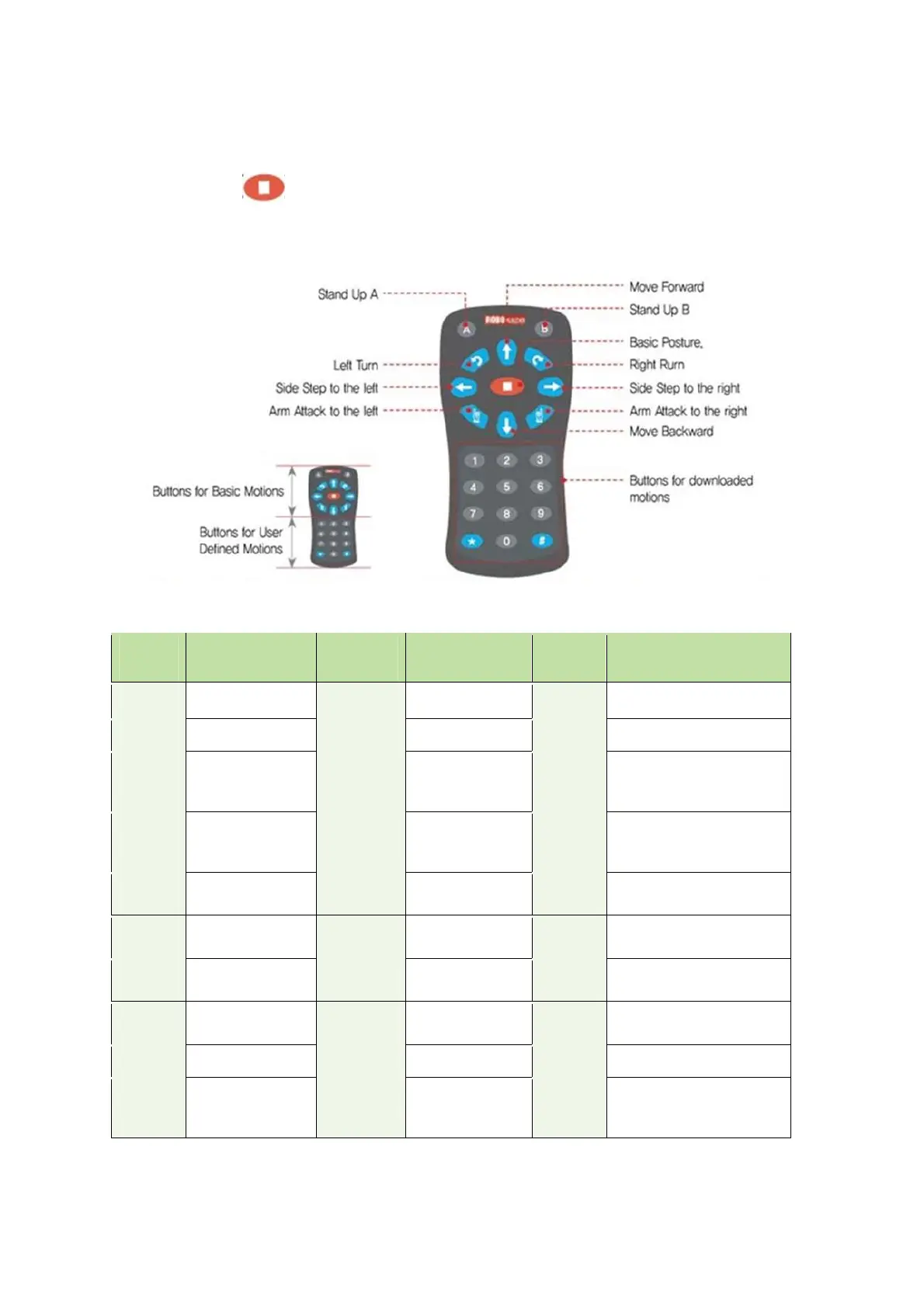
IR Remote Controller
The best way to use the remote control is to have remote controller point to the center of smart
controller. Press STOP ( ) button whenever power on RQ smart controller first to take the basic
posture. Otherwise, IR remote controller button would not work on robot.
* Motions and Actions are downloaded by users
Button Motion Button Motion Button Melody
1 Run Motion 1. # + 1 Run Action 1. * + 1
Ten little Indians
2 Run Motion 2. # + 2 Run Action 2. * + 2
Greeting
3 Run Motion 3. # + 3 Run Action 3. * + 3
Twinkle twinkle
Little star
4 Run Motion 4. # + 4 Run Action 4. * + 4
Head and shoulder
knees and toes
5 Run Motion 5. # + 5 Run Action 5. * + 5
Fur Elise
6 Run Motion 6. # + 6 Run Action 6. * + 6
Minuet(Mach)
7 Run Motion 7. # + 7 Run Action 7. * + 7
Congratulation
8 Run Motion 8. # + 8 Run Action 8. * + 8
Happy Birthday
9 Run Motion 9. # + 9 Run Action 9. * + 9
Arirang
0 Run Motion 10 # + 0
Run Action
10.
* + 0 Stop melody



 To Next Page