Home
RoboBuilder
Robotics
RQ-110
Page 83
RoboBuilder RQ-110 - Page 83
89 pages
Manual
Save Page as PDF
To Next Page
To Next Page
To Previous Page
To Previous Page
Loading...
83
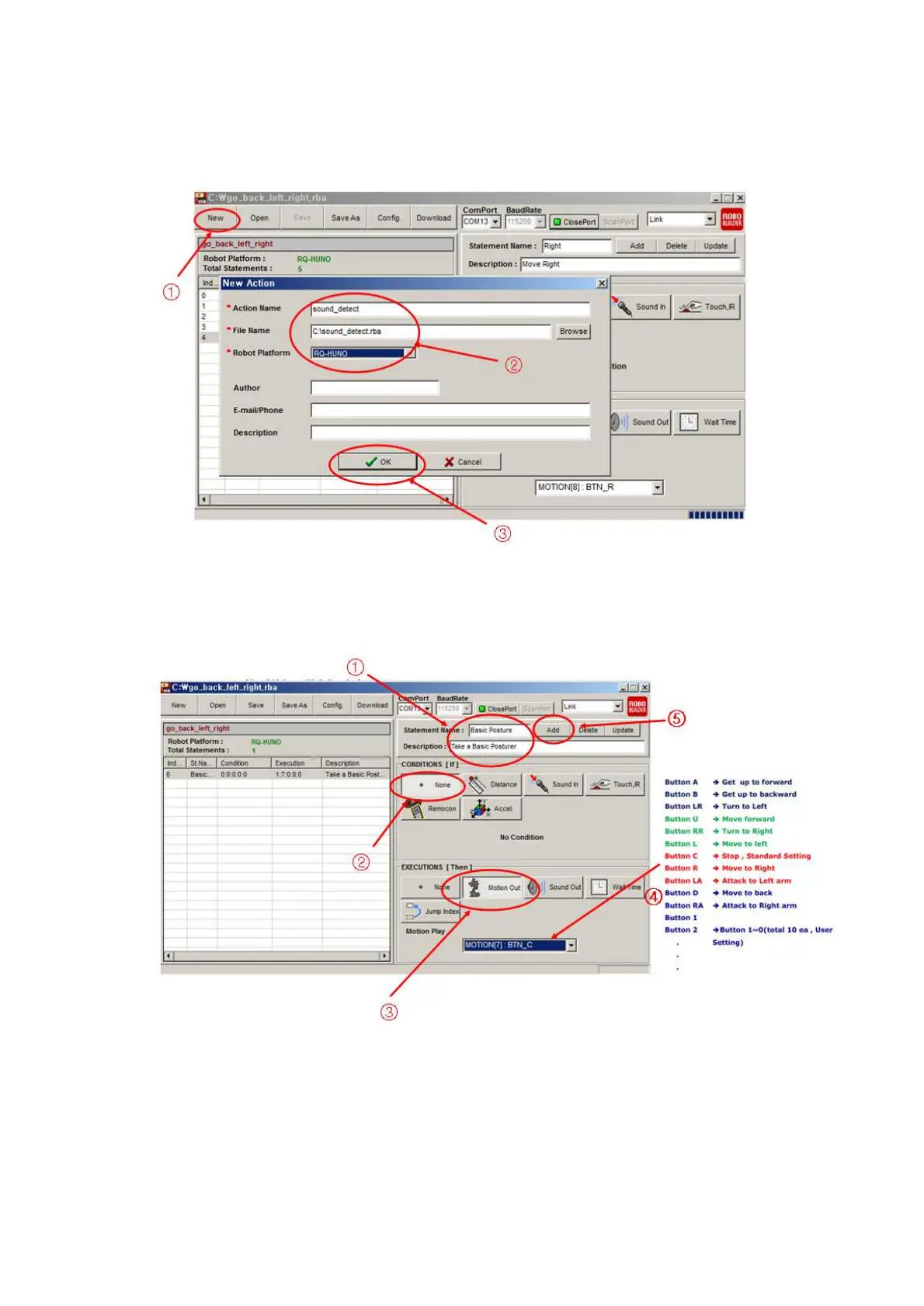
1)
Cli
ck
“N
ew”
to
cr
eate
n
ew
acti
on
fil
e,
then
i
nput
“
Act
ion
Name,
Fi
le
Name”
and
select
“RQ-HUNO” pl
atform as
the below.
2)
Cli
ck as the bel
ow procedu
res (1,2,3,4,5
) to add “basi
c posture” m
otion.
82
84
Table of Contents
Main Page
Default Chapter
6
Table of Contents
6
1 Basic Instruction
7
Product Introduction
7
Product Usage
8
Rivet Tool
12
2 RQ-HUNO Assembly Guide
16
Check Part List
16
Smart Servo Connection and Set Basic Posture Position
17
Right LEG Assembly
19
LEFT LEG Assembly
24
RIGHT ARM Assembly
29
LEFT ARM Assembly
32
BODY Assembly
35
Check Assembled Robot
49
3 Zero Position Adjustment
51
4 Download Cable (UART) Driver Installation
53
5 Download Tool
55
Introduction
55
Download File
56
6 Motionbuilder
59
Introduction
59
Motion Programming #1
62
Change Motion Speed
68
Motion Programming #2
69
7 Actionbuilder
77
Introduction
77
Action Programming #1 (Continuous Motions)
79
Action Programming #1 (Using Sound Sensor)
82
8 Appendix
86
Auto Power-Saving Mode
86
How to Change Smart Servo ID Number
87
How to Charge
89
Related product manuals
RoboBuilder UXA-90 Light
28 pages



 To Next Page