Operation Guide
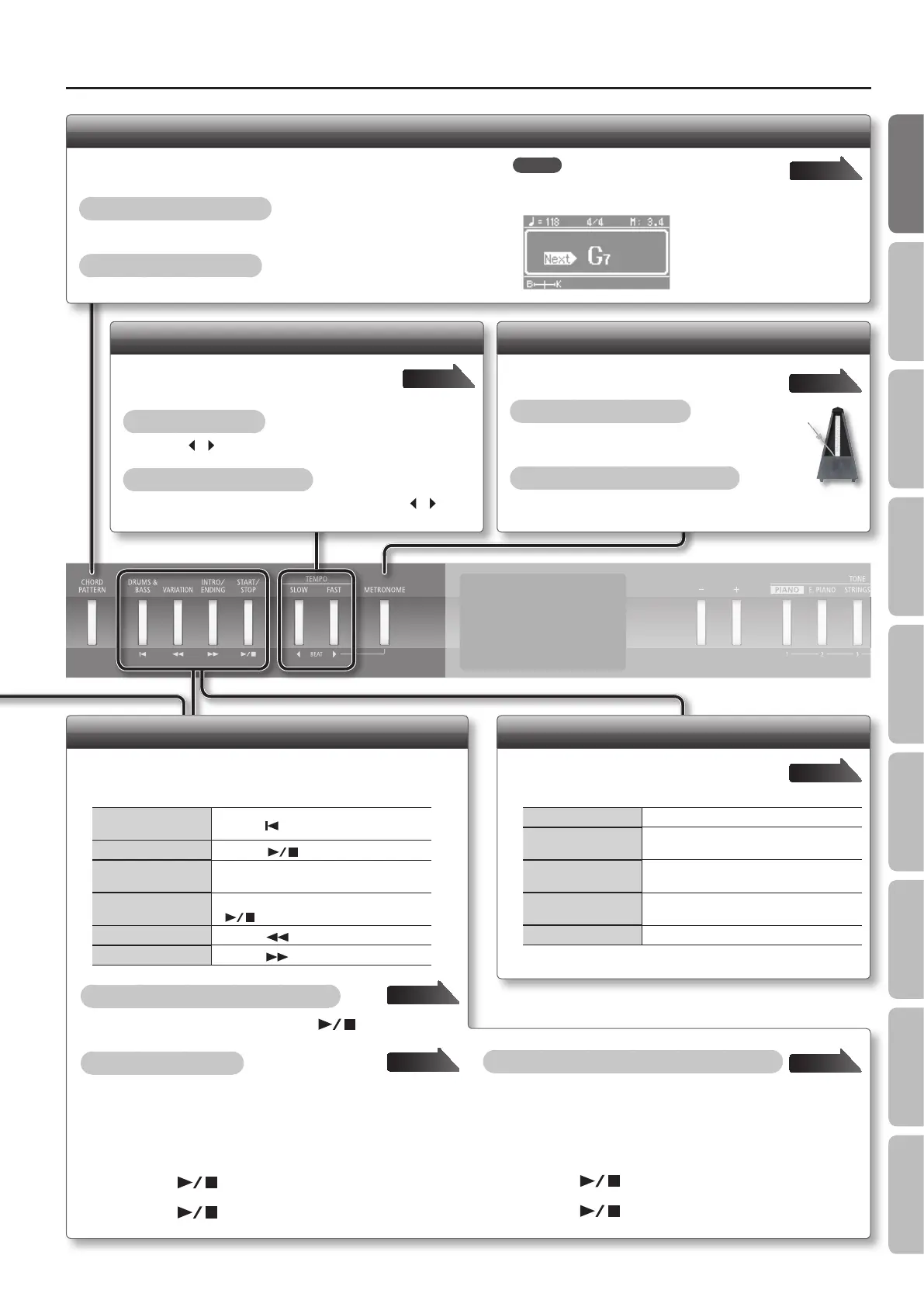
Using the Metronome
Try using the metronome.
Turning the metronome on
Press the [METRONOME] button so it’s lit.
Adjusting the metronome’s volume
Hold down the [METRONOME] button and press the [–] [+]
buttons.
Page 16
Changing the Tempo and Time Signature
You can adjust the tempo of the metronome,
song, and rhythm.
Changing the tempo
Press the [ ] [ ] (SLOW/FAST) buttons.
Changing the time signature
Hold down the [METRONOME] button and press the [ ] [ ]
(SLOW/FAST) buttons.
Page 16
Playing Songs and Recording Performances
Here’s how to control recording and playback (when the [SONG]
button is lit).
Return to the begin-
ning of the song
Press the [
] button.
Play/Stop
Press the [
] button.
Engage recording-
standby mode
Press the [REC] button.
Record
While in recording-standby mode, press the
[
] button.
Rewind
Press the [
] button.
Fast-forward
Press the [
] button.
Playing through all songs (All Song Play)
Hold down the [SONG] button and press the [ ] button.
Making a new recording
1. Select the desired tone(s).
2. Press the [SONG] button.
3. Press the [REC] button.
4. Press the [ ] button to start recording.
5. Press the [ ] button to stop recording.
Recording a rhythm together with your keyboard play
1. Select the desired tone(s).
2. Select the desired rhythm.
3. Press the [REC] button.
4. Press the [ ] button to start recording.
5. Press the [ ] button to stop recording.
Page 24
Page 26
Page 26
Playing a Rhythm
Playing a rhythm (when the [RHYTHM] button
is lit).
Play/Stop Press the [START/STOP] button.
Add the intro
Press the [INTRO/ENDING] button, and then
play the rhythm.
Add an ending
While the rhythm is playing, press the [INTRO/
ENDING] button.
Add some variation to
the rhythm
Press the [VARIATION] button.
Play a specic part Press the [DRUMS & BASS] button.
Page 20
Playing Along with a Chord Progression (Chord Pattern)
You can add a chord progression to a rhythm and play along with the
accompaniment.
Turning on the chord pattern
Press the [CHORD PATTERN] button so it’s lit.
Selecting the chord pattern
Hold down the [CHORD PATTERN] button and press the [–] [+] buttons.
Page 23
MEMO
Shortly before the chord changes, the name of the
next chord is displayed.
9
Operation Guide Getting Ready Performing Recording Designing Sounds Microphone Registrations AppendixSettings



 To Next Page