Introduction Playing/Creating Sounds Use with a Computer Overall Settings Appendix
Quick Guide
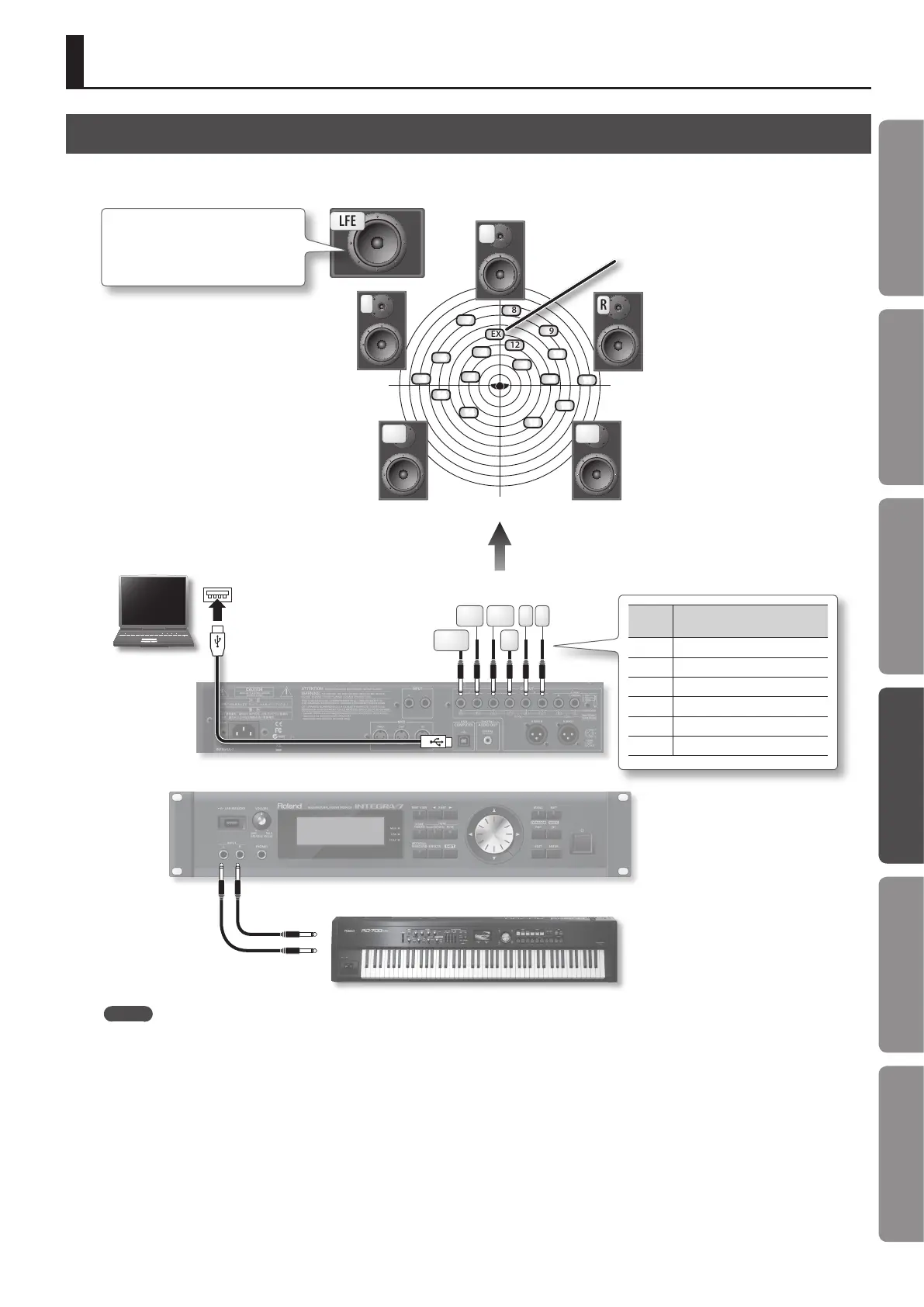
Connection Example
You can assign the sound of the external input as the Ext part, and apply Motional Surround to it.
Jack
name
Explanation
L Front left output
R Front right output
C Front center output
Ls Rear left output
Rs Rear right output
LFE Subwoofer output
1
2
7
8
9
12
3
4
10
11
13
15
14
16
5
6
R
L
C
Ls
LFE
Rs
Rs Ls
Computer
MIDI Keyboard/Synthesizer
R L
C
LFE
EX
Ext part
It’s best to place the subwoofer at the
same distance as the satellite speakers,
with the listening position at the center.
MEMO
• In order to use Motional Surround, you must turn Motional Surround on (p. 34).
• If you want to apply Motional Surround to the sound of the external input, set the “Ext Part Source Sel” parameter (p. 48) to “Input.”
• If you want to apply Motional Surround to your PC’s sound, set the “Ext Part Source Sel” parameter (p. 48) to “USB.”
• Depending on the equipment you’ve connected and the sound that is being input, it may be dicult to obtain the Motional Surround eect.
Applying Motional Surround to Sounds of an External Device
47










 To Next Page