18
Menu Operations
Recalling, Editing, and Saving a Scene
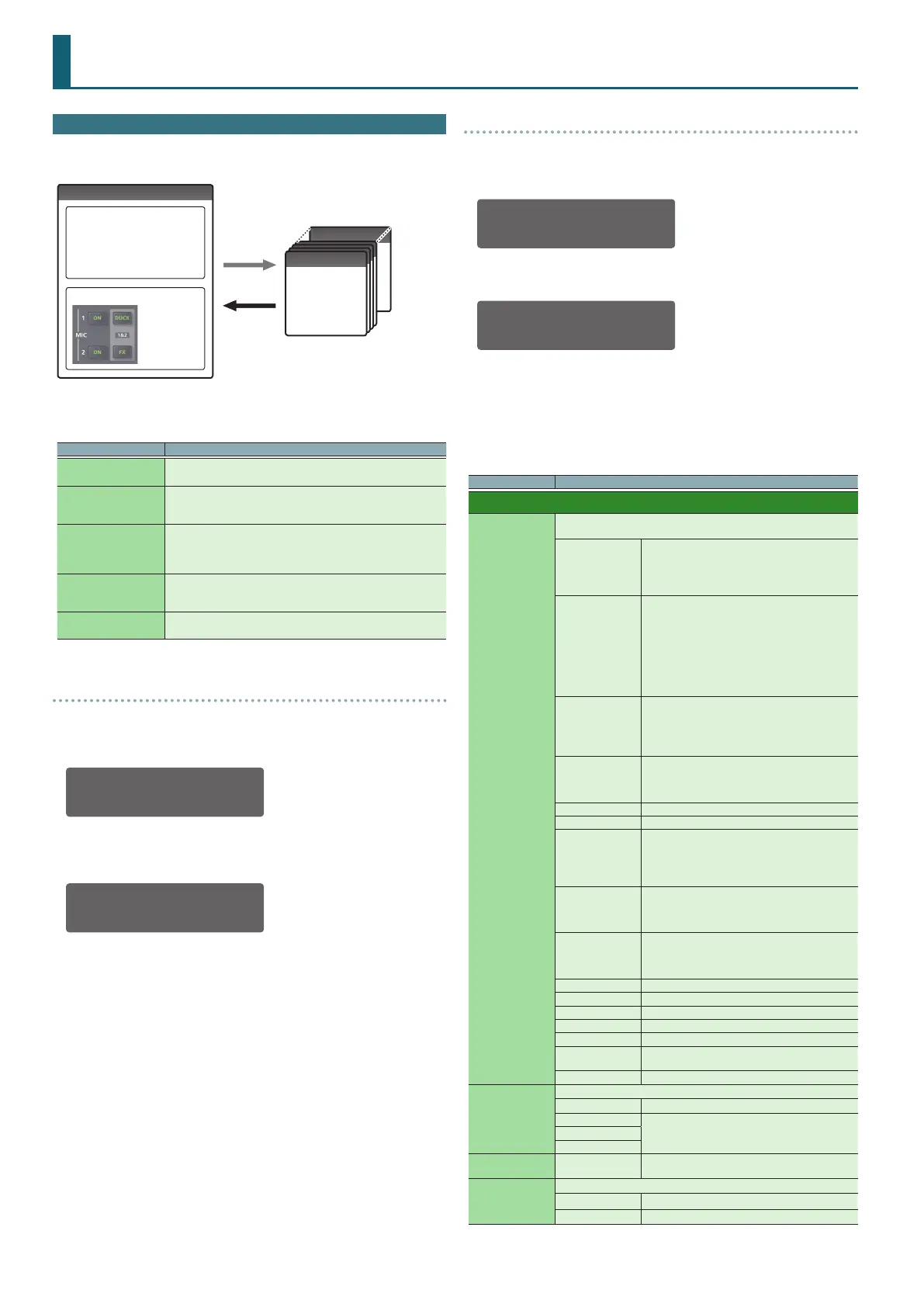
A “scene” contains settings for mixer, mic, and output. You can save ten
scenes in the DJ-707M unit.
Scene
5 Mixer settings
5 Mic 1–3 settings
5 MASTER OUT settings
5 BOOTH OUT settings
5 ZONE OUT settings
Mic section
Turn each
button on/o
Scene 10
Scene 1
Scene 1
Scene 1
Scene 1
Save
Load
When the unit is shipped from the factory, several scenes are already saved.
You can edit and overwrite these scenes.
Scene Explanation
1: Standard
The same audio as MASTER OUT is output from ZONE OUT.
This allows the same use as a standard DJ controller.
2: Two-Room
Mic audio is not output from ZONE OUT.
This is useful when you want to output only the song audio to a
dierent venue than the main venue.
3: DECK4-ZONE
The deck 4 audio is output only from ZONE OUT, without being mixed
into MASTER OUT or BOOTH OUT.
This is useful when you want to output dierent music to the main
venue and to another venue.
4: MICs-ZONE
The mic audio is output only from ZONE OUT.
This is useful when you want the mic audio to be output from dierent
speakers.
5: SoundBoost
A multi-band compressor is applied to each output.
This makes mixing easier when using TR, etc.
Recalling a Scene (Scene Load)
1. Press the [MENU] button.
2. Turn the [SELECT (ENTER)] knob to select “Scene Load,” and
press the knob.
Scene Load
1:Standard <
3. Turn the [SELECT (ENTER)] knob to select the scene that you
want to recall, and press the knob.
A conrmation message appears.
Load Scene?
CANCEL[OK]
If you decide to cancel, use the [SELECT (ENTER)] knob to make “CANCEL”
blink, and press the knob.
4. Press the [SELECT (ENTER)] knob.
The selected scene is loaded.
Editing a Scene (Scene Edit)
1. Press the [MENU] button.
2. Turn the [SELECT (ENTER)] knob to select “Scene Edit,” and
press the knob.
MENU>SCENE EDIT
Mixer Setting
3. Turn the [SELECT (ENTER)] knob to select the setting that you
want to edit, and press the knob.
Mixer: FX(All)<
FILTER
4. Turn the [SELECT (ENTER)] knob to select the parameter that
you want to edit, and press the knob.
The parameter value blinks.
5. Turn the [SELECT (ENTER)] knob to change the value, and press
the knob.
The value is conrmed.
Parameter Value (Bold: default) / Explanation
Mixer Setting
FX (ALL)
FX (Ch1–4)
FX (ALL) species the same eect for the entire channel mixer.
FX (Ch1–4) individually specify an eect for each channel.
FILTER
Applies a lter.
If you turn the [FILTER/FX] knob toward the right, only
the high-frequency range is heard. If you turn the
knob toward the left, only the low-frequency range
is heard.
DUB ECHO
Adds a delayed sound several times while attenuating
it.
If you turn the [FILTER/FX] knob toward the right,
the echo eect is added only to the high-frequency
range.
If you turn the knob toward the left, the echo eect is
added only to the mid-frequency range.
The farther you turn the knob, the longer the interval
between echoes.
JET
Applies a anger eect.
If you turn the [FILTER/FX] knob toward the right, the
peak varies cyclically.
If you turn the knob toward the left, the peak lowers
according to the knob’s position.
NOISE
Adds noise.
If you turn the [FILTER/FX] knob toward the right, the
pitch of the noise rises.
If you turn the knob toward the left, the pitch falls.
REVERB Applies a reverb.
DELAY Applies a delay.
BIT CRUSH
Creates a lo- sound.
If you turn the [FILTER/FX] knob toward the right, only
the high-frequency range is heard. If you turn the
knob toward the left, only the low-frequency range
is heard.
PHASER
Applies a phaser eect.
If you turn the [FILTER/FX] knob toward the right, the
peak varies cyclically. If you turn the knob toward the
left, the peak lowers according to the knob’s position.
NOISE2
Adds peaky noise.
If you turn the [FX] knob toward the right, the pitch
of the noise rises. If you turn the knob toward the left,
the pitch falls.
SIDE CHAIN Lowers the level in synchronization with the tempo.
SLICER Slices the sound in synchronization with the tempo.
ROLL Plays the sound repeatedly.
ROLL FILTER Plays the sound repeatedly and applies a lter.
LOOP PITCH Plays the sound repeatedly and modies the pitch.
LOOP FILTER
Plays the sound repeatedly and modies the pitch
and lter.
VINYL SIM Simulates sound heard from an analog record.
Anti.FB
Selects the output that uses anti-feedback for the mic input.
OFF
Anti-feedback is not used.
MASTER
Anti-feedback is applied only to the output sound
from the selected jacks.
BOOTH
ZONE
Mode SERATO, INTERNAL
Selects whether mixing is done in Serato DJ Pro or in
the DJ-707M.
DVS Deck
Species the controller when using DVS.
TURNTABLE Turntable (analog)
CDJ DJ player


 To Next Page