23
Appendix
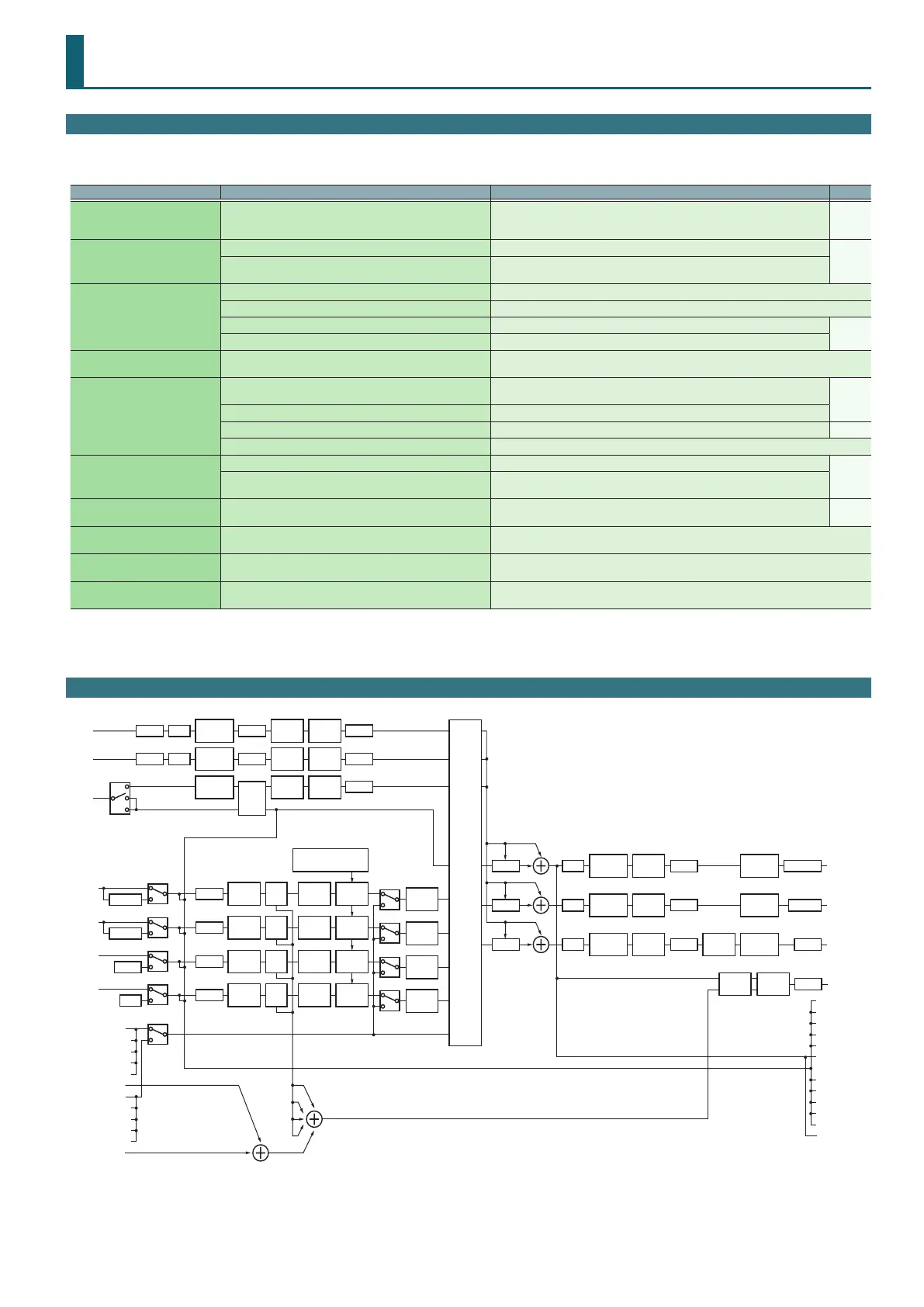
Troubleshooting
If the DJ-707M does not function in the way you expect, rst check the following points. If this does not resolve the problem, consult your dealer or a
nearby Roland service center.
Problem Items to check Action Page
The power does not turn on
Are the included AC adaptor and power cord correctly connected
to an outlet and to the DJ-707M?
Make sure that the DJ-707M’s AC adaptor is correctly connected to an AC outlet and
to the rear panel power connector, and that the adaptor itself and AC power cord are
connected correctly.
p. 9
Serato DJ Pro does not start
Is Serato DJ Pro installed correctly? Uninstall Serato DJ Pro, and then reinstall it.
p. 3
If you’re using Windows, is the user account specied correctly?
Create a new user account with administrative privileges. After creating the account,
install the USB driver and Serato DJ Pro.
The DJ-707M is not recognized
Is the USB cable connected correctly? Make sure that the USB cable is connected correctly.
Could you have connected via a USB hub? You cannot use a USB hub. Connect the DJ-707M directly to your computer via a USB cable.
Is the USB driver installed correctly? Uninstall the USB driver, and then reinstall it.
p. 3
Is Serato DJ Pro updated to the most recent version? Use the most recent version of Serato DJ Pro.
Jog dial does not respond Could the jog dial be dirty?
If the top surface of the jog dial is dirty or if your hand is dirty, the jog dial might not respond.
Make sure that the jog dial and your hand are clean.
No sound, or insucient volume
Are the knobs and faders that adjust the volume set correctly?
Set the [TRIM] knob, channel fader, cross fader, [SAMPLER] knob, and [MASTER] knob
to the appropriate positions.
p. 6
Is the input select switch set correctly? Set the input select switch appropriately for the input source.
Are the powered speakers or amp connected correctly? Check the connections of the powered speakers or amp. p. 8
Are the connected powered speakers or amp set correctly? Check the volume settings of the powered speakers or amp.
Sound is distorted
Is the [TRIM] knob set correctly? Set the [TRIM] knob to the appropriate position.
p. 6
Is the [MASTER] knob set correctly?
Set the [MASTER] knob so that the red area of the MASTER level indicator does not
light.
Mic sound is not output Is the [LEVEL] knob of the mic 1–3 set correctly?
For mic 1–2, adjust the mic section’s [LEVEL] knobs appropriately; for mic 3, adjust the
front panel AUX IN [LEVEL] knob.
p. 7
p. 8
Can’t use pitch play Have you activated Pitch’n Time DJ?
In order to use pitch play, you must separately purchase the Pitch’n Time DJ and activate Pitch’n
Time DJ.
Can’t use Saved Flip Have you activated Serato Flip?
In order to use Saved Flip mode, you must separately purchase the Serato Flip Expansion Pack
and activate Serato Flip.
Can’t use DVS control Have you activated Serato DVS Expansion?
In order to use DVS control, you must separately purchase the Serato DVS Expansion Pack and
activate Serato DVS Expansion.
Block Diagram
TRIMMIC 1
MIC 2
AUX
INPUT 1
INPUT 2
INPUT 3
INPUT 4
LEVELONON ON
LOW CUT/
GATE
ON
3 BAND
EQ
ON
VOCAL
FX
TRIM
PHONO
PHONO
LEVELONON ON
LOW CUT/
GATE
ON
3 BAND
EQ
ON
VOCAL
FX
LEVEL
ON
LOW CUT/
GATE
ON
3 BAND
EQ
ON
VOCAL
FX
TRIM
ISOLATOR UP FADER
CROSS
FADER
CH 1
CUE
TRIM
ISOLATOR UP FADER
CROSS
FADER
CH 2
CUE
TRIM
ISOLATOR UP FADER
CROSS
FADER
CH 3
CUE
TRIM
ISOLATOR UP FADER
CROSS
FADER
CH 4
CUE
FILTER /
FX
FILTER /
FX
FILTER /
FX
FILTER /
FX
TR
OSC
DUCK MASTEREQ
MONO
MODE
COMP /
LIMITER
ATTENUATOR
DUCK BOOTHEQ
MONO
MODE
COMP /
LIMITER
ATTENUATOR
DUCK ZONEEQ
MONO
MODE
SUB. W
MODE
COMP /
LIMITER
ATTENUATOR
LEVEL
SPLIT /
STEREO
MIXING
ASSIGN
CROSS FADER CURVE /
CHANNEL ASSIGN
LINE/PC
LINE/PC
LINE/PC
LINE/PC
LINE/PHONO
LINE/PHONO
LINE/TR
LINE/OSC
PC A/B
MIC
MONO/STEREO
DECK 1
AUX
CUE
DECK 2
DECK 3
DECK 4
DECK 1
AUX
CUE
DECK 2
DECK 3
DECK 4
From
Serato
PC A
From
Serato
PC B
DECK 1
AUX
MASTER
RECORD
DECK 2
DECK 3
DECK 4
DECK 1
AUX
MASTER
RECORD
DECK 2
DECK 3
DECK 4
To
Serato
PC A
To
Serato
PC B
MASTER OUT
BOOTH OUT
ZONE OUT
PHONES
PAN
PAN
PAN
PAN
PAN
PAN


 To Next Page