6
Panel Descriptions
1
2
3
4
5
6
7
8
9
10
11
13
12
1
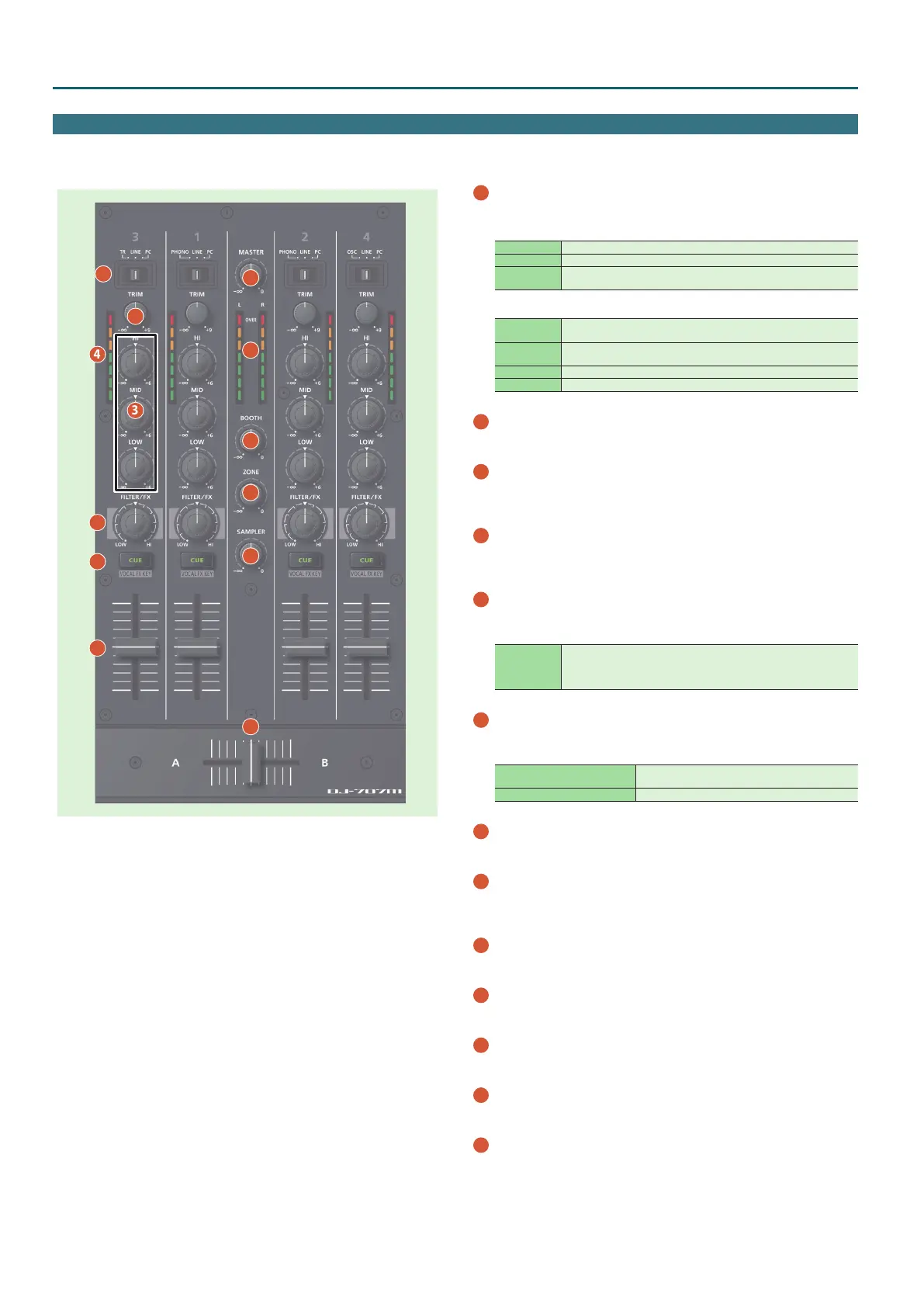
Input select switches
Select the input source for each channel.
CH 1, 2
PHONO The phono level (MM type cartridge) input is the source.
LINE The line level input is the source.
PC
The sound loaded into the Serato DJ Pro deck is the source.
Select this if you’re using DVS.
CH 3, 4
TR (CH 3)
The internal TR sound generator is the source.
You can use deck 3 to operate the TR.
OSC (CH 4)
The internal OSC sound generator is the source.
You can use deck 4 to operate the OSC.
LINE The line level input is the source.
PC The sound loaded into the Serato DJ Pro deck is the source.
2
[TRIM] knobs
Adjust the volume.
3
[HI], [MID], [LOW] knobs
Boost/cut the volume of the high-frequency, mid-frequency, and low-
frequency regions.
4
Channel level indicators
Indicate the level of each channel before the sound passes through
the channel fader.
5
[FILTER/FX] knobs
Apply a lter to each channel, or adjust the FX eect that’s assigned by
the menu settings.
FILTER
If you turn the knob toward the right, only the high-frequency range is
heard.
If you turn the knob toward the left, only the low-frequency range is
heard.
6
Channel [CUE] buttons
Turn cue on/o for each channel. The sound of channels whose [CUE]
button is lit is output from the headphones.
[SHIFT] + [CUE]
You can make the mic section’s eect follow the key
information of the song that’s loaded into the deck.
[CUE] + [SELECT (ENTER)] knob You can change the FILTER/FX eect.
7
Channel faders
Adjust the output level of each channel.
8
Cross fader
Outputs the sounds that are assigned by the front panel [CROSS FADER]
assign switches.
9
[MASTER] knob
Adjusts the master output level.
10
Master level indicator
Indicates the master output level.
11
[BOOTH] knob
Adjusts the output level of the BOOTH OUT jacks.
12
[ZONE] knob
Adjusts the output level of the ZONE OUT jacks.
13
[SAMPLER] knob
Adjusts the output level of the sampler.
Mixer Section
This is a four-channel mixer. Here you can adjust the sound, connect sounds, and turn headphone cue on/o.



 To Next Page