19
Connecting External Equipment
Connecting Microphones
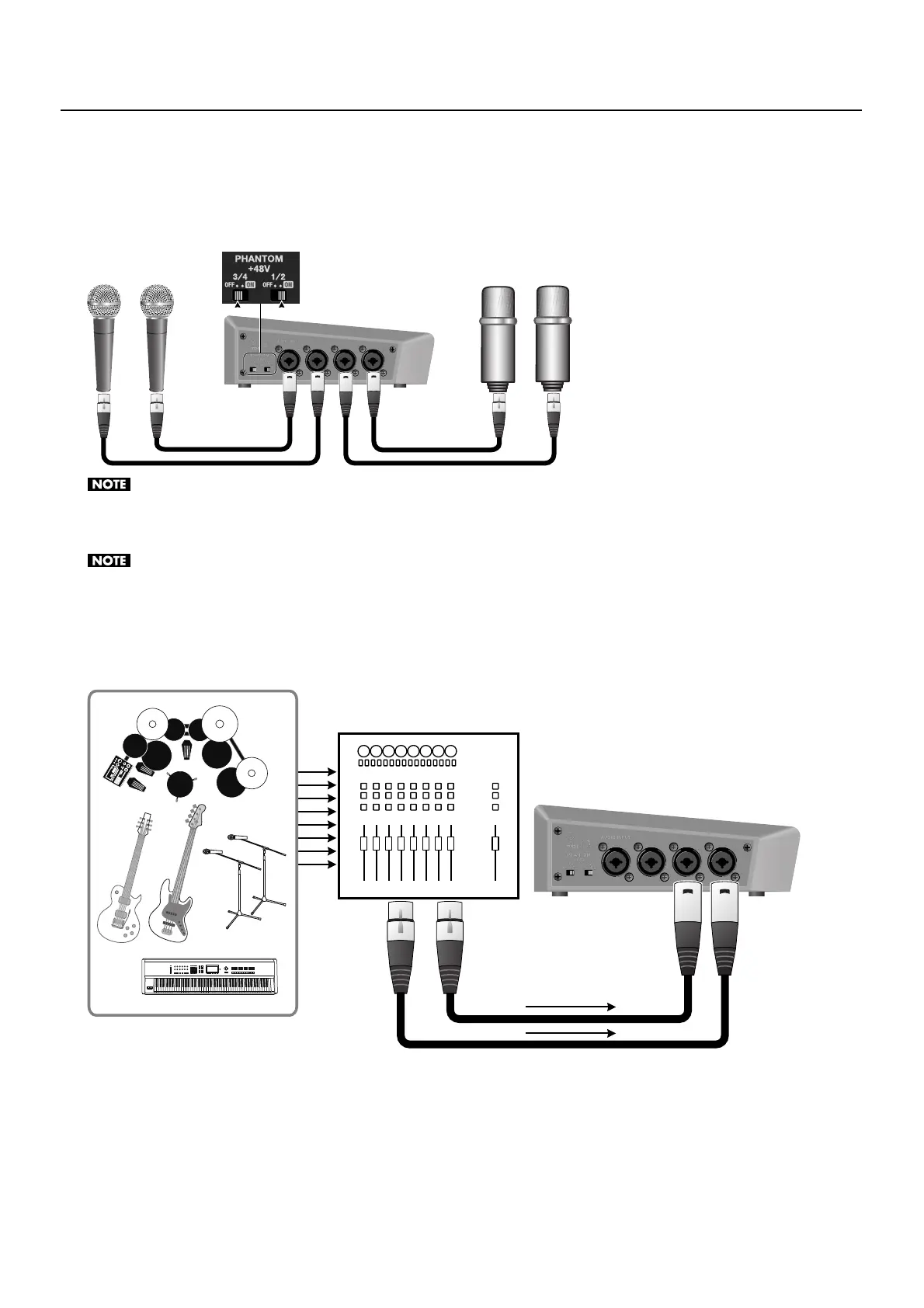
Connect microphones to the AUDIO INPUT connectors on the left side panel. When you are connecting a condenser microphone
or other device that requires a supply of +48 V phantom power, set the [PHANTOM +48V] switch to ON.
* The unit has one [PHANTOM +48V] switch for channels 1/2 and one for channels 3/4. Set the switch to correspond to the connector where the
device is connected.
fig.connect-mic.eps
When you are connecting a dynamic microphone or other device that does not require power supply, be sure to set the [PHANTOM +48V] switch
to OFF. Making the connection while the switch is left set to ON may cause malfunction. (Phantom power on the VR-3: +48 VDC/maximum 14 mA
per channel)
When one or both of the [PHANTOM +48V] switches is set to ON, current consumption increases by approximately 200 mA per switch.
Connecting an External Audio Mixer
When the number of audio channels is large, such as when you are recording a band performance, make the connections to the
AUDIO INPUT connectors via an external audio mixer.
fig.connect-audio-mixer.eps
Dynamic Mic Condenser Mic
Audio Mixer



 To Next Page