32
Compositing the Picture
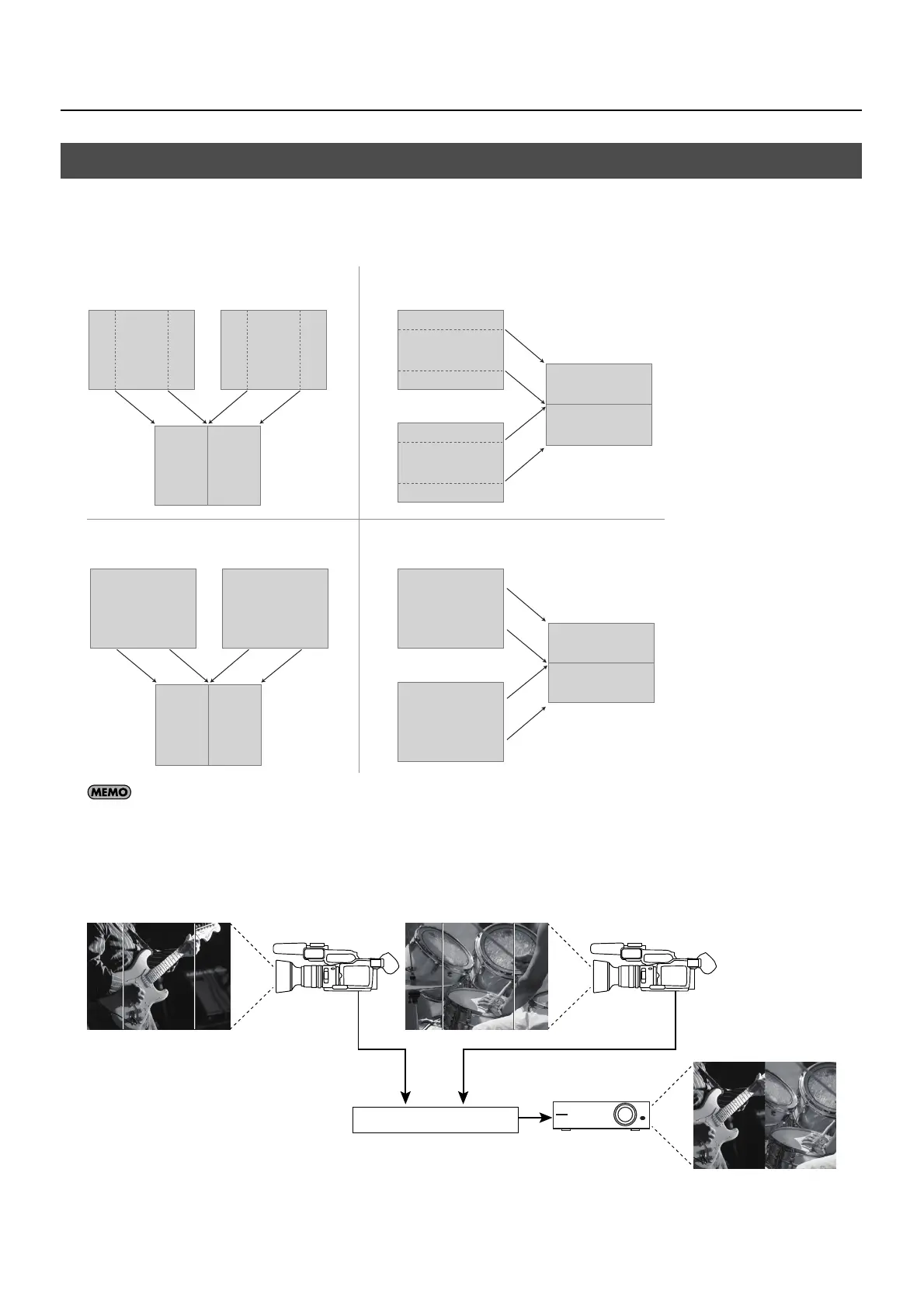
The four split composition patterns described below are available on the VR-3.
* The names of the menu items are shown below. By default, “V. CENTER” is selected as the split pattern. You can use the menus to change this to
a different pattern. At the [VIDEO] menu, go to [SPLIT] and select [PATTERN]. Refer to “Menu Operations” (p. 44) and “VIDEO Menu” (p. 45).
fig.split-concept.eps
With [V. CENTER] and [H. CENTER], you can use the menus to adjust the extraction locations (the center positions for A and B). Go to the [VIDEO]
menu, and at [SPLIT], adjust the setting values for [A-CENTER] and [B-CENTER]. Refer to “Menu Operations” (p. 44) and “VIDEO Menu” (p. 45).
* When [V. STRETCH] or [H. STRETCH] is selected as the split pattern, the center locations and the [SOFT EDGE] value cannot be adjusted.
Under the default settings (V. CENTER and center cropping), you can carry out compositing like that shown below.
fig.split-sample.eps
Compositing Using Split
A B
AB
V.CENTER
A
H.CENTER
B
B
A
A B
V.STRETCH H.STRETCH
BA
A
B
A
B
Split
BA



 To Next Page