Communications
24 AC-215 Installation Manual
5.3 Communication through the Local Area Network (LAN)
The TCP/IP connection, used to control the ACU, is assigned in the AxTrax™
AS-525 software’s Network Properties dialog box.
The PC running the AxTrax™ AS-525 software can communicate with the ACU
through the LAN card inside the PC. The ACU connects to the LAN using
Rosslare MD-N32, TCP/IP to RS232 gateway converter. MD-N32 can be
connected in any legal network address in the Local Area Network.
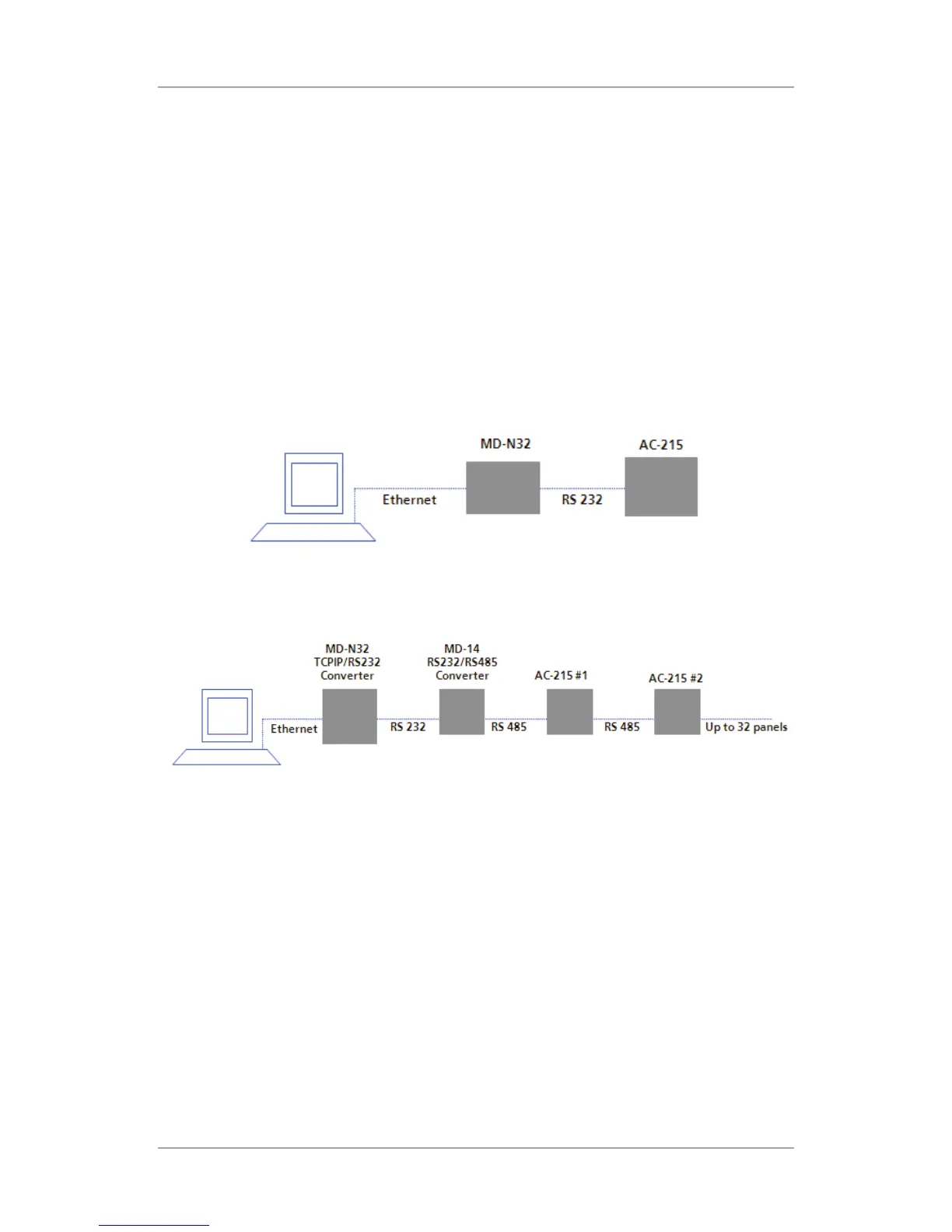
The following type of connection is used when a LAN network already exists
and therefore the long RS485 network is not required. This schematic
illustrates the connection of a single AC-215 to the PC using the LAN network.
MD-N32 must be first configured by Rosslare's Netconfig software. The setting
is stored in a non-volatile memory in the MD-N32.
Figure 3: MD-N32 Configuration Connecting a Single Panel
Multiple ACUs can be connected by adding an RS485 converter (MD-14)
between the RS485 ACUs network and MD-N32 converter.
Figure 4: Connecting Multiple Access Control Panels with MD-N32
For more information, see Appendix A.


 To Next Page
 Loading...