20
Master Station Safe Use, Installation and Maintenance Manual
6. Basic Commissioning continued
Ethernet Settings
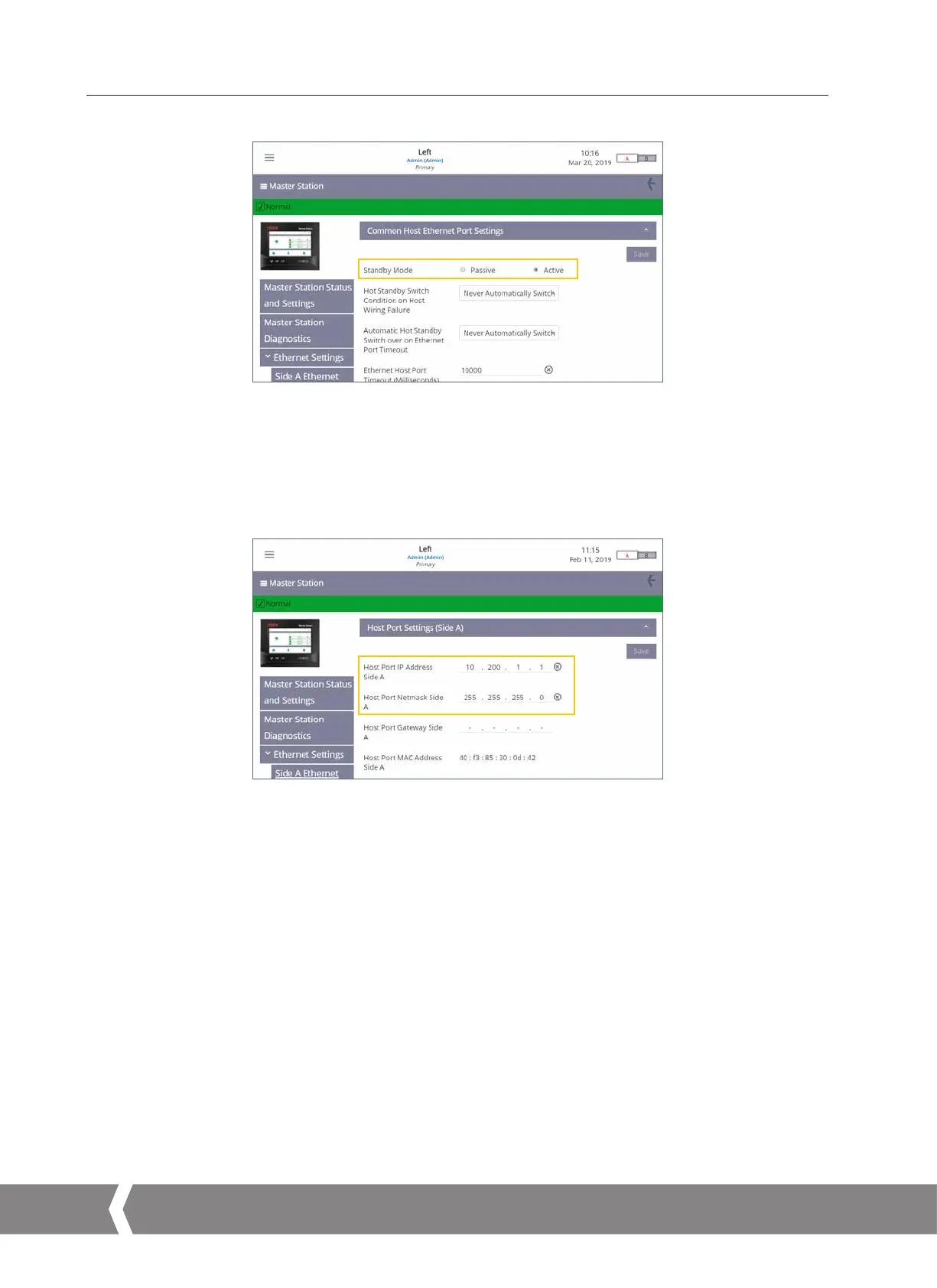
Fig. 6.9
Common Host Ethernet Port Settings
Hot Standby Master Station only.
Standby Mode must be configured correctly for the Ethernet network topology. Passive standby mode means only the primary side will
communicate over Ethernet. Active standby mode means both primary and standby sides will communicate. Special consideration should
be given to the IP address of the primary and standby sides as duplicate active IP addresses are not permitted on the same physical
network.
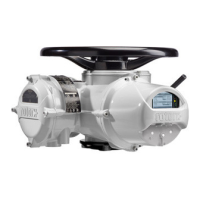
Fig. 6.10
Host Port Settings for Side A
Side A Ethernet and Side B Ethernet settings allow the user to configure the IP address information for the Master Station. Each page
includes a tab for host port settings and a tab for service port settings.
Only the Host Port IP Address and Host Port Netmask need to be set.
A single Master Station requires only side A to be configured. A dual Master Station requires side A to be configured on side A and side B
to be configured on side B. Hot standby Master Station requires side A and side B to be configured.
A4US
US
A4
US A4
US
A4



 To Next Page