25
In order for the Master Station to identify Modbus FCUs, a Device File must be created that defines the FCU type code against the Modbus
address of each FCU.
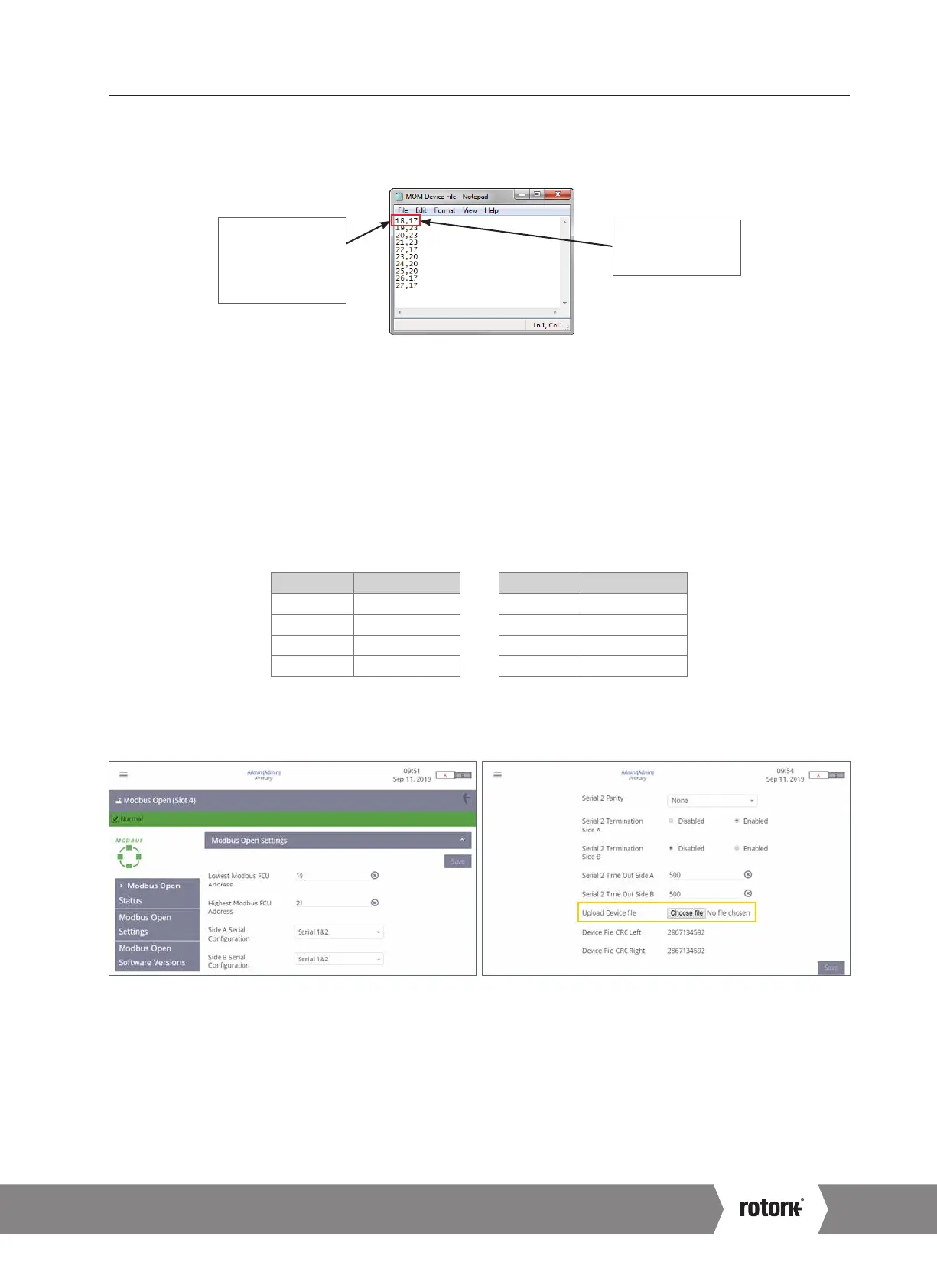
The Device File is a plain text file in a CSV (Comma Separated Values) format.
Fig. 6.25
Modbus Device File
18 – the Modbus
address. The top
line also shows this
FCU appears first
on the network.
17 – the FCU type
code indicating this
unit is an IQ3.
A Device File can be created directly in a Text Document editor such as Notepad. Each row of the Device File represents a Modbus
FCU. Each row consists of the Modbus FCU address and the applicable FCU Type Code, separated by a comma. The order of Modbus
addresses will represent the order that FCUs appear on the network. The FCU Type Code defines the type of FCU the Master Station is
communicating with.
For large network loops with many FCUs, a Device File can be created using a spreadsheet program such as Excel. Column A should
contain the Modbus FCU address and Column B should include the FCU Type Code. Only one Modbus FCU is permitted per row.
Separation with commas is not necessary when using Excel.
One row per Modbus device. The file must always be saved as ‘.csv’ format.
A sample of Modbus FCU Type Codes are detailed in the following table:
Value (dec) Description Value (dec) Description
12 CVL 18 IQT3
13 CVQ 20 CMA
14 ROMpak 21 SI3
17 IQ3 23 Centronik (CKc)
Refer to PUB059-052 for a full list of Modbus FCU Type Codes.
The Device File is uploaded to the Master Station from the Modbus Open Settings screen
Fig. 6.26
Upload Modbus Device File
Communication to Modbus RTU FCUs cannot occur until the Device File is uploaded to the Master Station. The file will need to be loaded
into both sides of a hot standby Master Station.
For changes to settings it is advisable to use the Service Port connection (rather than host connections).
6. Basic Commissioning continued
A4 US
US
A4
US
A4
A4 US



 To Next Page