3 Phase Power Analyser / EN
29 09/30/16 Version No. 00
10. Energy measurement:
Press “ENERGY” key, the “Pt”, “Qt”, “St” and “PFt” or “φt” symbol are displayed and the
starting time of the energy measurement is displayed in the “STAR” line. The energy values
and the current time will be displayed during the energy measurement.
a). KW displays KWh
b). KVAR displays KVARh
c). KVA displays KVAh
Press “STOP” key to stop and hold the energy measurements. The “HOLD” symbol is
displayed and the final calculation time appears in the “STOP” line on the display.
Press “
↵
” key to exit the energy measurement mode and return to normal measurement
mode.
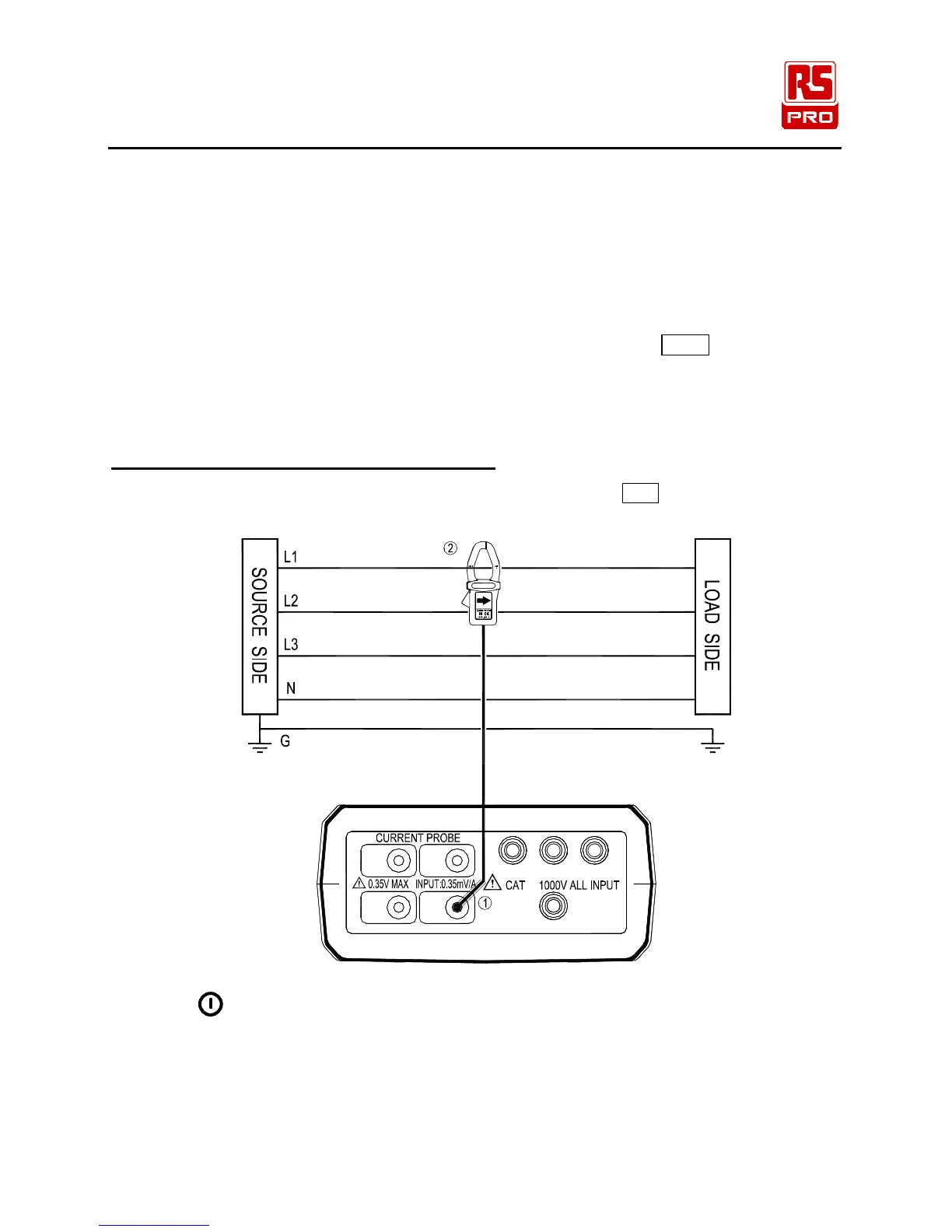
5-7 Single Phase Current Measurement
L1, L2, L3 : Phase 1, Phase 2, Phase 3, N: Neutral, G : Ground, Face the current probe
arrows toward the load
I3
I1
I4
I2
N
U1 U2
Ⅲ
U3
Figure 15. Single Phase Current Measurement
1. Press “
”
key to turn on the instrument.
2. Press “I4” key.
3. Connect the I4 current probe to the “I4” socket.
4. Clamp the I4 current probe securely around the conductor to be measured.
5. Read the I4 value, if the measured current value greater than 250A, the display will show the “OL”
symbol.


 To Next Page