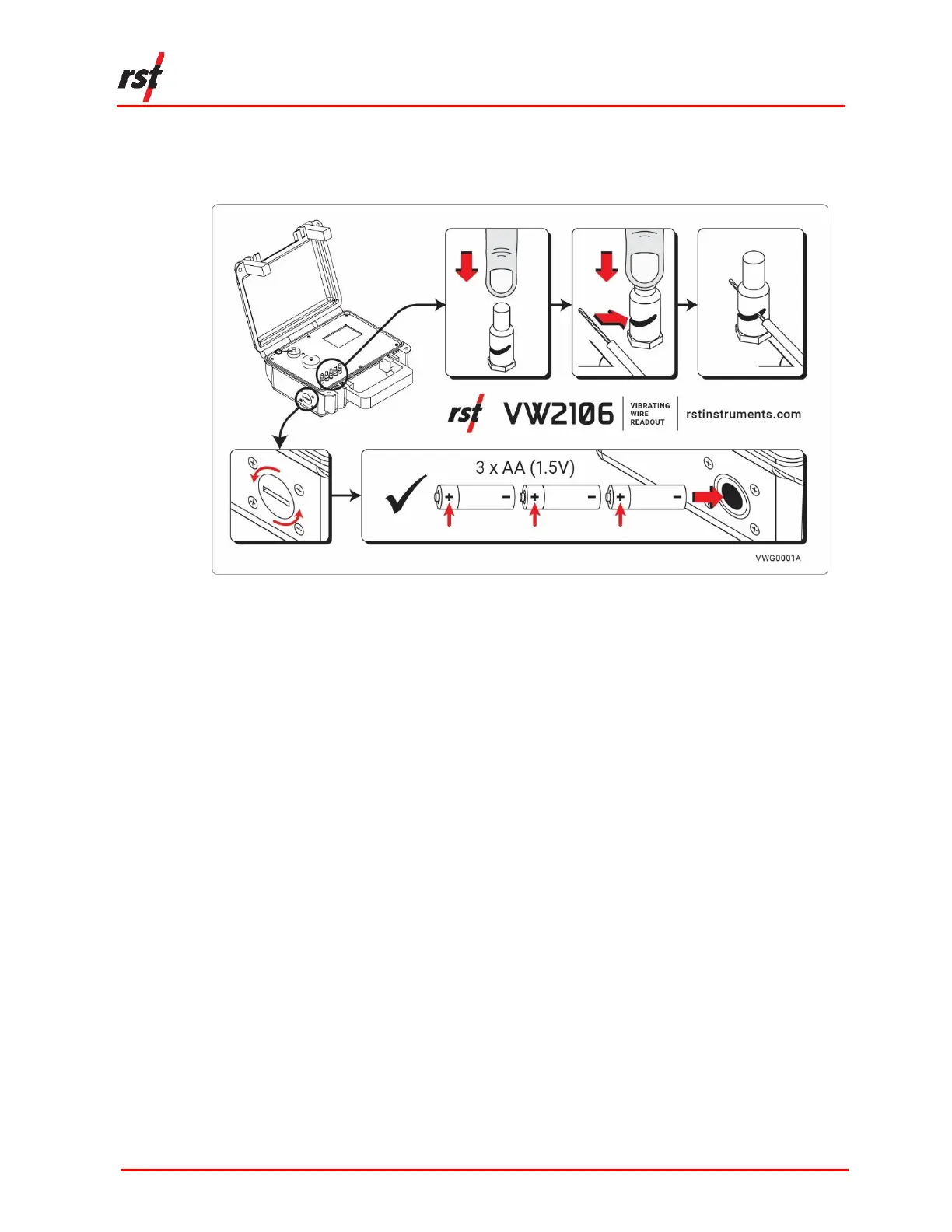
The latest model of the VW2106 features push post terminals to easily connect VW
Sensor instruments, visual instructions for using the terminal posts and changing the
batteries (Figure 1-2), and a refreshed look.
FIGURE 1-2 VISUAL INSTRUCTIONS FOR TERMINAL POSTS AND BATTERY CHANGES
If you have an older model VW2106, please refer to Section 3.2 for instructions to
connect a single field instrument to the readout. The multi-channel connection
instructions are identical for all models.
1.1 SAFETY
This product is battery operated. There are no major safety concerns associated
with use.
It is important to keep the unit clean during use in the field. Ensure there is no dirt or
dust in the wire terminals, battery compartment, and weather seal along the edge of
the lid of the enclosure. Make sure that weather caps for the USB port and
expansion port are properly secured when not in use.
2 GETTING STARTED
2.1 POWERING ON
The VW2106 Readout unit can be powered on any time by pressing any key.
2.2 POWERING OFF
The VW2106 unit can be powered off either manually or automatically.


 To Next Page