Default IP Address – 192.168.0.100
460 Gateway User Manual Page 68
4. Launch the web browser. In the address window, enter
http://192.168.0.100
Press Enter
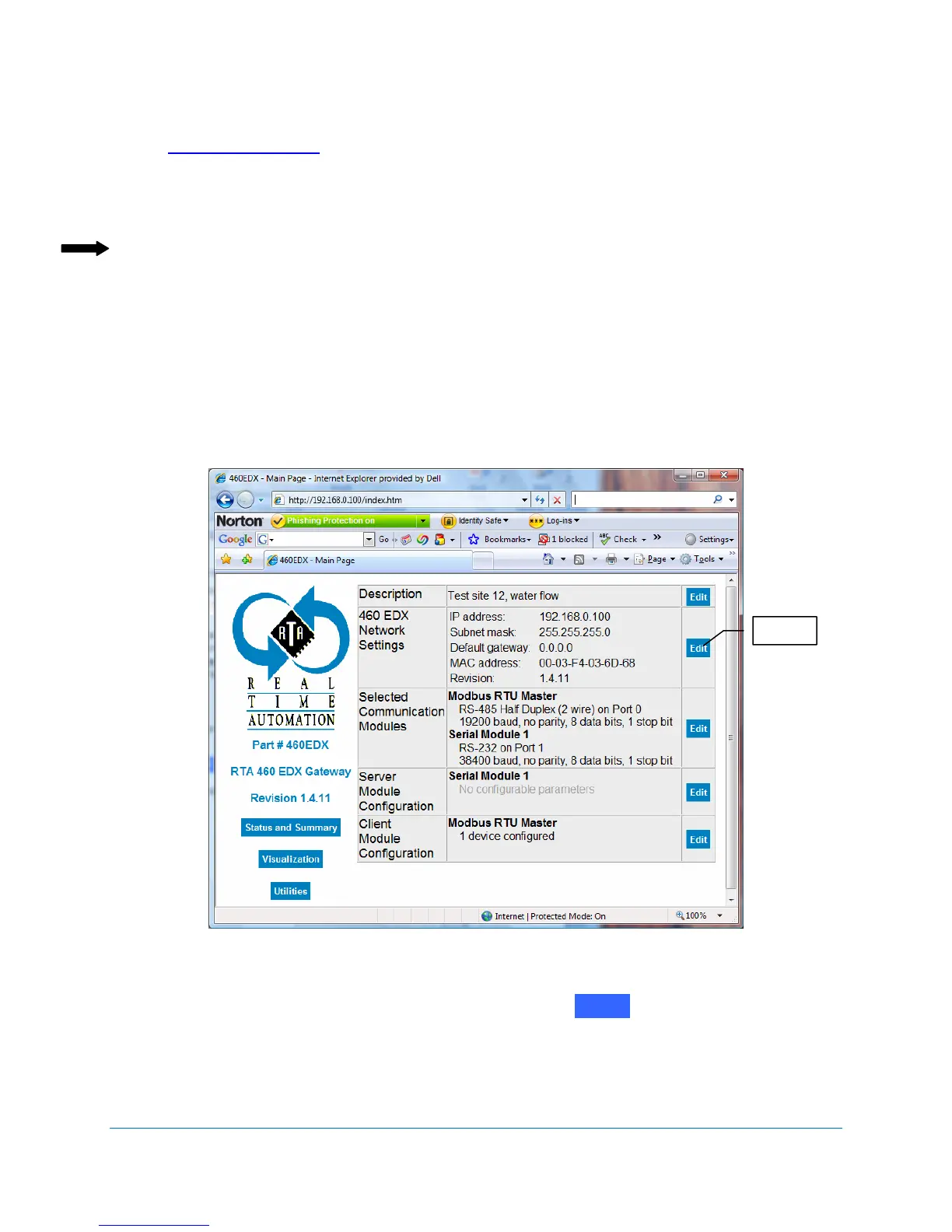
The Real Time Automation 460 Gateway web page displays. See Figure 4-11.
Note: If the web page does not display, check the following settings:
The web page does not display when the computer is on a wireless network because
of subnet selections. Use either the crossover cable or a hub/switch on the same
subnet.
Verify that your web browser is not set for a proxy server. If you are using Internet
Explorer, check Internet Options/Connections/LAN Settings. Make sure the check
box is checked for Automatically detect settings and the check box is empty (not
checked) next to the
Use a proxy server for your LAN option.
Figure 4-11 Real Time Automation 460 Gateway Main Page
5. Go to the
Network Settings area of the screen. Click on
The Network Setup screen displays. See Figure 4-12.
E
it
t



 To Next Page