Installation
2.9.2 GBIC Module Removal
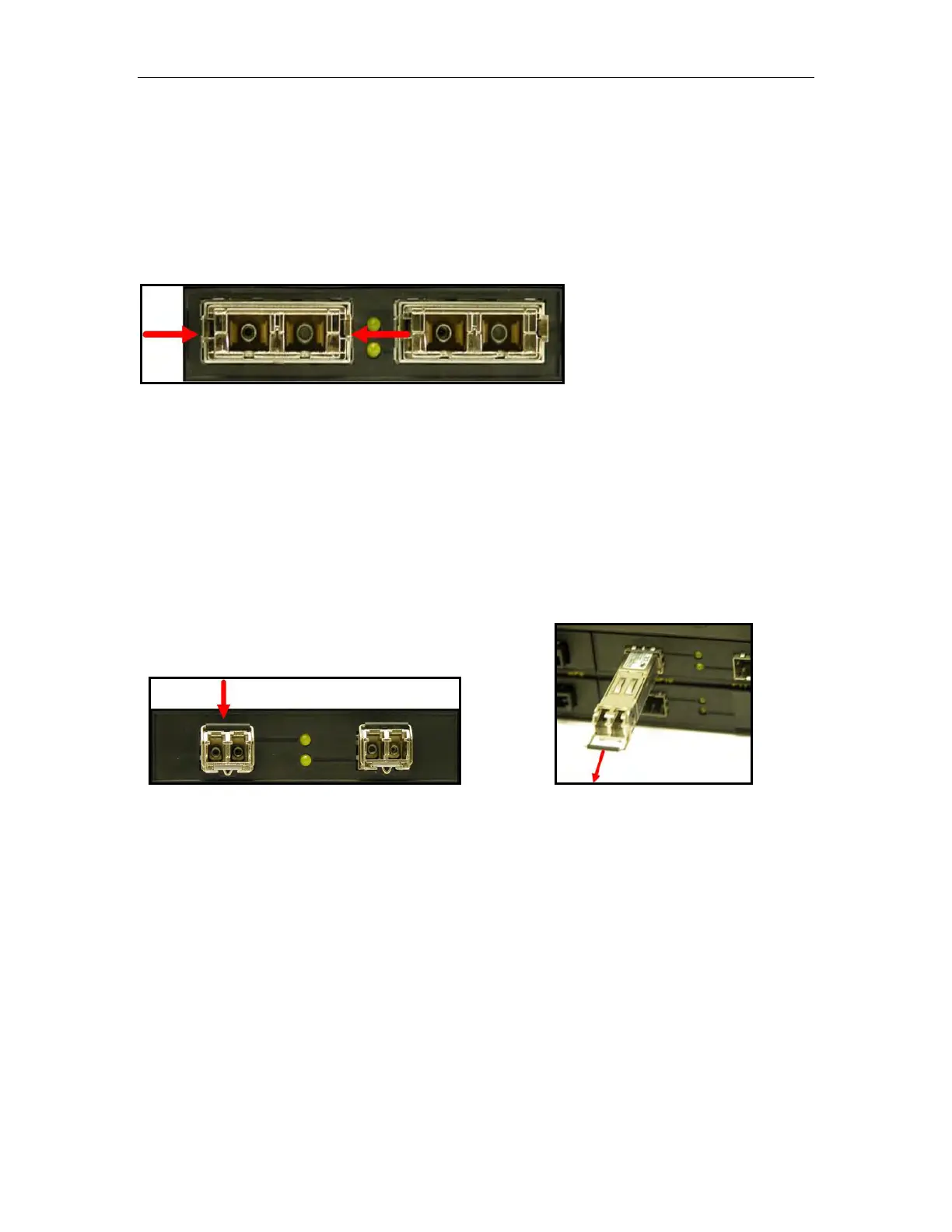
GBIC Modules have two locking latches on either side of the module shown in Figure 27.
To remove GBIC
module, disconnect any cable and replace with dust cover to protect
the optics. User should depress both latches simultaneously and gently pull the module
from the chassis. The module should be immediately stored in an ESD-safe
environment.
Figure 27: Locking latch location on GBIC optical modules
2.9.3 SFP Module Removal
SFP Modules are removed using the metal bail latch located on the top of the module
shown in Figure 28. To remove the SFP module, disconnect any cable and replace with
dust cover t
o protect the optics. User should grasp bail latch and gently pull outwards to
unlock and
remove the SFP module. Removal of the SFP module is shown further in
Figure 29. The module should be immediately stored in an ESD-safe environment.
Figure 28: SFP Bail Latch location
Figure 29: SFP Removal
RuggedSwitch
®
RSG2100 27 RuggedCom
®


 To Next Page