F11GIM2 User Manual
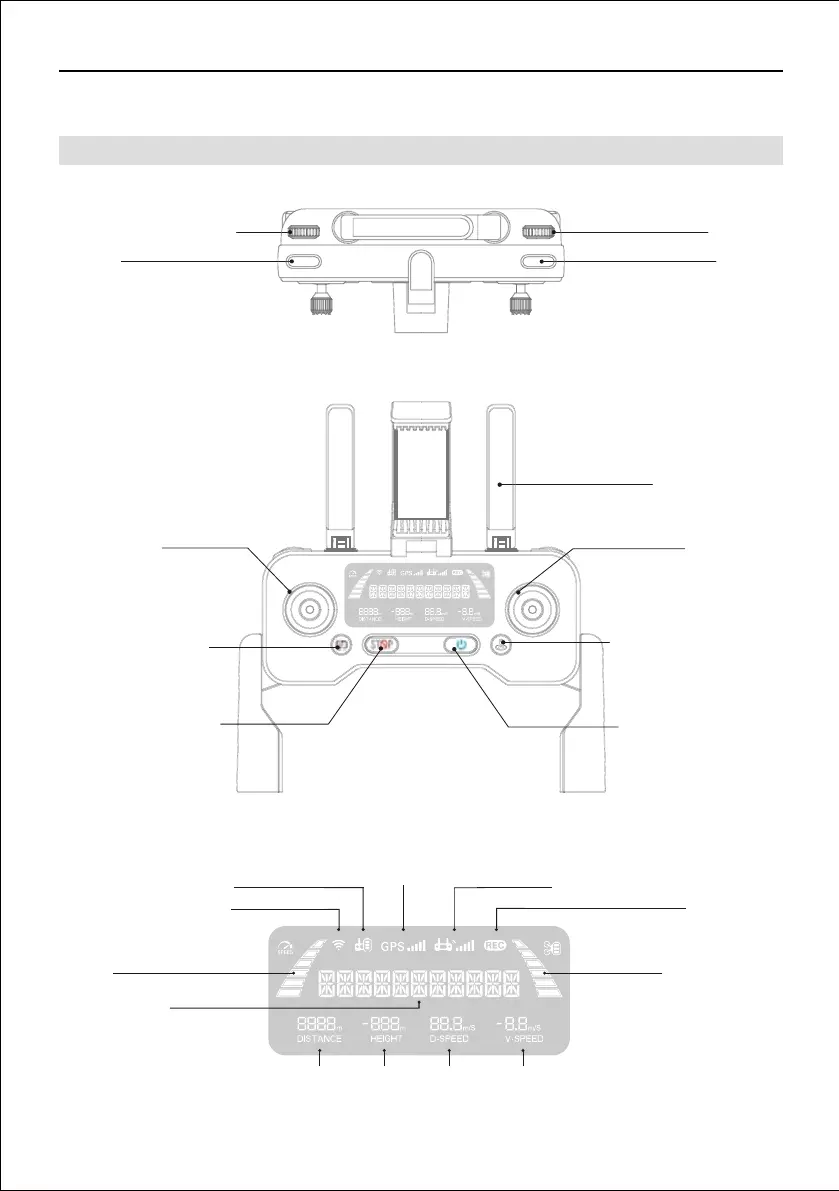
6.1 Controller Features
Copyright ©2021 Ruko All Rights Reserved.12
6 Remote Controller
Distance
Status Display
Long-distance version
Remote control battery
GPS signal strength
Remote control signal strength
Speed Aircraft battery
Photo/video
Height D-speed V-speed
Camera zoom in and out
Gimbal dial
Shooting
Recording
Throttle stick
Direction stick
Press once, speed switch;
Press and hold for 5
seconds, turn off
GPS mode
Press once then press
again and hold for 3
seconds to activate
Emergency Stop
Press once check the
battery level, press again
power on.Press once and
then keep pressing
power off
Press once, Return To Home;
Press again, cancel Return
To Home
Antennas, lift up to
receive signal



 To Next Page