F11GIM2 User Manual
9.1 Return to Home
9 Product Functions Profile
The Return to Home (RTH) function brings the drone back to the Home Point.
This function can only be achieved under GPS mode. There are three types of RTH: Smart RTH,
Low Battery RTH, and Fail connection RTH. If the drone have successfully recorded the Take
off Point and the GPS signal is strong, the RTH will be triggered when either the Smart RTH
is initiated, the drone battery level is low, or when the signal between the drone and remote
controller is lost.
Smart RTH
Smart RTH can bring the drone back to the Home Point. It is
initiated by either clicking the button once on the remote
controller or on the app, the remote controller will alert with
a "DI DI" sound. Click the button again cancel the RTH process.
Copyright ©2021 Ruko All Rights Reserved.
18
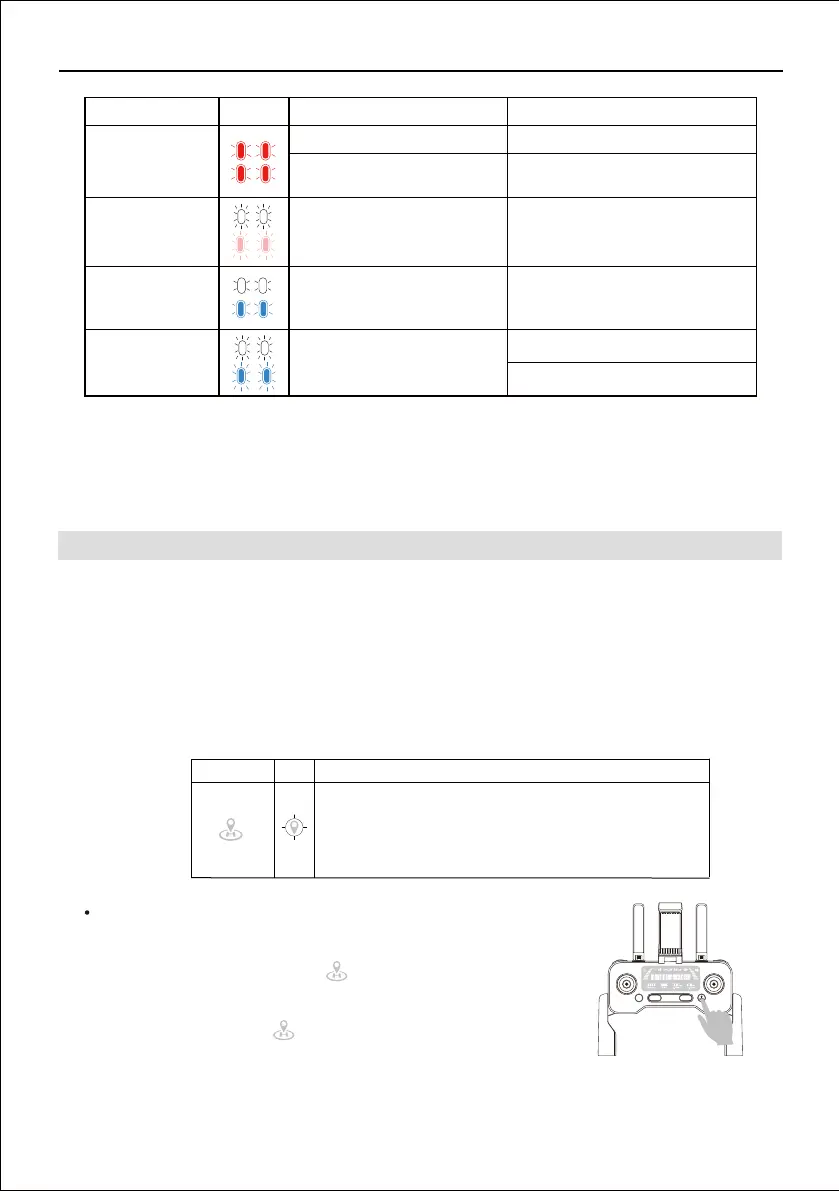
Front and back
lights flashing red
Front and back
lights flashing pink
Front and back
lights flashing
white and blue
Front and back
lights rapid-flash-
ing white and blue
The controller is not connected to
the drone
The drone turns to Compass
Calibration process
Follow the insturction to rotate the
drone to complete calibration process
The drone is in Gyroscope
Calibration process
Wait till the drone complete calibration
automatically (This only take 2-3
seonds)
GPS searching
Waiting for GPS signal
Change to another place and try again
Charge the battery
Restart and wait for the drone and
controller auto-connection
Low Power
LED light indicator Reason Action requiredColor
The default Home Point is the first location where the drone
received a strong or moderately strong GPS signal (3 or more
satellite reception).
Home Point GPS Description



 To Next Page