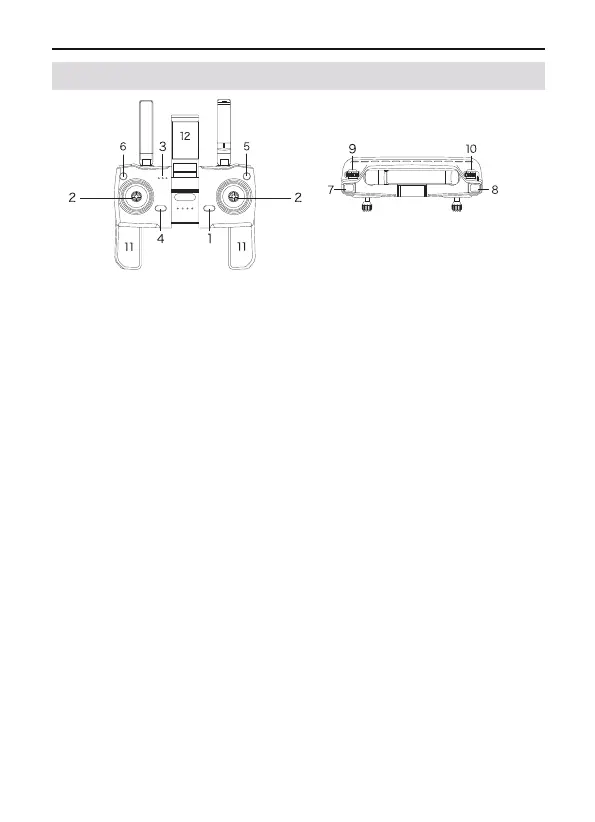
Power Button
Short-press once to start; Short-press + long-press for more than 2
seconds to turn off the transmitter;
Control Sticks
(American control sticks)Use a control stick to control aircraft
movements. The left control stick is the throttle lever, which can
adjust the aircraft's altitude and nose direction. The right control
stick is a directional stick that controls the aircraft's flight direction
(forward / back / left / right). The Japanese hand's control stick func-
tions in reverse to the American control sticks;
Battery Level LEDs
Displays the current battery level of the transmitter. a) Turn on the
power, and the white light blinks. b) Push the left control stick up and
down to pair the transmitter with the aircraft, and the white light is
steady on. c) Blinking white light during flight indicates the battery
of the transmitter is low.
Press Smart RTH Button
Press the button to let the aircraft automatically return to the
take-off position. Due to GPS signal problems (commercial class),
the landing position may be slightly different from the take-off posi-
tion. The deviation range is about 10 feet(3 meters) in diameter. Press
the RTH button once again to cancel the intelligent return.
F11 PRO User Manual
Copyright ©2023 Ruko All Rights Reserved.
13
①
②
③
④
2.5 Transmitter Diagram



 To Next Page