F11 PRO User Manual
Copyright ©2023 Ruko All Rights Reserved. 28
3.7 Camera Overview
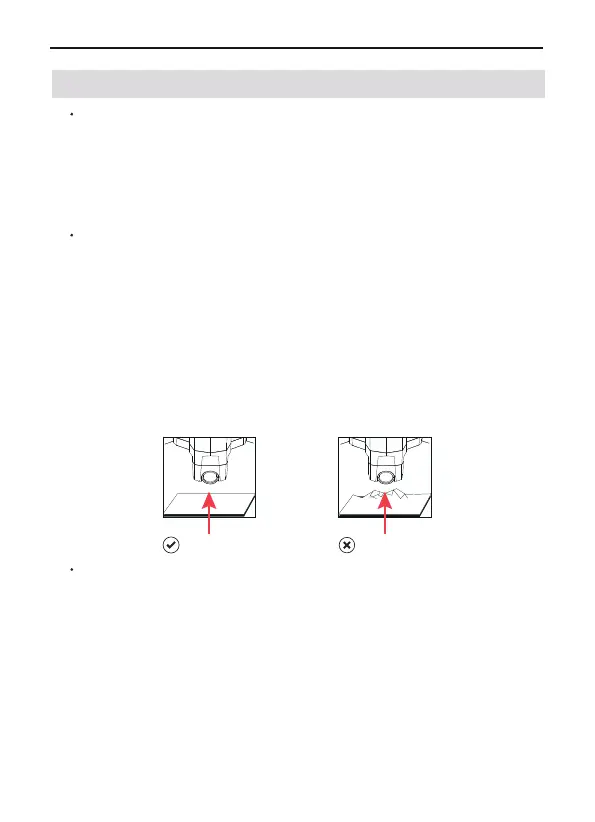
large gap Rough ground
Camera overview
The camera uses an upgraded 5GHz Wi-Fi FPV real-time transmis-
sion function, equipped with a 120°FOV lens and a 90°adjustable
camera, which can stably shoot 4K HD video and 4K ultra-clear
images, providing you with a broad field of vision for unforgettable
moments.
Camera Guideline
Do not place the aircraft on rough ground and turn it on, because the
camera will adjust up and down for self-calibration. Please place it in
a horizontal position to ensure that there is enough clearance under
the camera, otherwise the camera will get stuck. If the camera is
stuck, please place the aircraft in a horizontal position with no obsta-
cles, restart the aircraft, and then check whether it can perform
self-calibration or gyroscope calibration, and check the camera's
self-calibration. If not, turn off the aircraft and move the camera up
and down by hand. If it is still stuck, please contact us for technical
support.
Storing Photos and Videos
F11 PRO is equipped with a micro SD card slot for storage space
expansion.
Card speed: 10M/s;
File format: support FAT32 format;
Memory capacity: a memory card with a memory capacity of 32G or
less.
The phone and the memory card store photos and videos at the same
time. If you want a clearer video, please download the video files in
the memory card.



 To Next Page