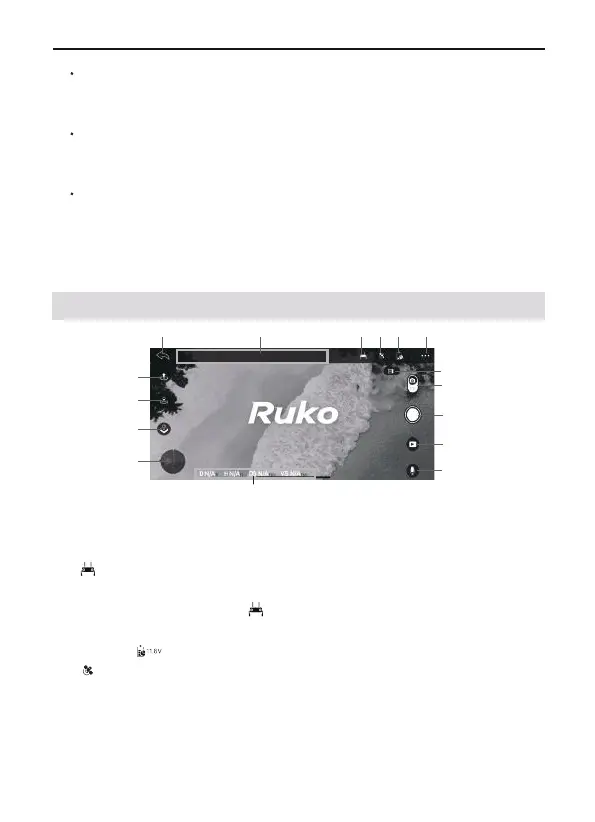
Aircraft Status Indicator Bar
In flight: Display the flight status of the aircraft and various
warning information.
Transmitter Battery Display
When the mobile phone is not connected to the aircraft’s WiFi,
this icon is transmitter . After the mobile phone is connected
to the aircraft’s WiFi, this icon is the transmitter real-time
voltage .
GPS Status
Used to display the GPS signal strength, 3 bars indicate that
the GPS signal meets the flight requirements, 1 or 2 bars
indicate that the GPS signal is weak, and the flight position
needs to be changed.
F11 PRO User Manual
Copyright ©2023 Ruko All Rights Reserved.37
②
5.2 Camera View
①
③
1
2
3 4 5
6
7
8
9
10
11
12
13
15
14
16
CONTROLS
Operate the aircraft through the APP page buttons to realize the
functions of the aircraft.
LEARN TO FLY
Click to enter the flight YouTube video website, where you can
view the flight guidance of the corresponding product.
GUIDE
Click to view Help Manual、Instructions Videos and Quick Start.
Long press the position of the non-function icon on the APP
homepage to enter the flight log interface, and click the file to
share and send.



 To Next Page