Copyright ©2023 Ruko All Rights Reserved.
48
F11 PRO User Manual
6.4 Starting/Stopping the Motors
Please choose a flat ground to land.
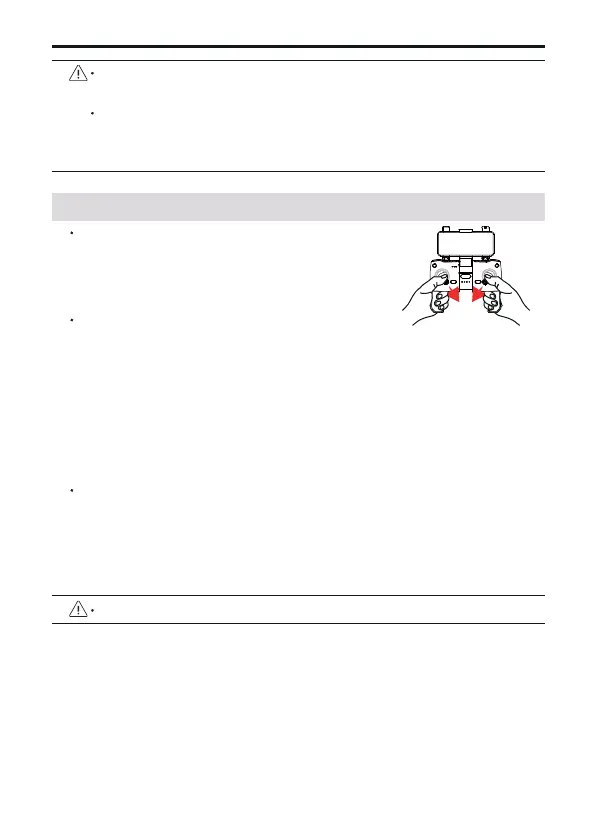
Starting the Motors
Push the joysticks into 5 & 7’o clock positions to
start the motor.
When the aircraft's flight state is tilted and unstable, please land
the aircraft on a level ground for gyroscope/horizontal calibration.
When the aircraft resets the gyroscope/horizontal calibration, the
camera will also swing up and down again for self-checking to
ensure that there is enough space at the bottom of the camera.
Stopping the Motors
After the motor starts rotating, there are two ways to stop:
Method 1: After the aircraft takes off, push the throttle stick to the
lowest positions and operate the aircraft to land until the motor
stops, then release the joystick.
Method 2: When the flight is not taking off, Push the joysticks
into 5 & 7’o clock positions to start the motor. After the motor is
turned off, please release the joystick immediately.
Manually Land the Aircraft
When you need to manually land the aircraft, continue to push
the transmitter throttle lever downwards. Do not release the
throttle lever during landing until the aircraft landsand the
motors stop.



 To Next Page