4. Pre-Flight Checklist
5. Flight Operations
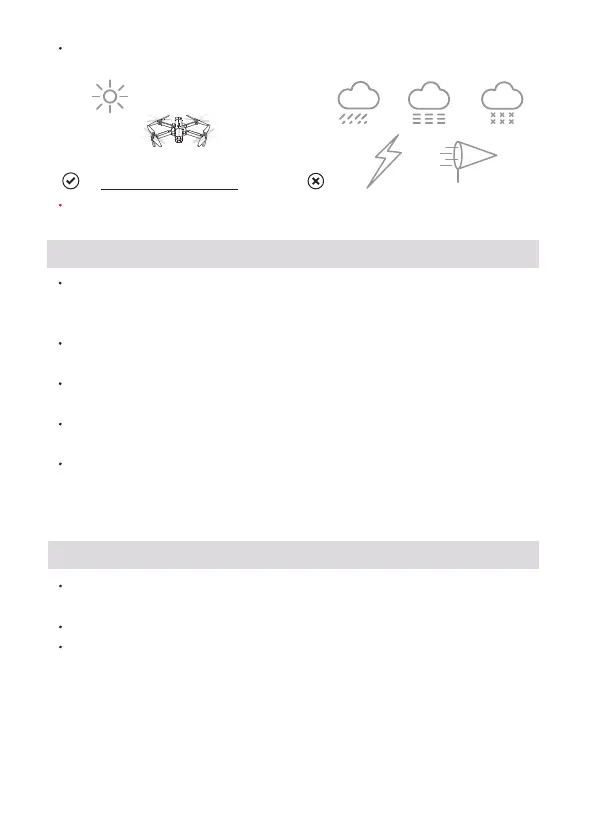
Fly in an environment of 0°C to 40°C and good weather (not rain, fog,
snow, thunder andlightning, strong wind, or extreme weather).
It is forbidden to fly indoors. Please do not fly in the no-fly zone and
comply with local laws.
Copyright ©2023 Ruko All Rights Reserved. 3
Ensure that the arms of the aircraft are fully extended. Make sure
that the battery compartment cover is fastened firmly and the
intelligent flight battery is installed firmly.
Ensure that the propeller is free from damage, aging, deformation, no
foreign matter entanglement, and firm installation.
Please make sure that GPS is turned on to avoid that it would be lost
please fly outdoor in an open place.
Turn on the aircraft, then turn on the transmitter, please pair it with
the aircraft.
Connect Aircraft's Wi-Fi with your phone, make sure that you have
connected the Wi-Fi name “RUKO-PRO-XXXXXX" exactly after App
access right and Internet permission with your phone, please make
reference to operation video on App first before flying.
Keep away from propellers and motors that are working and rotating.
Fly in a non-interference environment and within line of sight (VLOS).
Do not make calls or send text messages during the flight.
When the GPS signal is poor, please return as soon as possible when
the battery is low or the wind is warning.



 To Next Page