3
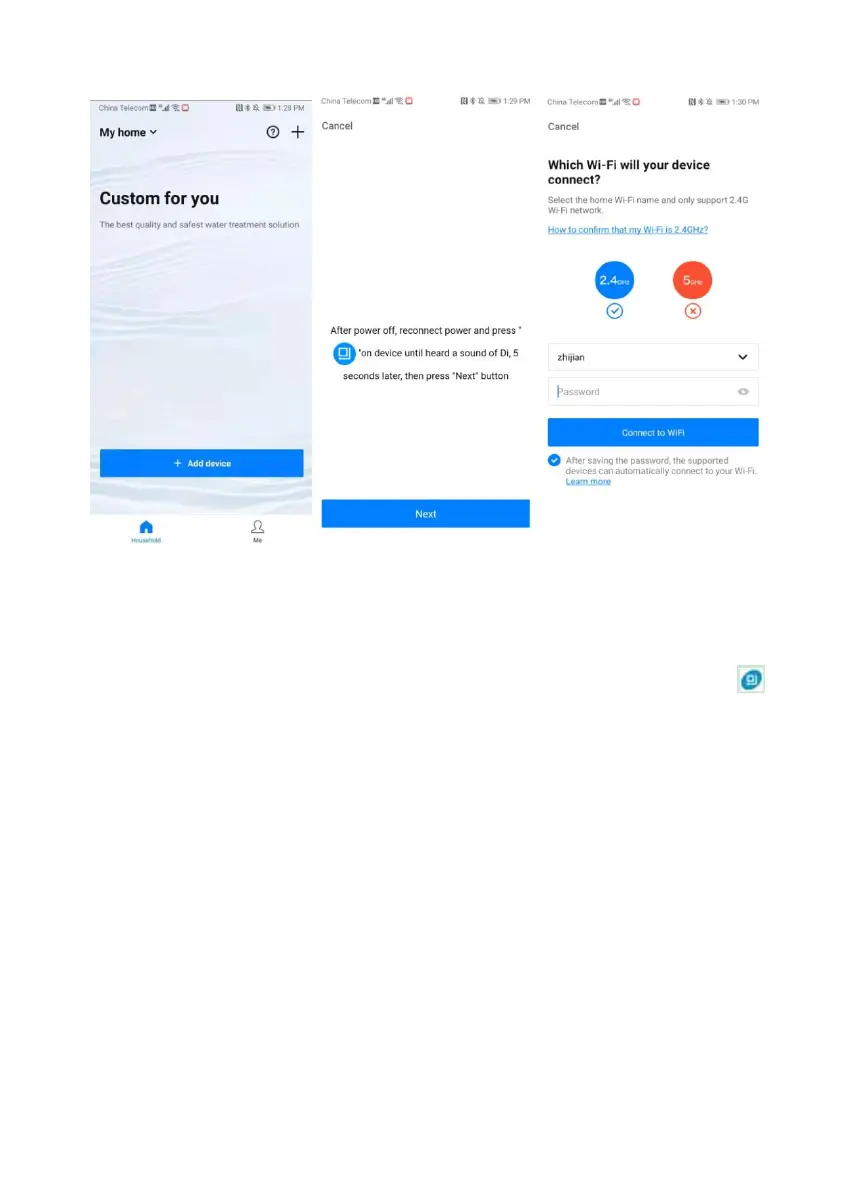
Figure 2-1 Figure 2-2 Figure 2-3
Figure 2 Figure 3
④ In Figure 2-1, click "Add device", enter to Figure 2-2 interface. Follow the
instruction, disconnect the power and reconnect it manually. Press and hold " "
button until hear a buzzer “Di”. Press "Next" after 5 seconds. Then enter to Figure 2-3
interface. Input the Wi-Fi password, click "Connect to Wi-Fi" and wait for configuration.
After configuration successfully, you can perform related operations such as device
addition, name modification, saving data, etc.
1.3. Product Characteristics
➢ Simple structure and reliable sealing
It adopts hermetic head faces with high degree pottery and corrosion resistance for
opening and closing. It combines with Service, Brine Refill, Brine Dissolve, Backwash,
Brine & Slow Rinse, and Fast Rinse.
➢ Raw water flows out from outlet or not when in regeneration process
Changing the fixed disk can make raw water flows out from outlet or not when in
regeneration process.
➢ Down-flow or up-flow regeneration



 To Next Page