START-UP
Axio Lab.A1 Mounting optional components Carl Zeiss
04/2013 430037-7144-001 63
3.2.3 Mounting and centering the
overview fixture
x Lift the condenser carrier together with its drive
knob upwards as far as it will go.
x Remove the polarizer or filter holder from the
condenser carrier as applicable.
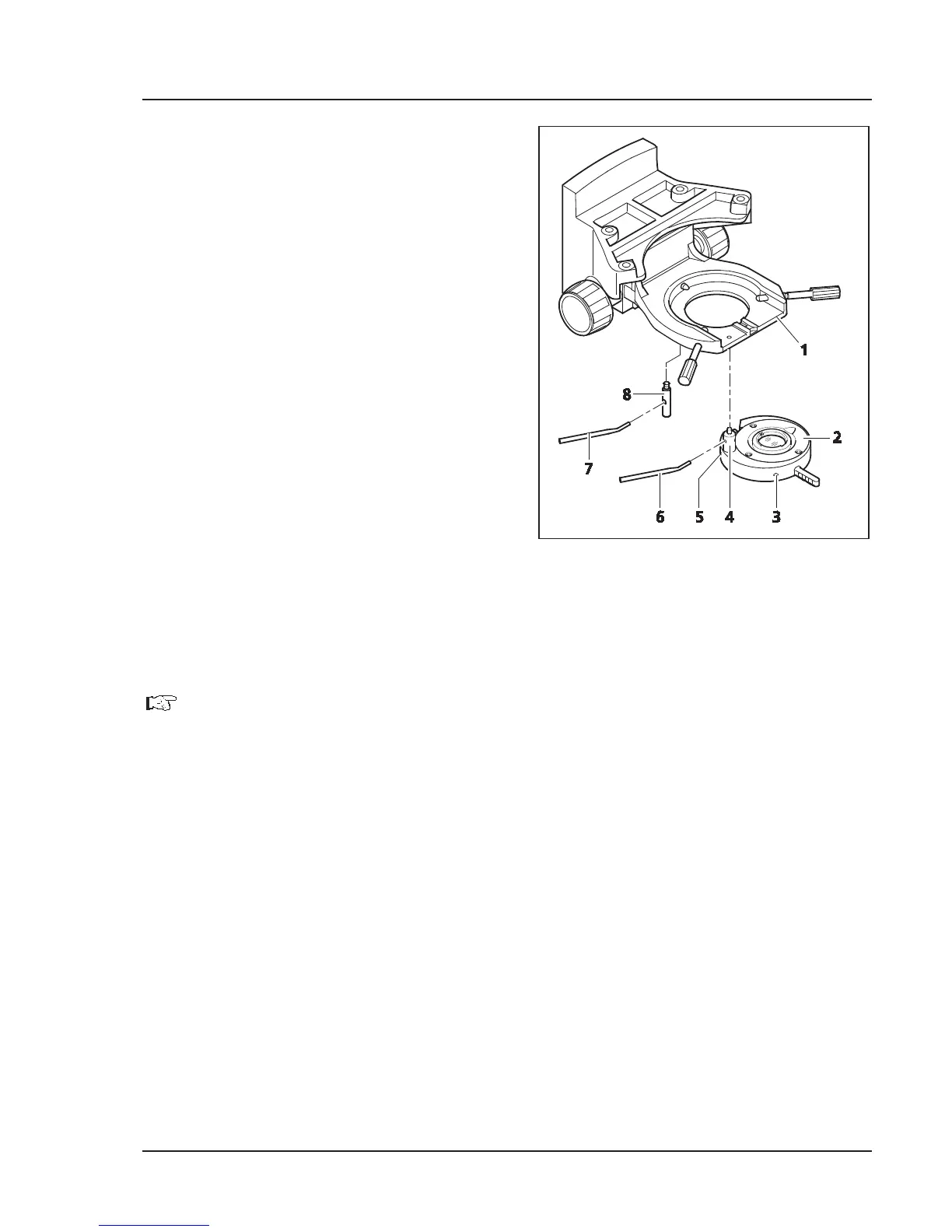
x Hold the overview fixture or filter holder
(Fig. 3-27/2) parallel to the underside of the
condenser carrier (Fig. 3-27/1) and screw the
holding pin (Fig. 3-27/4) of overview fixture
with the angled adjusting lever (Fig. 3-27/6) into
the front left threaded hole below the
condenser carrier as far as it will go.
x Screw the locking pin (Fig. 3-27/8) with
adjusting lever (Fig. 3-27/7) as far as it will go
into the rear threaded hole of the condenser
carrier.
x Swivel the overview fixture into the beam path.
Ensure that it is securely locked into place.
x Completely open the aperture and luminous-
field diaphragm.
x Use the SW 1.5 hexagonal socket wrench to set
the two adjusting screws (Fig. 3-27/3 and 5)
until the field of view is optimally illuminated.
The overview fixture should only be mounted on condenser 0.9/1.25.
Fig. 3-27 Mounting the overview fixture


 To Next Page