ENGLISH
Warning
This operation is required for vending machine installation
and bypasses the safety system provided for in case of
door opening. It should therefore be performed by
specialized personnel that are conscious of the risks
involved in working on live devices.
- Make sure that the lyophilized product container cover (ref.
5, fig. 1) is open (only V.M 5P).
- Keep the button pressed (ref. 25, fig, 1) until a steady water
jet is coming out of the dispensing tube (ref. 18, fig. 1).
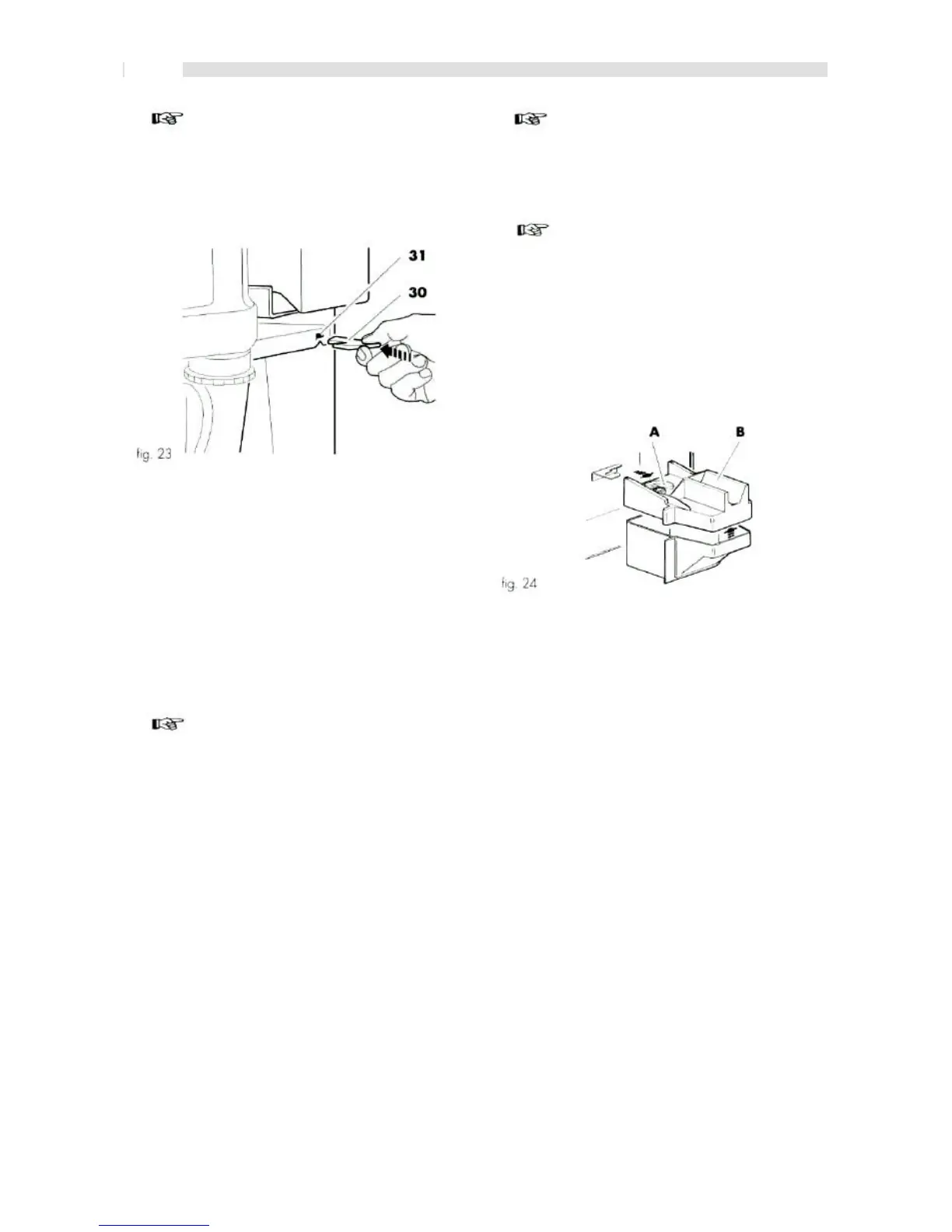
- Remove the micro-switch bypassing key (ref. 30, fig. 23).
- Close the door.
- Wait for the flashing red light to go off. If the red light stays
on and the display indicates "PLEASE WAIT", this means
that the machine didn't reach the proper temperature.
- Read the vending machine dialogue message on the
display (ref. 1, fig. 1) and perform the possibly indicated
operations.
- Wait for the display to indicate "INSERT COIN".
- Place the cup in the dispensing slot.
Important
The dispensed products should be consumed rapidly, and
shouldn't be stored and/or packaged.
- Check proper machine operation by dispensing some
drinks.
Important
Although all the buttons are originally programmed on
standard values, it's necessary to check that the obtained
drink has the desired characteristics. In case it hasn't, it's
necessary to proceed in programming the dispensing
buttons (see "7 -Programming).
- Extracting.
- Remove the cover (ref. B, fig. 24).
- Empty it from the contained coins/tokens.
- Reinsert it in its seat (fig. 24).
Important
Drinks should be dispensed only in open containers
(glasses, cups, etc.).
- Insert the credit corresponding to the type of drink.
- Press the corresponding button.
8.6 Display messages
Vending machine operation is completely or partially blocked
when some products are missing or faulty conditions occur.
The display (ref. 1, fig. 1) on the control panel indicates the
reasons that caused the possible block, together with the red
light (ref. 2, fig. 1) turned on.
24







 To Next Page