English
7
30
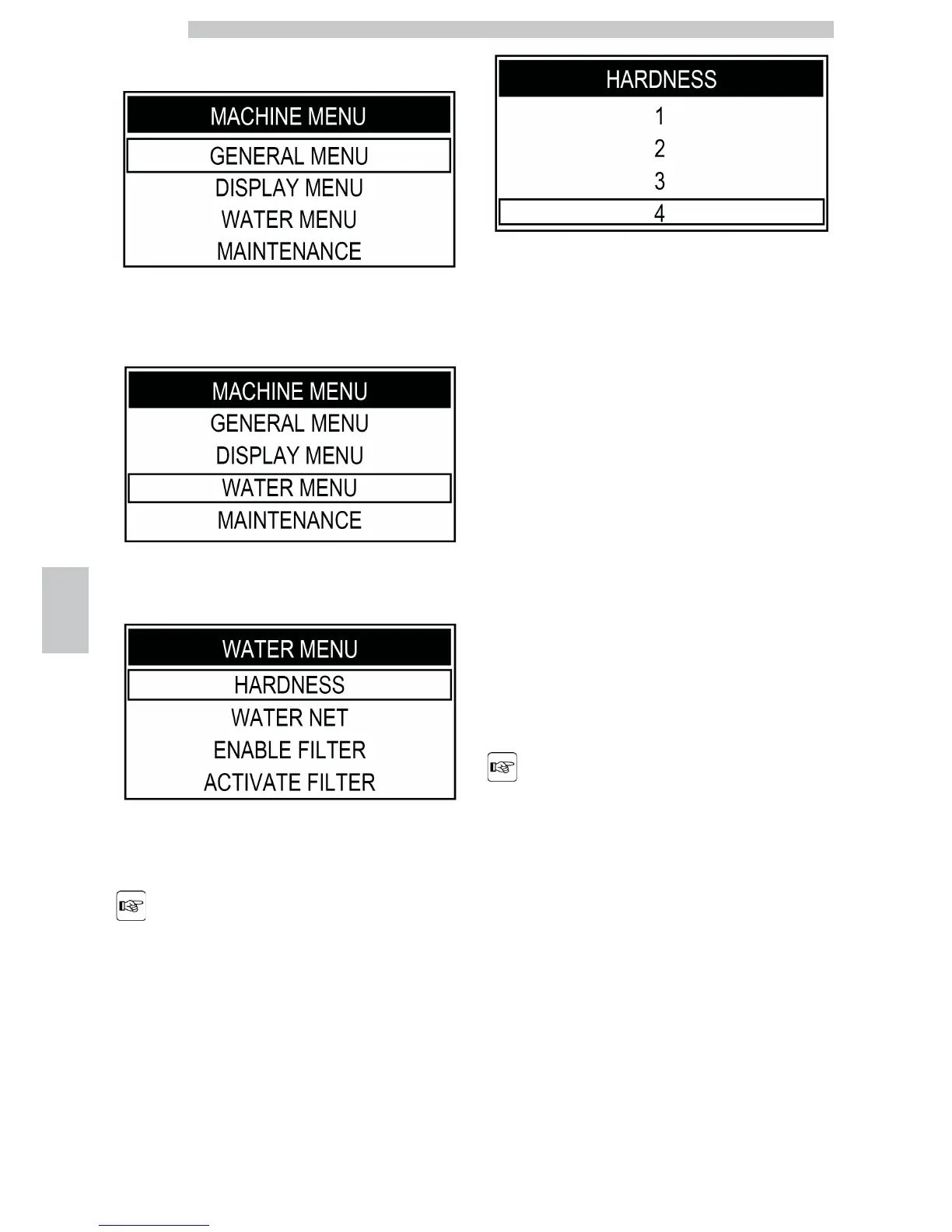
Press the "Coffee" button to access.
Press the "Clean" button until the "WATER MENU"
option can be selected.
Press the "Coffee" button to access.
Press the "Coffee" button to enter the "HARDNESS"
menu.
The machine is supplied
with standard adjustments,
suitable for most uses.
Press the "Clean" button to increase the value or the
"Cappuccino" button to decrease the value.
Press the "Coffee" button to confirm the selected change.
After adjusting water hardness, install the filter (Intenza+)
as described in the following section. Exit programming
mode as described in section "Button Description in
Programming Mode".
7.6 "INTENZA+" Water Filter
Water is a key element for a good espresso coffee.
Therefore, it should always be filtered in a professional
manner. That is why all Saeco machines can be equipped
with the INTENZA+ filter. This filter is easy to use and its
sophisticated technology is effective in preventing limescale
build-up. This way, water will always be perfect and will
give a much more intense aroma to your espresso coffee.
The "INTENZA+" water
filter can be installed only if
the machine is NOT
connected to the water
network.








 To Next Page