English
5
21
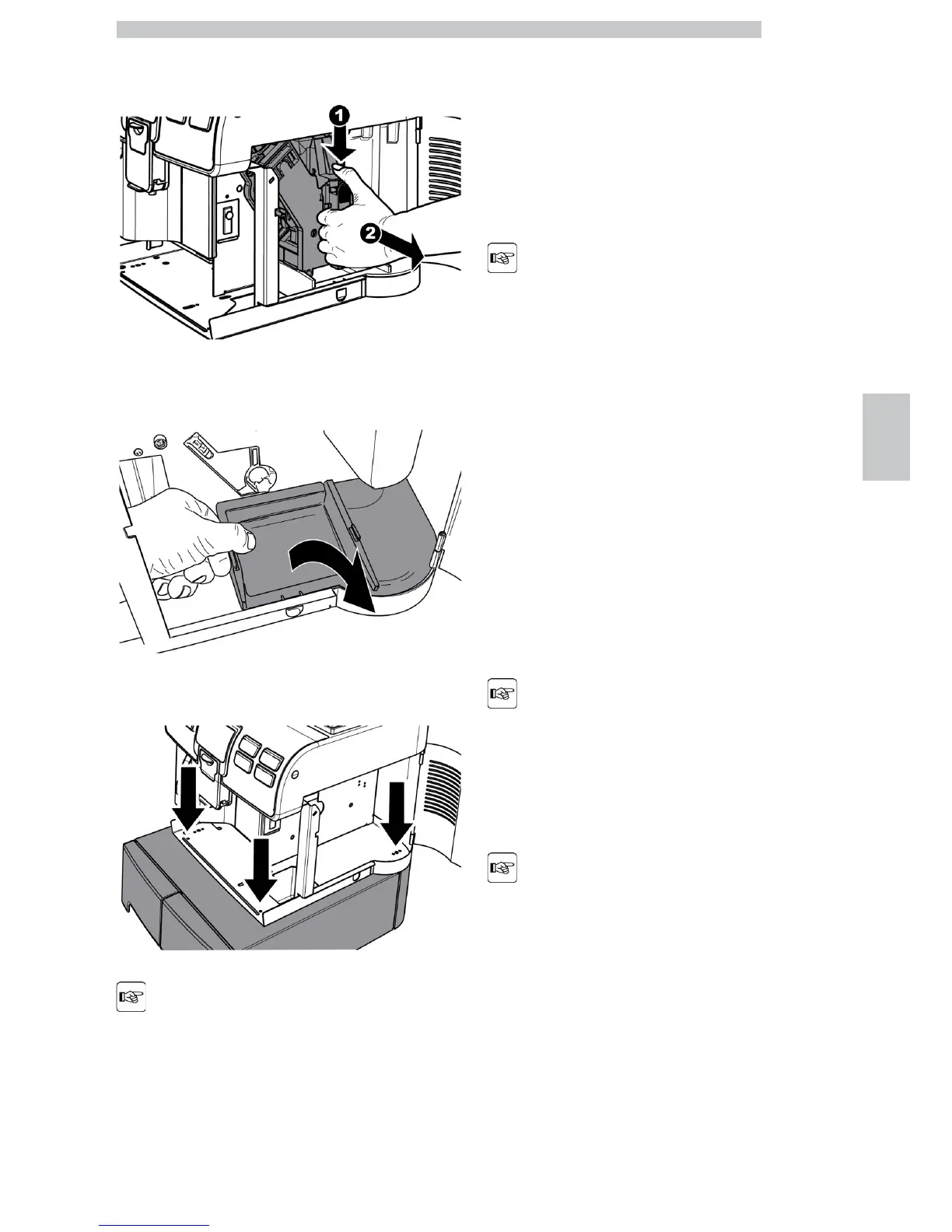
Remove the brew group by pulling it by the handle and
pressing the «PRESS» button.
Lift the rear side of the inner drawer to unlock it.
Fix the base with the drawers by using the screws supplied with the machine.
Check the components to
make sure that they are
correctly aligned.
After installing the containers, refit the components and
close the door. Install the group compartment drawer and
the drip tray.
5.4 Installation of Payment
Systems
This machine is designed to manage specific payment
systems according to the needs of the service provider.
The payment system must
be purchased and installed
by the service provider.
The payment systems are:
• "Stepper" coiner;
• "Apollo" system "Rfid" sensor.
The following sections explain the procedures for installing
the two systems in the machine.
5.4.1 Installing the Coiner Box
The machine has been specially conceived and designed to
interface with all "Stepper" coiners available on the
market.
The coiner must be
purchased and installed by
the service provider.
Please refer to the coiner
manual for each coiner
programming option.
The coiner (not supplied) must be installed in the
(optional) box provided upon request.
Follow the instructions below to install the box:











 To Next Page