19
!
MX3+ v1.06 EN
© 2018 SafeLine and all the SafeLine products and accessories are copyrighted by law.
Confi guration
CONFIGURATION EXAMPLES
SAFELINE EMERGENCY TELEPHONE UNITS
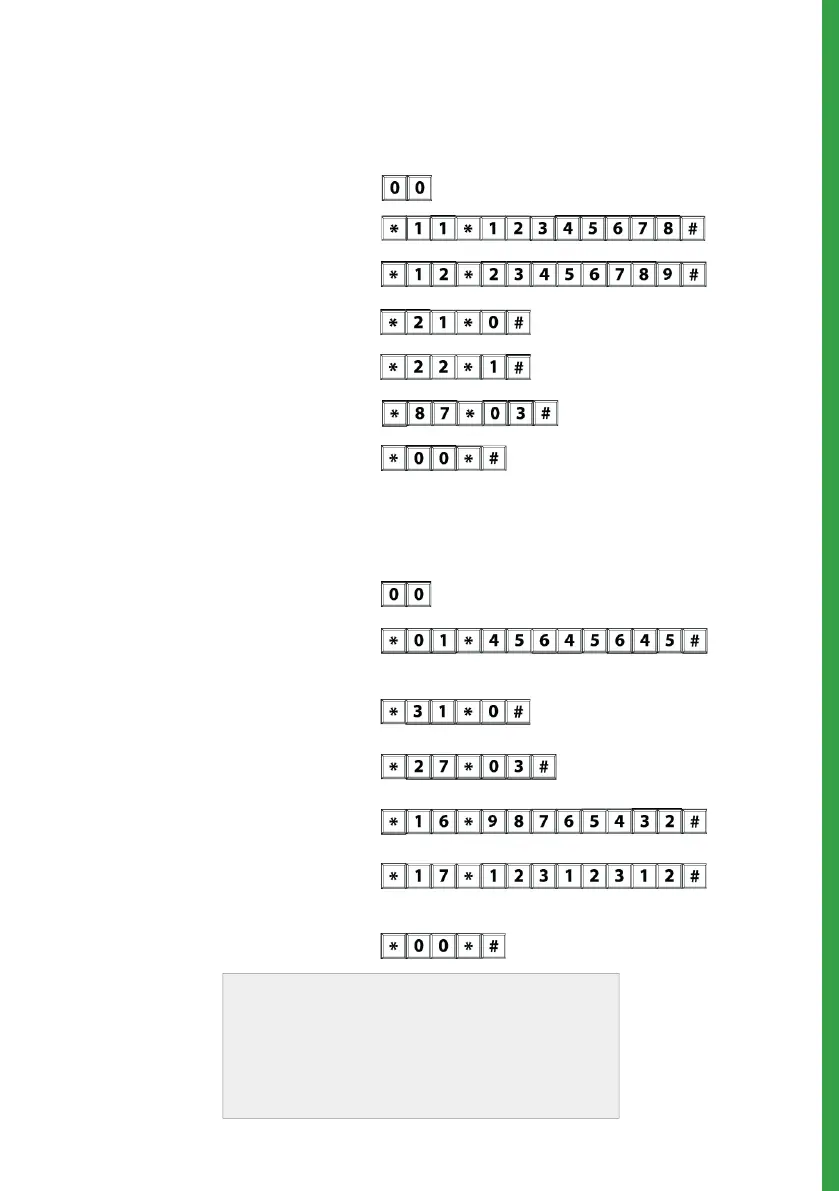
Lift ID code (each lift must have its own unique code).
1. Start confi guration:
2. 1
st
phone number:
3. 2
nd
phone number:
4. Call type 1
st
number:
5. Call type 2
st
number:
6. Alarm button delay:
7. End confi guration:
- Example: 3 seconds delay.
If at any time you need to start over, use the
factory reset command *99*1#.
Please refer to the full confi guration setup
in the “Parameter list” as these are merely
examples.
Example 1. Storing of two different telephone numbers, one to be answered by P100 code and
the other one with voice. For test facility, see example 2.
Example 2. SLCC (SafeLine Call Centre) and 3 day test.
(Only if using SLCC)
- Example: 3 days between test alarm.
(For more information, please refer to parameter *17* in the
”Parameter list”)
Enter P100 ID code:
2.
7. End confi guration:
6. Test alarm:
5. LMS phone number:
4.
Set number of days between
test alarm:
3. Set test alarm type:
1. Start confi guration:
- Example: Answered as voice call.
- Example: Answered with P100 code.
- Example: Test alarm type P100.


 To Next Page