17
SafeLine Pro
SafeLine Pro
SLPro Link
MX3+ v1.06 EN
© 2018 SafeLine and all the SafeLine products and accessories are copyrighted by law.
Confi guration
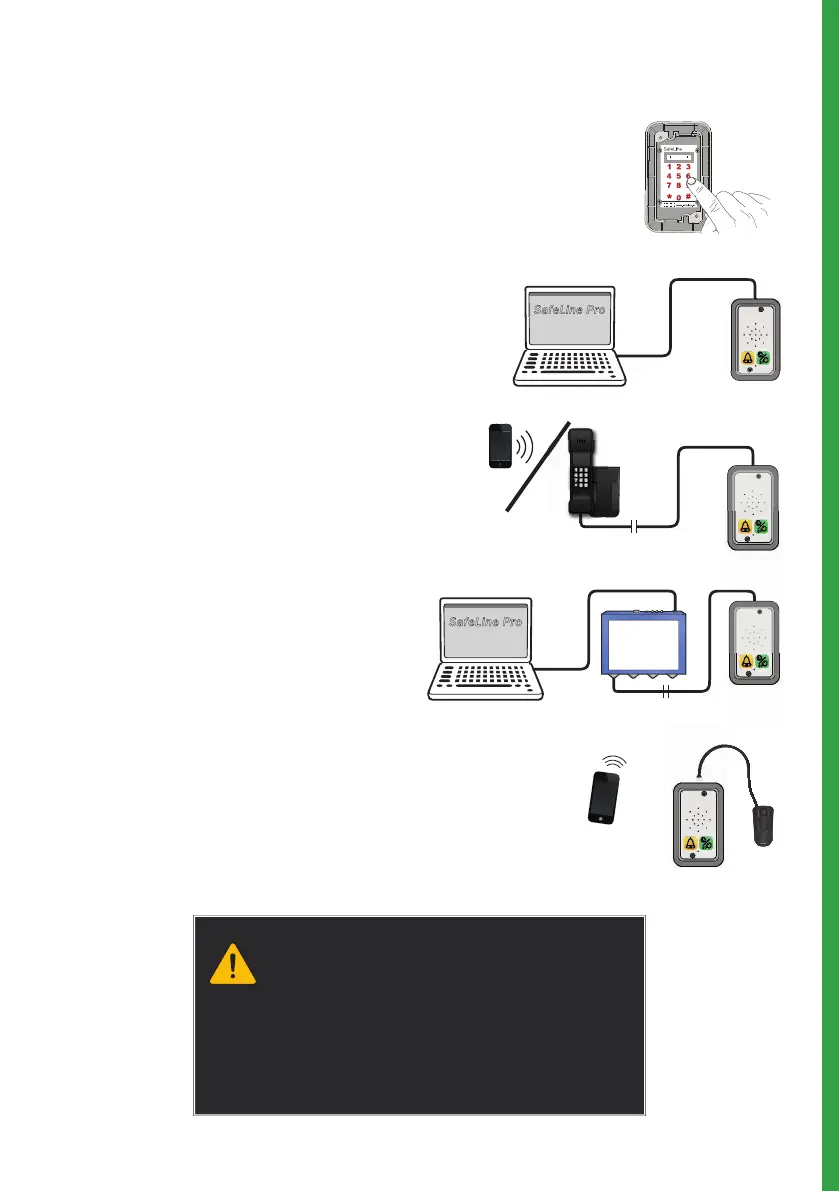
CONFIGURATION INTERFACES
Keyboard confi guration
The integrated keyboard at the rear of the
MX3+ enables a fast confi guration of the unit.
Confi guartion with SafeLine Pro
The unit can be confi gured at the offi ce prior to
the installation or at site after installation, with
a confi guration cable (*PCable).
Remote confi guration
For remote confi guration, you can use any PSTN
tone dial phone. Please fi nd the instructions of
how to perform it in the section ”Confi guration
method” (page 18).
Remote confi guraion with SafeLine Pro
Connect an SLPro Link to a computer with
SafeLine Pro and a serial cable.
The unit has to be connected to a power source
before the confi guration begins!
SafeLine Pro can be downloaded on our website:
http://www.safeline-group.com/en/downloads/
SafeLine Pro 4.42 or later is required.
Remote confi guraion with CONNECTable
Remote confi guration with the SafeLine
CONNECT
smartphone app (available free of
charge on the Apple App Store and on Google
Play).


 To Next Page