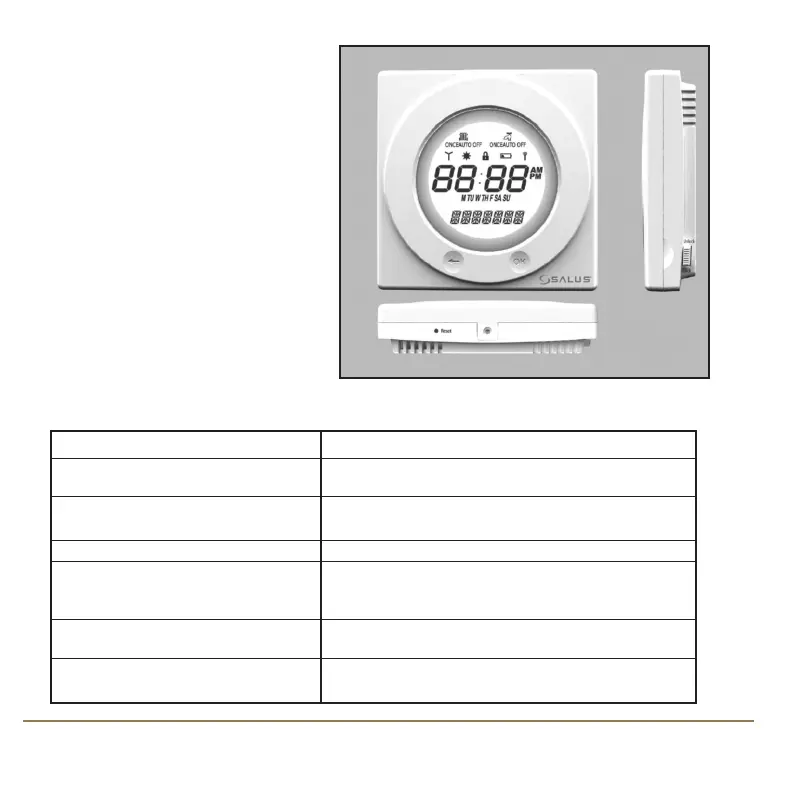
USER CONTROL FUNCTION SUMMARY:
Key / Operation Functions
Touch Ring (move clockwise) Increases the selected setting and scrolls
down the menu selection
Touch Ring (move anti- clockwise) Decreases the selected setting and scrolls
up the menu selection
OK Key Enters Menu or confirms a menu selection
Arrow (Back) Key Single press goes back to the previous screen
or previous option selected. Press and hold for
2 seconds to return to NORMAL mode
Reset Button Resets the controller to default (original factory)
settings, except when in SERVICE mode.
Slide Switch Activates and deactivates the key lock function
(prevents accidental changes)
There are few user controls for the
SP220, making the controller very
easy to operate. The controls are a
Touch Ring (which surrounds the
user display), two touch sensitive
buttons, a reset button and a slide
operated switch mounted on the
side of the controller.
These controls are shown below,
along with a description of each of
their functions.
SP220 INSTRUCTION MANUAL8
SP220 Manual Ver 005.qxd:Layout 1 5/1/11 10:54 Page 8



 To Next Page