USER INTERFACE AND CONTROLS
The status and operation of the SP220 can be clearly seen on the large
backlit Liquid Crystal Display (LCD) - this display allows the user to see
at a glance the current status of the heating system.
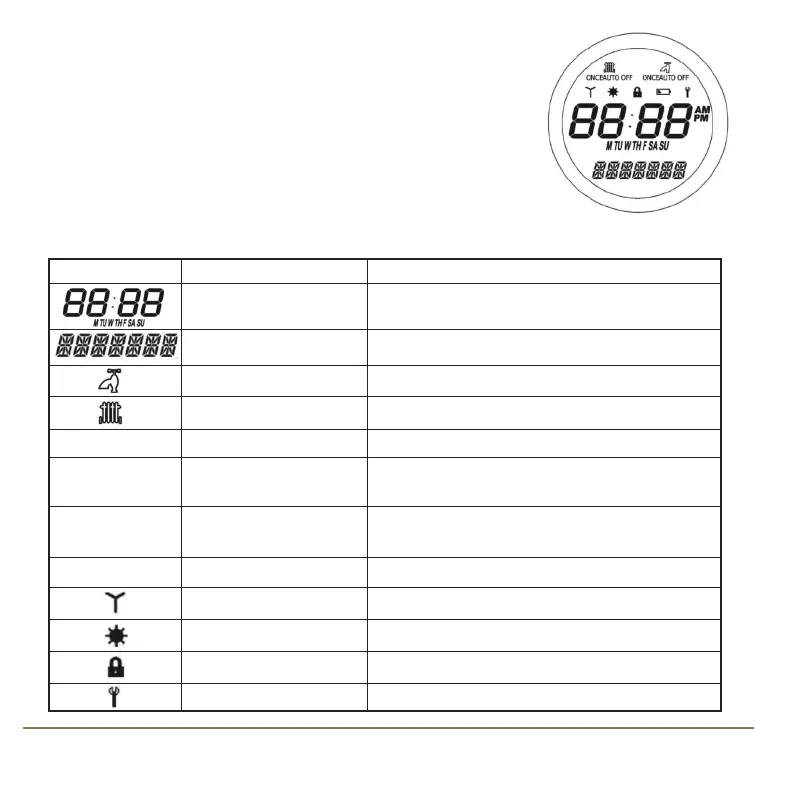
The display consists of a combination of symbols and alphanumeric
displays. The top row displays status indicators, the centre row is a time
and day of the week indicator and the bottom row is an alphanumeric
display for menu and status messages.
The status indicator symbols and their meanings are shown in the following table:
Indicator Description Function
Clock Display Displays the day and time
Alphanumeric Display Displays menu and other status messages
Hot Water indicator Indicates Hot Water system is turned on
Central Heating indicator Indicates Central Heating system is turned on
ON
Mode indicator Indicates Continuously On
ONCE
Mode indicator Indicates output is turned on for one period per
day, from PROGRAM 1 ON to PROGRAM 3 OFF
AUTO
Program Mode indicator Indicates Auto ON or Auto OFF
programme is running
OFF
Mode indicator Indicates Continuously Off
RCC indicator Indicates the status of the Radio Controlled Clock
Holiday indicator Indicates Holiday operation mode is selected
Touch Lock indicator Indicates Touch Lock is activated
Service indicator Indicates Service function is active
7SP220 INSTRUCTION MANUAL
SP220 Manual Ver 005.qxd:Layout 1 5/1/11 10:54 Page 7



 To Next Page