BONUSVIEW
Video
Select to set the desired bonusview
option.
BONUSVIEW
Audio
Go to Videos
List
Select to go to the list of videos on the
current media.
Information
Select to view video file information.
| NOTE |
\
Depending on the disc or storage device, the Tools menu
may differ. See pages 42~44 for addtional options.
\
Video files with high bit rates of 20Mbps or more strain
the player's capabilities and may stop playing during
playback.
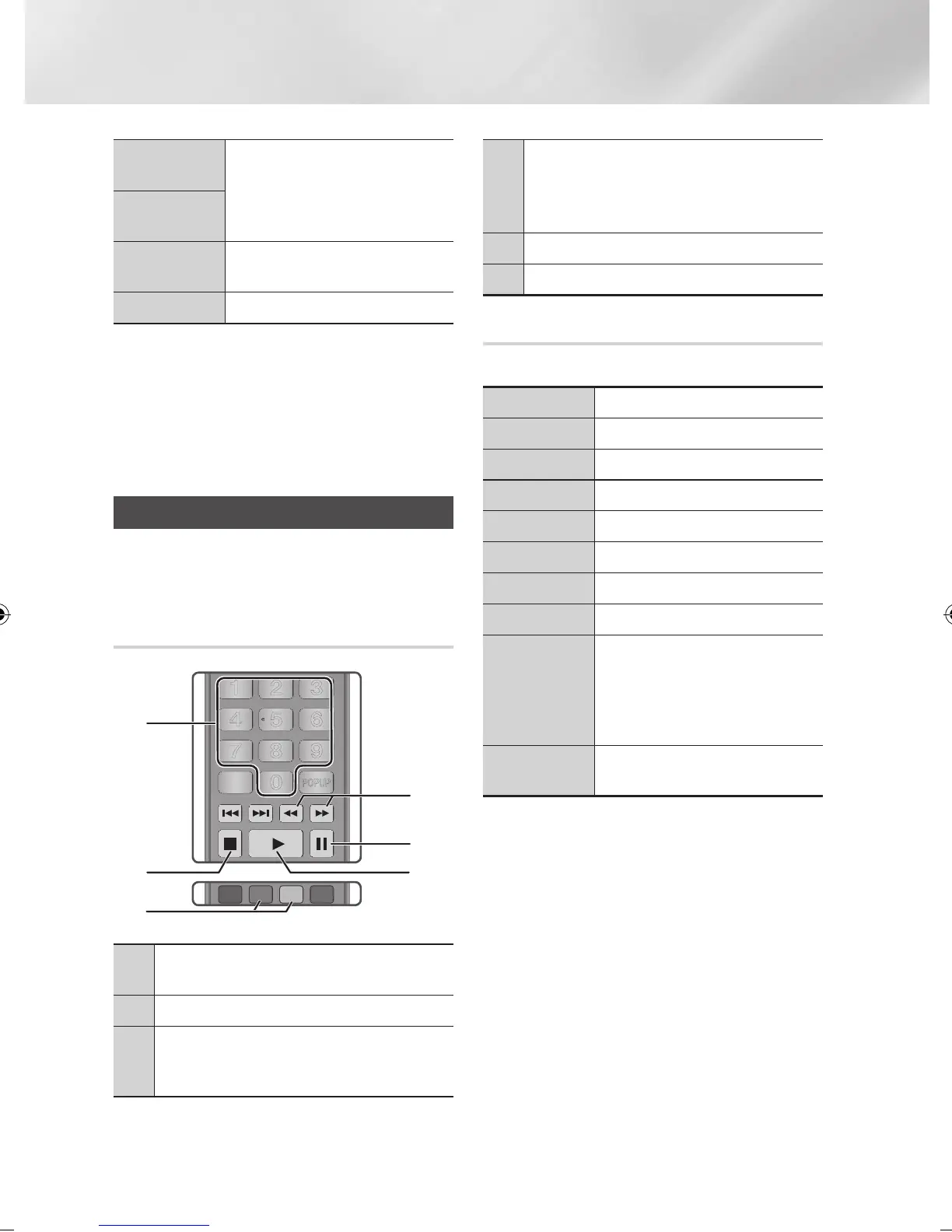
Controlling Music Playback
You can control the playback of music content
located on a DVD, USB, mobile device or PC.
Buttons on the Remote Control used
for Music Playback
1
NUMBER buttons : Press the number of a track.
The selected track is played.
2
5
button : Stops a track.
3
Skip : During playback, press the GREEN (B) or
YELLOW (C) button to move to the previous or next
page of the playlist.
4
Fast Play (Audio CD (CD-DA) only)
During playback, press the
3
or
4
button.
Each time you press the
3
or
4
button, the
playback speed will change.
5
7
button : Pauses a track.
6
6
button : Plays the currently selected track.
Using the Tools Menu
During playback, press the TOOLS button.
View
See pages 42~44.
Folder view
See pages 42~44.
Title
See pages 42~44.
Artist
See pages 42~44.
Album
See pages 42~44.
Genre
See pages 42~44.
Play selection
See pages 42~44.
Go to Playlist
See pages 42~44.
Rip
The Ripping function converts CD
audio to the mp3 format and saves
the converted files on a USB device
connected to the player. See Ripping
on pages 41~42.
Information
Select to see the (Contents)
information: File size, date created, etc.
| NOTE |
\
Depending on the disc or storage device, the Tools menu
may differ. See pages 42~44 for addtional options.
PANDORA
DIGITAL
SUBTITLE
INPUT
PANDORA
DIGITAL
SUBTITLE
INPUT
1
4
7
VOL
+
2
8
0
VOL
–
3
6
9
SOURCE
DISC MENU TITLE MENU
VOL VOL
POPUP
A B C D
SUBTITLE HDMI IN
TV
– +
INFOTOOLS
RETURN
EXIT
BONUS
5
AUDIO
VIEW
HOME
HOME REPEATSMART
HUB
PANDORA
DIGITAL
SUBTITLE
INPUT
PANDORA
DIGITAL
SUBTITLE
INPUT
1
4
7
VOL
+
2
8
0
VOL
–
3
6
9
SOURCE
DISC MENU TITLE MENU
VOL VOL
POPUP
A B C D
SUBTITLE HDMI IN
TV
– +
INFOTOOLS
RETURN
EXIT
BONUS
5
AUDIO
VIEW
HOME
HOME REPEATSMART
HUB
1
4
5
6
2
3
|
40 English
02229K-BD-E6500-ZK-ENG.indd 40 2012-05-02 오후 6:03:19



 To Next Page