English - 13
When the television is initially powered on, three basic customer
settings proceed automatically and subsequently: setting the
language, channel and clock.
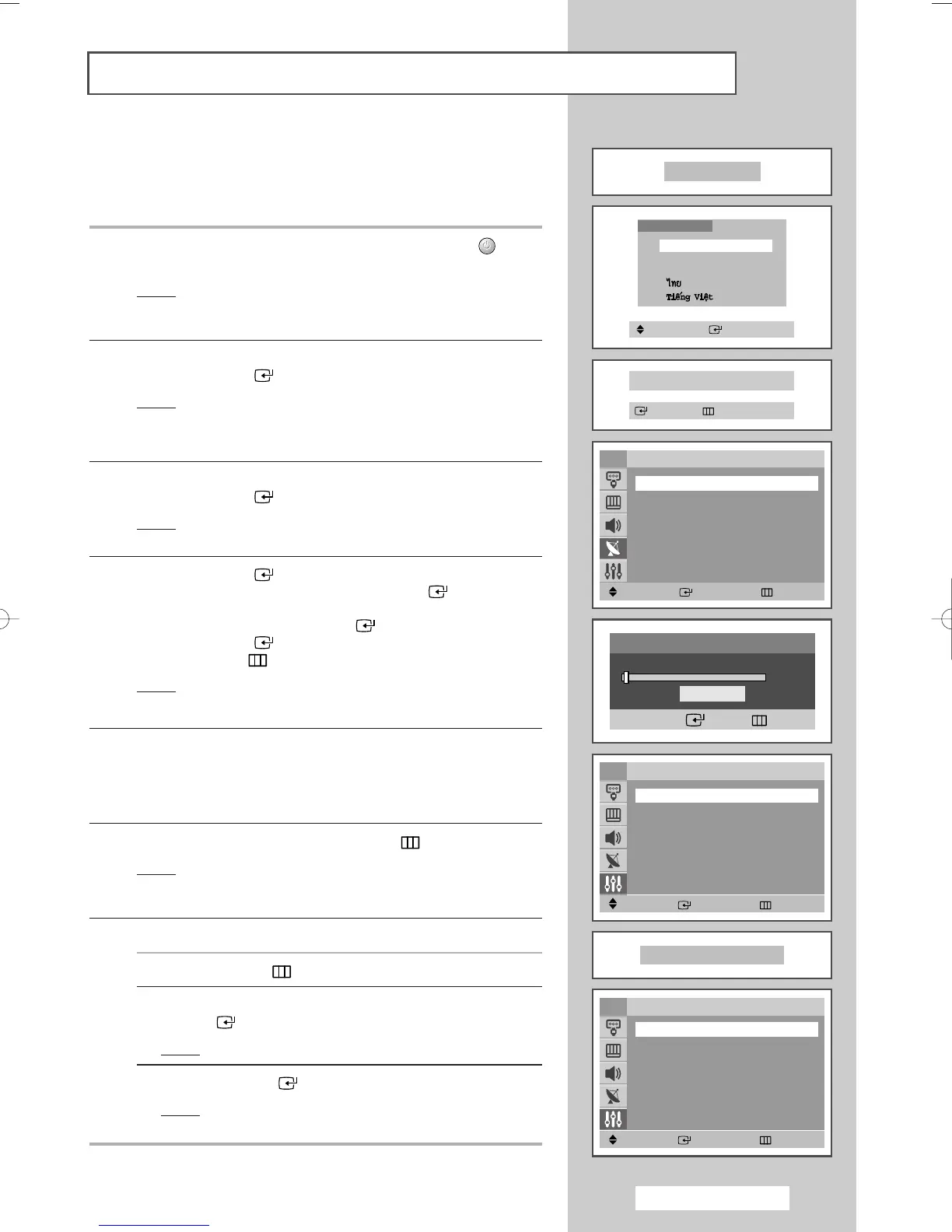
1 If the television is in Standby mode, press the POWER () button
on the remote control.
Result
: The message Plug & Play is displayed. It flickers for
a little while and then
Language menu is automatically
displayed.
2 Select the appropriate language by pressing the ▲ or ▼ button.
Press the
ENTER () button to enter the language.
Result
: The message
Check antenna input. is displayed.
➢
If any language is not selected on the Language menu, the
Language menu will disappear about 30 seconds later.
3 Make sure that the antenna is connected to the TV.
Press the
ENTER () button.
Result
: The
Auto Store menu is displayed with Area
selected.
4 Press the ENTER () button again. Select your area by pressing
the
▲ or ▼ button, and then Press the ENTER () button.
To search the channels, select
Search by pressing the ▲ or ▼
button, and then press the ENTER () button.
Press the
ENTER () button again to start search the channels.
Press the
MENU () button to stop the search.
Result
: The
Time menu is displayed with Clock selected.
➢
Refer to “Storing Channels Automatically” on page 15.
5 Press the œ or √ button to move to the hour or minute. Set the
hour or minute by pressing the
▲ or ▼ button.
➢
Refer to “Setting and Displaying the Current Time” on page
30.
6 When you have finished, press the MENU () button.
Result
: The message
Enjoy your watching is displayed,
and then the channel which has been stored will be
activated.
7 If you want to reset this feature...
1 Press the MENU () button.
2 Press the ▲ or ▼ button to select Setup, and then press the
ENTER () button.
Result
: The Plug & Play is selected.
3 Press the ENTER () button again.
Result
: This feature starts with the message Plug & Play
is displayed.
Plug & Play Feature
Plug & Play
Enjoy your watching
Move Enter Return
Setup
Plug & Play
√√
Language : English
Time
√√
Child Lock
√√
Blue screen : Off
√√
Melody : On
√√
Demonstration
√√
TV
Move Enter Return
Auto Store
Area : ASIA W/EUROPE
√√
Search
√√
TV
Move Enter Return
Time
Clock -- : -- am
Sleep Timer : Off
On Timer -- : -- am Off
Off Timer -- : -- am Off
On Timer Volume : 10
TV
Language
English
Melayu
Indonesia
Check antenna input.
Enter Exit
Move Enter
Search
Enter Return
Start
AA68-03701A-00Eng 7/19/05 3:43 PM Page 13







 To Next Page