English - 37
m
Viewing the Picture In Picture (PIP) (continued)
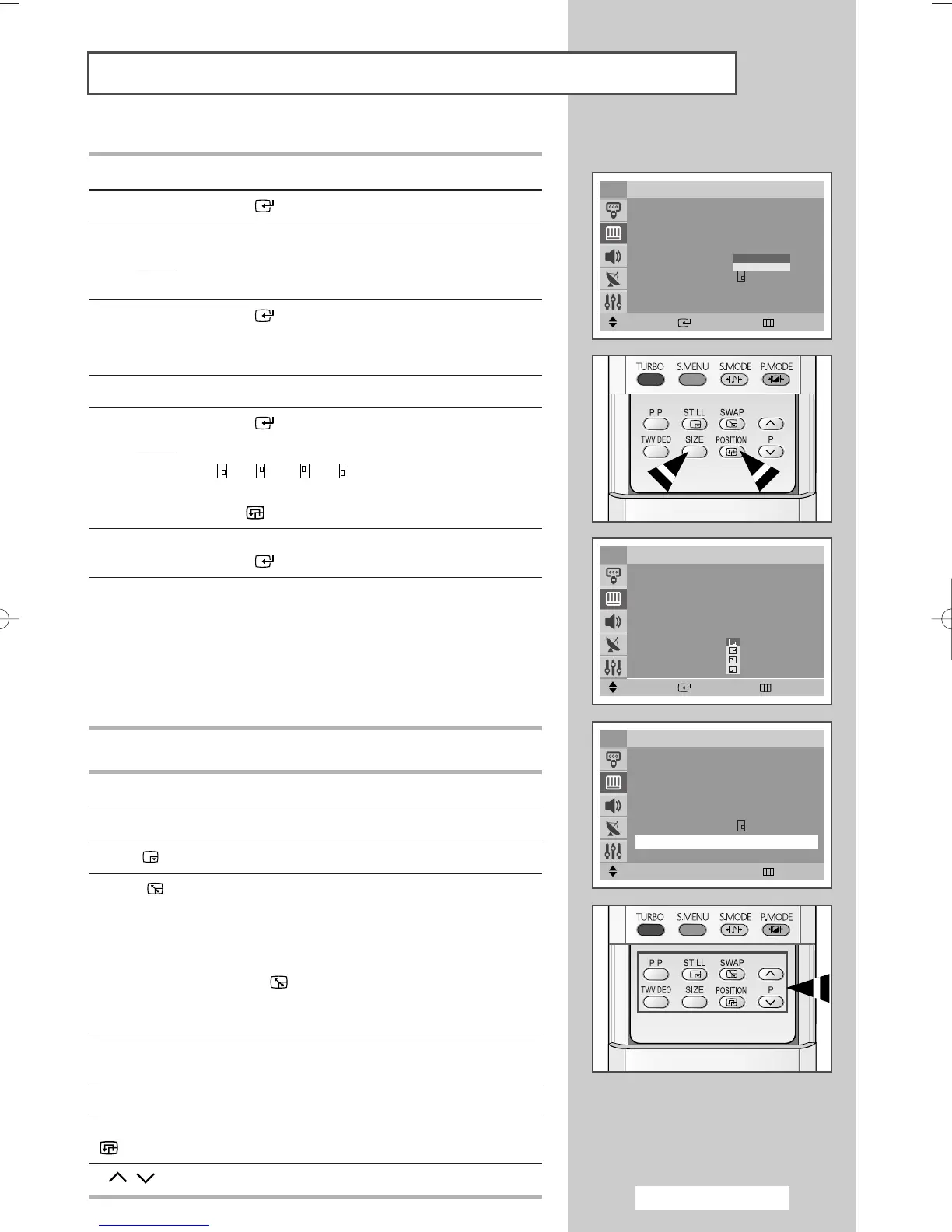
14 Press the ▲ or ▼ button to select Size.
15 Press the ENTER () button.
16 Select a size of sub picture by pressing the ▲ or ▼ button.
Result
: The sizes are displayed in the following order:
Small
-
Large
17 Press the ENTER () button.
➢
You can select these options simply by pressing the SIZE
button.
18 Press the ▲ or ▼ button to select Position.
19 Press the ENTER () button.
Result
: The positions available are displayed.
---
➢
You can select these options simply by pressing the
POSITION () button.
20 Select a position of the sub picture by pressing the ▲ or ▼ button.
Press the
ENTER () button.
21 Press the ▲ or ▼ button to select Programme. You can select the
channel that you want to view through sub picture by pressing the
œ or √ button.
➢
◆ When the Source is set to TV, you can select the
channel of sub picture.
◆ You can select the channel of the sub picture simply by
pressing the
▲ or ▼ button.
Easy functions of remote control
Buttons Feature
PIP Used to activate or deactivate the PIP function directly.
STILL
()
Used to freeze the sub picture.
SWAP
()
Used to interchange the main picture and the sub
picture.
➢
When the main picture is in the Video mode and the
sub picture is in the TV mode, you might not hear
the sound of main picture when pressing the
SWAP
()
button after changing the sub picture
channel. At this time, reselect the channel of main
picture.
TV/VIDEO Used to assign a source of sub picture (TV, AV1, AV2,
or
S-Video).
SIZE Used to select a size of sub picture (Large, Small).
POSITION Used to move the sub picture counterclockwise.
()
P/ Used to select the channel of sub picture.
Move
œœ √√
Adjust Return
PIP
PIP : On
√√
Source : TV
√√
Swap
√√
Size : Large
√√
Position :
√√
Programme : P 1
TV
Move Enter Return
TV
PIP
PIP : On
√√
Source : TV
√√
Swap
√√
Size : Large
√√
Position :
√√
Programme : P 1
Move Enter Return
PIP
PIP : On
√√
Source : TV
√√
Swap
√√
Size : Large
√√
Position :
√√
Programme : P 1
TV
Small
Large
AA68-03701A-00Eng 7/19/05 3:44 PM Page 37







 To Next Page