English - 27
◆ Auto Volume
Each broadcasting station has its own signal conditions, and
so it is not easy for you to adjust the volume every time the
channel is changed. This feature lets you automatically
adjust the volume of the desired channel by lowering the
sound output when the modulation signal is high or by
raising the sound output when the modulation signal is low.
◆ Pseudo Stereo
Pseudo stereo feature converts a monaural sound signal
into two identical left and right channels.
Once the Pseudo stereo is set to On or Off, these
settings apply to the sound effects such as
Standard,
Music, Movie, and Speech.
◆ Turbo Sound
This feature suitably emphasizes both higher and lower
bands of sound (and includes other effects). You can enjoy
more magnificent and dynamic sound when watching
music, movie or other channels.
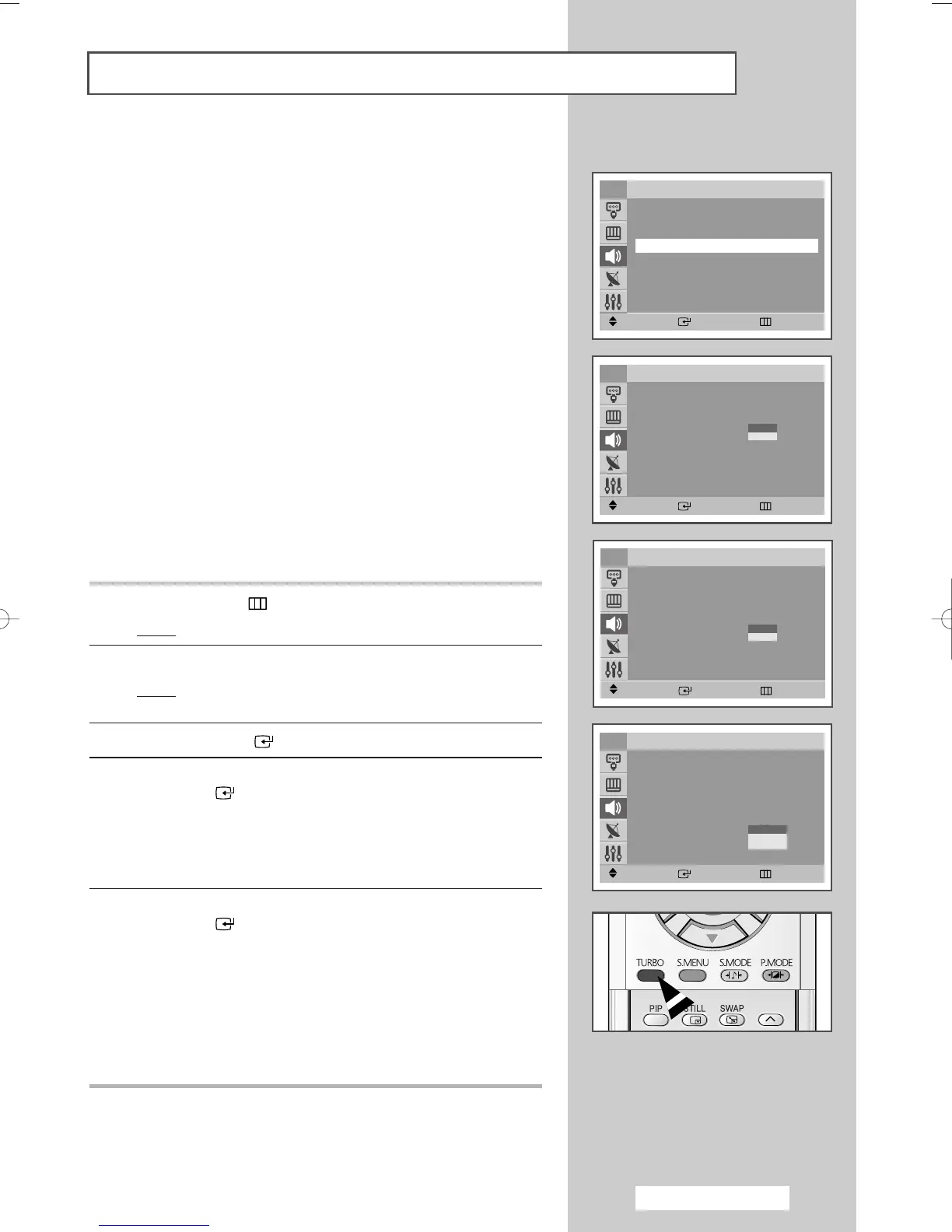
1 Press the MENU () button.
Result
: The main menu is displayed.
2 Press the ▲ or ▼ button to select Sound.
Result
: The options available in the
Sound group are
displayed.
3 Press the ENTER ()button.
4 Select the required option by pressing the ▲ or ▼ button. Press
the
ENTER ()button.
◆
Auto Volume
◆
Pseudo Stereo
◆
Turbo Sound
5 Select the required option by pressing the ▲ or ▼ button. Press
the
ENTER ()button.
◆
Auto Volume : On or Off
◆
Pseudo Stereo : On or Off
◆
Turbo Sound : Off, Plus or Voice
➢
You can select the turbo sound feature simply by pressing
the
TURBO button.
Extra Sound Settings
.
Move Enter Return
Sound
Mode : Standard
√√
Equalizer
√√
Auto Volume : Off
√√
Pseudo Stereo : Off
√√
Turbo Sound : Off
√√
TV
Move Enter Return
Sound
Mode : Standard
√√
Equalizer
√√
Auto Volume : On
√√
Pseudo Stereo : Off
√√
Turbo Sound : Off
√√
TV
Move Enter Return
Sound
Mode : Standard
√√
Equalizer
√√
Auto Volume : Off
√√
Pseudo Stereo : Off
√√
Turbo Sound : Off
√√
TV
Move Enter Return
Sound
Mode : Standard
√√
Equalizer
√√
Auto Volume : Off
√√
Pseudo Stereo : On
√√
Turbo Sound : Off
√√
TV
Off
On
Off
On
Off
Plus
Voice
AA68-03701A-00Eng 7/19/05 3:44 PM Page 27









 To Next Page