English - 26
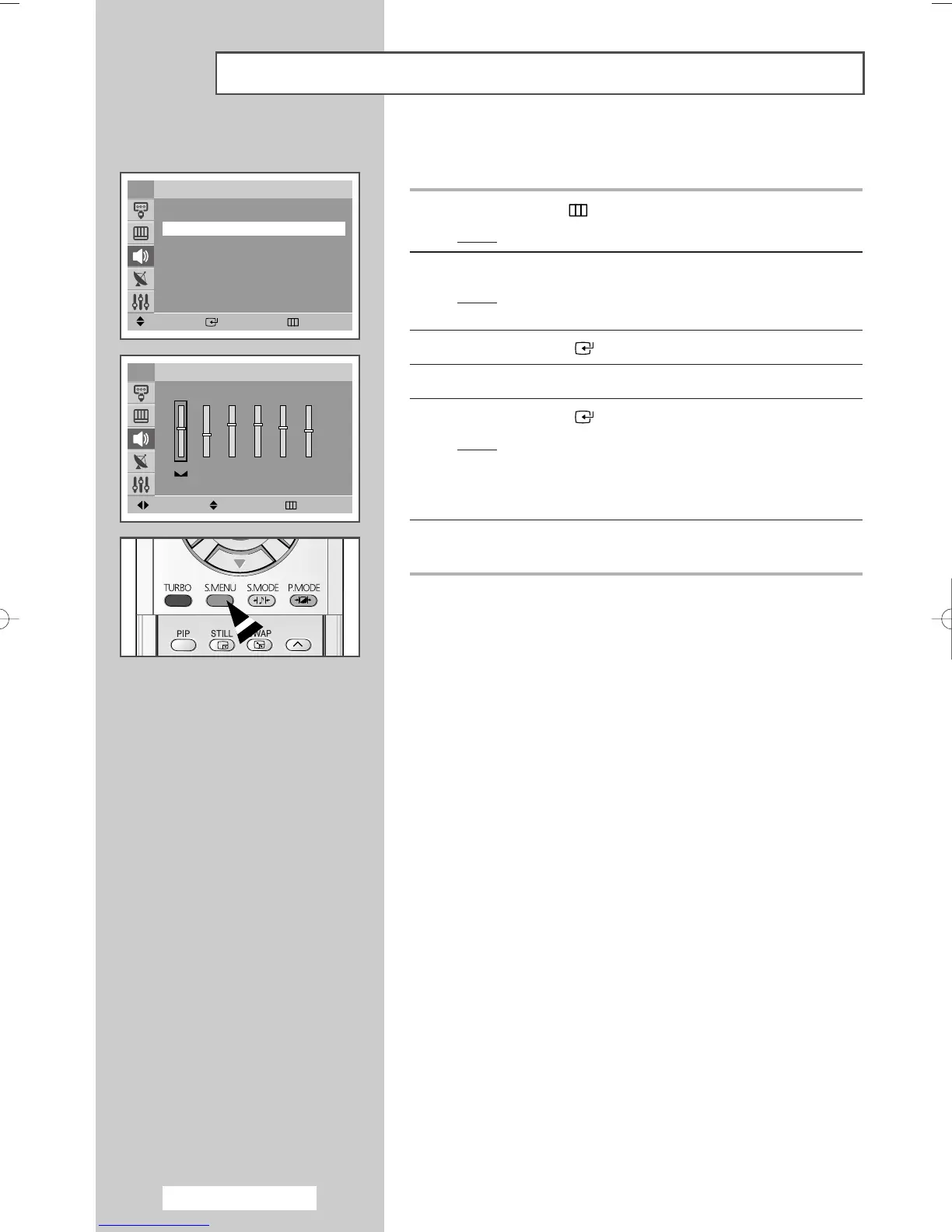
The sound settings can be adjusted to suit your personal preferences.
1 Press the MENU () button.
Result
: The main menu is displayed.
2 Press the ▲ or ▼ button to select Sound.
Result
: The options available in the Sound group are
displayed.
3 Press the ENTER ()button.
4 Press the ▲ or ▼ button to select Equalizer.
5 Press the ENTER ()button.
Result
: The options available in the Equalizer group are
displayed.
➢
You can also display this group simply by pressing the
S.MENU button.
6 Select the option to be adjusted by pressing the œ or √ button.
Press the
▲ or ▼ button to reach the required setting.
➢
If you make any changes to these settings, the sound
standard is automatically switched to
Custom.
Adjusting the Sound Settings
Move Enter Return
Sound
Mode : Standard
√√
Equalizer
√√
Auto Volume : Off
√√
Pseudo Stereo : Off
√√
Turbo Sound : Off
√√
TV
100 300 1K 3K 10K
Move Adjust Return
Equalizer
TV
R
L
AA68-03701A-00Eng 7/19/05 3:44 PM Page 26







 To Next Page