English - 34
Activating the Child Lock
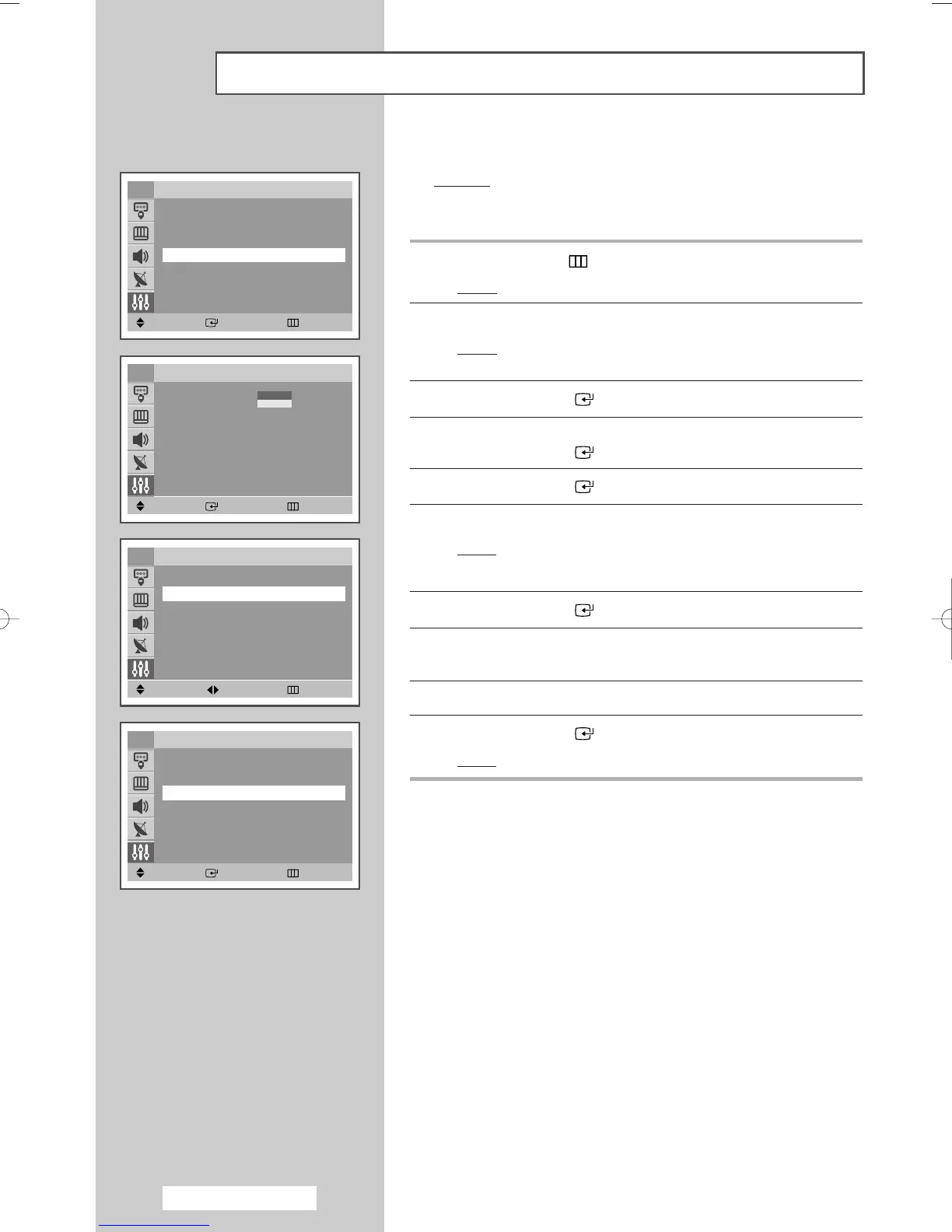
You can restrict viewing by locking the channels of your choice.
Example
: You can prevent your children from watching
unsuitable programmes.
1
Press the MENU () button.
Result
: The main menu is displayed.
2
Press the ▲ or ▼ button to select Setup.
Result
: The options available in the
Setup group are
displayed.
3
Press the ENTER ()button.
4 Press the
▲ or ▼
button to select the
Child Lock
.
Press the ENTER ()button.
5
Press the ENTER ()button again.
6 Press the
▲ or ▼
button to select the
On
.
Result
: The
Child Lock
menu is displayed.
➢
If you want to unlock a channel, set to
Off
.
7
Press the ENTER ()button.
8 Press the
▲ or ▼
button to select the
Programme
. Select the
number of the channel to be locked by pressing the
œ or √
button.
9 Press the
▲ or ▼
button to select the
Lock
.
10
Press the ENTER ()button
.
Result
:
Locked
is displayed.
➢
If any channel is locked, you can not enter the Channel
menu by using the control buttons on the television, and
the message “Not availble” is displayed. You can access
by using the remote control only.
Move Enter Return
Setup
Plug & Play
√√
Language : English
Time
√√
Child Lock
√√
Blue screen : Off
√√
Melody : On
√√
Demonstration
√√
TV
Move Enter Return
Child Lock
Child Lock : Off
√√
TV
Off
On
Move Adjust Return
TV Child Lock
Child Lock : On
√√
Programme : P 1
Lock : ?
Move Enter Return
TV Child Lock
Child Lock : On
√√
Programme : P 1
Lock : Locked
U
co
T
AA68-03701A-00Eng 7/19/05 3:44 PM Page 34







 To Next Page