English - 21
.
Your television has several settings which allow you to control
picture quality.
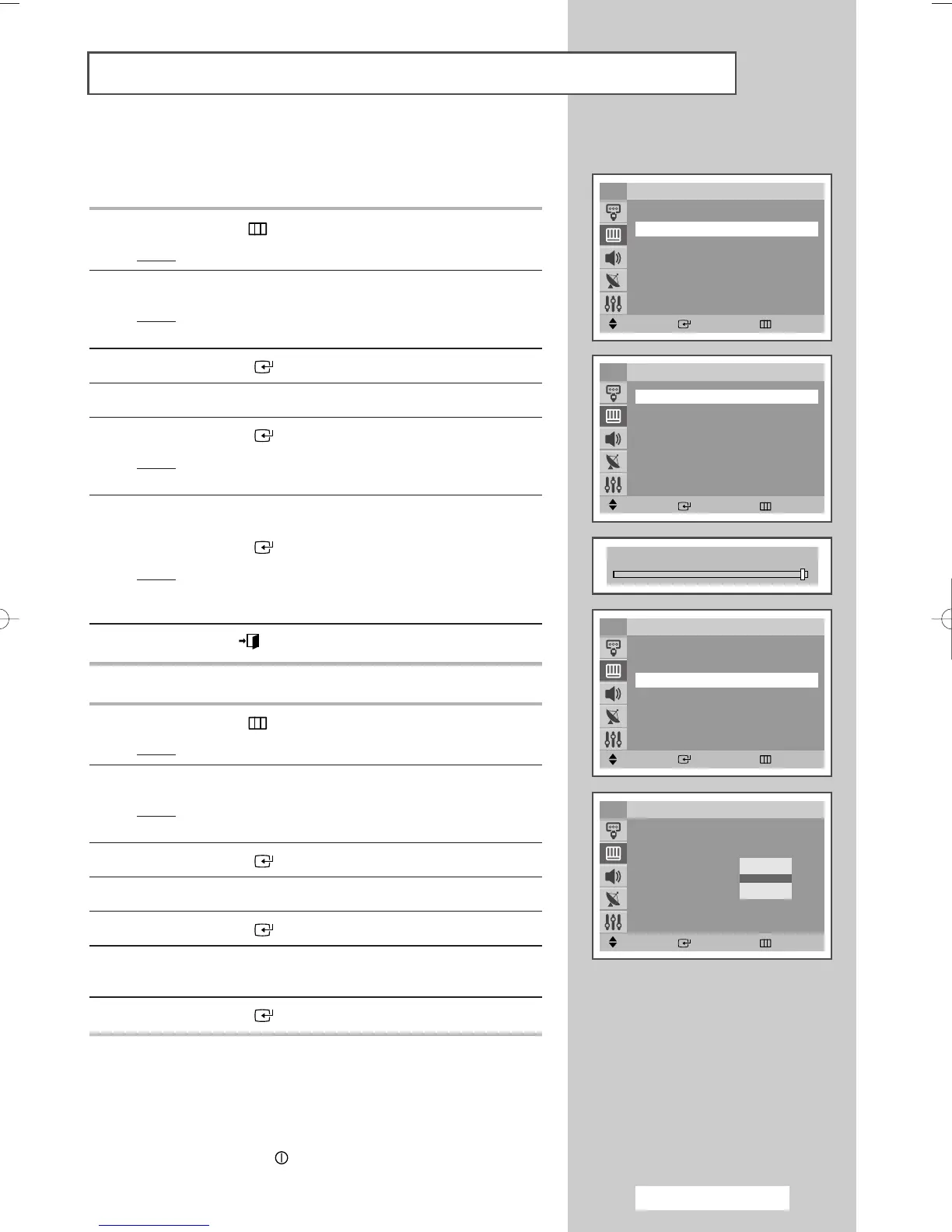
1 Press the MENU () button.
Result
: The main menu is displayed.
2 Press the ▲ or ▼ button to select Picture.
Result
: The options available in the Picture group are
displayed.
3 Press the ENTER ()button.
4 Press the ▲ or ▼ button to select Custom.
5 Press the ENTER ()button.
Result
: The options available in the Custom group are
displayed.
6 Press the ▲ or ▼ button to select the option (Contrast,
Brightness, Sharpness, Color or Tint-NTSC only) to be adjusted.
Press the
ENTER ()button.
Result
: The horizontal bar is displayed. Move the horizontal
bar’s cursor left or right by pressing the
œ or √
button.
7 Press the EXIT ()button.
Selecting the Color Tone
1 Press the MENU () button.
Result
: The main menu is displayed.
2 Press the ▲ or ▼ button to select Picture.
Result
: The options available in the Picture group are
displayed.
3 Press the ENTER () button.
4 Press the ▲ or ▼ button to select Color Tone.
5 Press the ENTER ()button.
6 Press the ▲ or ▼ button to select the required option (Cool2,
Cool1, Normal , Warm1 or Warm2).
7 Press the ENTER ()button.
➢
◆ If you make any changes to these settings, the picture
standard is automatically switched to
Custom.
◆ The television has an “automatic degaussing” system
that is activated if magnetic interference is present.
To degauss the television screen, switch power off by
pressing the “ ” (On/Off) button on the front panel.
(Refer to “Automatic Degaussing to Remove Colour
Patches” on page 44.)
Adjusting the Picture Settings
Contrast 100
Move Enter Return
Custom
Contrast : 100
Brightness : 45
Sharpness : 75
Color : 55
TV
Move Enter Return
Picture
Mode : Dynamic
√√
Custom
√√
Color Tone : Normal
√√
Size : Normal
√√
Digital NR : Off
√√
DNIe Jr : On
√√
PIP
√√
TV
Move Enter Return
Picture
Mode : Dynamic
√√
Custom
√√
Color Tone : Normal
√√
Size : Normal
√√
Digital NR : Off
√√
DNIe Jr : On
√√
PIP
√√
TV
Move Enter Return
Picture
Mode : Dynamic
√√
Custom
√√
Color Tone : Normal
√√
Size : Normal
√√
Digital NR : Off
√√
DNIe Jr : On
√√
PIP
√√
TV
Cool2
Cool1
Normal
Warm1
Warm2
AA68-03701A-00Eng 7/19/05 3:44 PM Page 21







 To Next Page