English - 38
Y
b
U
Most television channels provide written information services via
teletext. Information provided includes:
◆
Television programme times
◆
News bulletins and weather forecasts
◆
Sports results
◆
Travel information
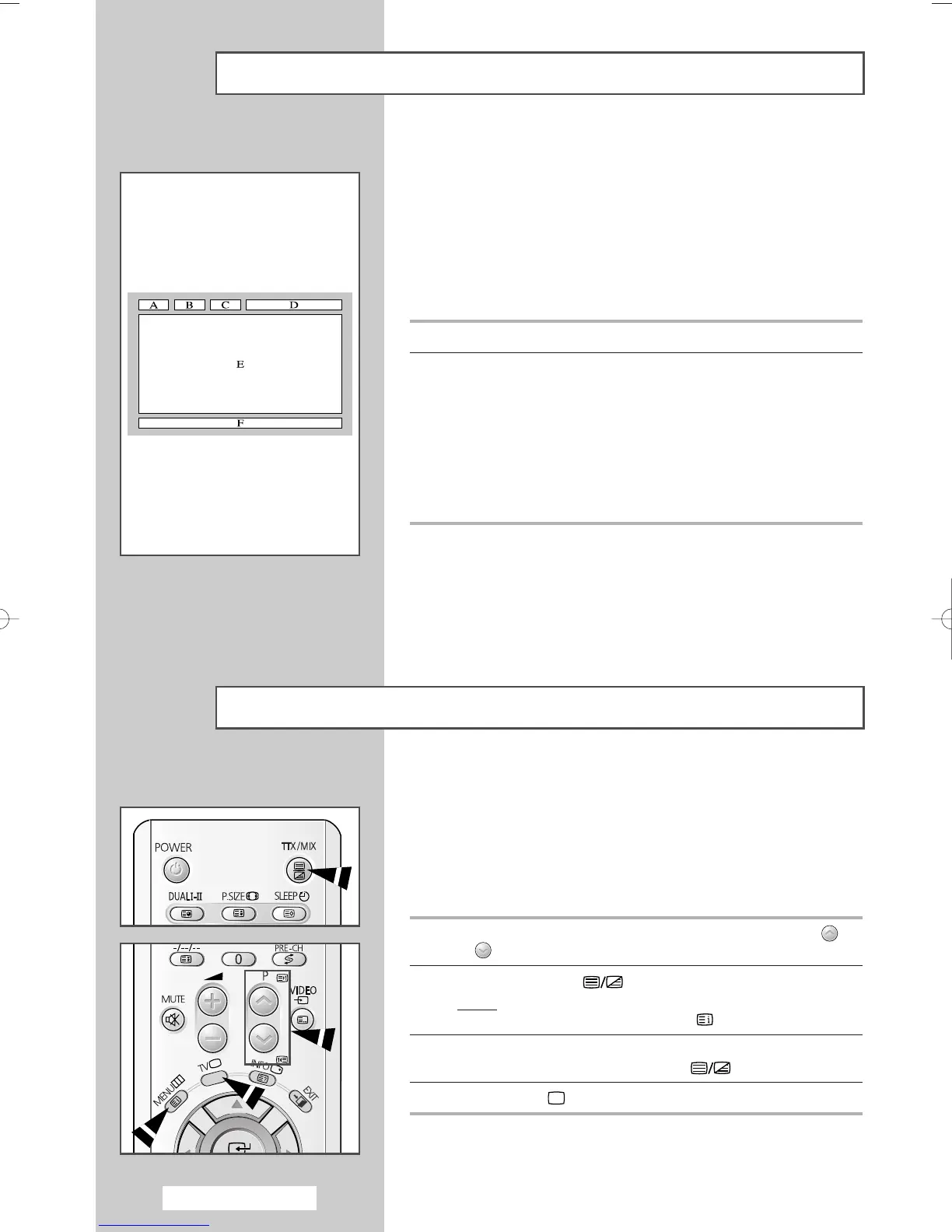
This information is divided into numbered pages (see diagram).
Part Contents
A Selected page number.
B Broadcasting channel identity.
C Current page number or search indications.
D Date and time.
EText.
F Status information.
FASTEXT information.
➢
It can be different from depending on TTX source.
➢
Teletext information is often divided between several
pages displayed in sequence, which can be accessed by:
◆ Entering the page number
◆ Selecting a title in a list
◆ Selecting a colored heading (FASTEXT system)
Teletext Feature
You can display Teletext information at any time on your television.
☛
For Teletext information to be displayed correctly,
channel reception must be stable; otherwise:
◆ Information may be missing
◆ Some pages may not be displayed
1 Select the channel providing the Teletext service using the
or
button.
2 Press the TTX/MIX () button to activate the teletext mode.
Result
:
The contents page is displayed. It can be redisplayed
at any time by pressing the (index) button.
3 If you wish to display the actual broadcast at the same time as
the teletext page, press the
TTX/MIX () button.
4 Press the TV ()button to exit from the teletext display.
Displaying the Teletext Information
AA68-03701A-00Eng 7/19/05 3:44 PM Page 38







 To Next Page