104
Gettingstarted
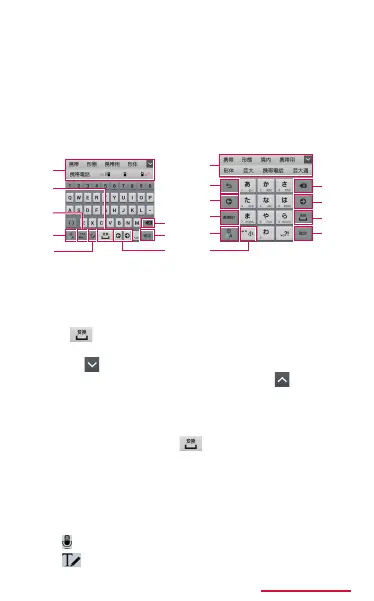
• 3x4 Keyboard: It is a keyboard similar to a
general mobile phone keyboard (for multi-tap
method). Tap a key assigned character you
want to enter several times until the target
character is displayed.
• QWERTY Keyboard: It is a keyboard similar
to the one of PC. Enter Japanese in Roman
character.
QWERTYKeyboard
a
b
c
d
e
3x4Keyboard
b
e
g
h
i
j
a
k
f
h
f
h
g
a
Display predictive options/usual conversion
options. Tap an option to enter text.
• When Word Prediction (P.115) is set to OFF,
if
is tapped while the predictive options is
displayed, usual conversion options appear.
• Tap to display predictive options/usual
conversion options in full screen. Tap to return
the previous display.
b
Display usual conversion options.
• When any conversion options are not displayed,
tap to enter a space
is displayed only when
entering Japanese.
c
Perform displayed key operations.
• Touch and hold to display the following icon menu.
Displayed key diers depending on selected icon
menu.
:
Switch to voice input.
:
Switch to the handwriting keyboard.














 To Next Page