Press RETURN button to return to the previous level.
Press EXIT button to exit the setup screen.
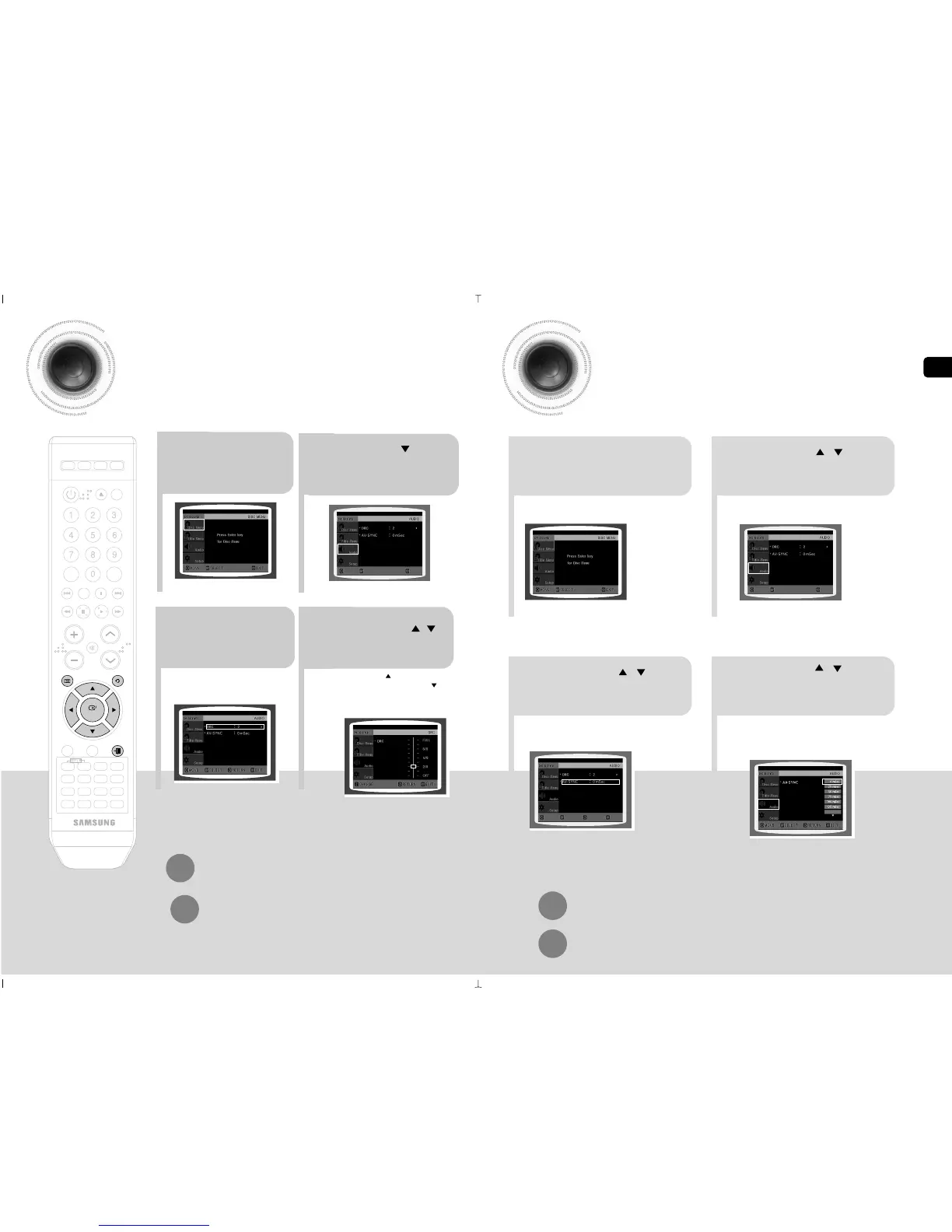
AV SYNC Setup
21
3
Press Cursor , buttons
to move to ‘Audio’ and then
press ENTER button.
4
•
You can set the audio delay time between 0 ms
and 300 ms. Set it to the optimal status.
Press Cursor , buttons
to select the Delay Time of
AV-SYNC and then press the
ENTER button.
Video may look slower than the audio if it is connected with digital TV.
In this case, adjust the delay time of audio to optimal status to fit the video.
Press Cursor , buttons
to move to ‘AV-SYNC’ and
then press ENTER button.
In stop mode,press
MENU button.
Setting the DRC (Dynamic Range Compression)
You can use this function to enjoy Dolby Digital sound when watching movies at
low volume at night.
1
2
In stop mode,press
MENU button.
Press Cursor button to
move to ‘Audio’ and then
press ENTER button.
3
4
If “DRC” is
selected, press
ENTER.
Press Cursor , to
adjust the ‘DRC’.
Press RETURN button to return to the previous level.
Press EXIT button to exit the setup screen.
•
The more times the Cursor button is pressed, the
greater the effect, and the more times Cursor button is
pressed, the smaller the effect.
MOVE ENTER RETURN
EXIT
ENG
51
52



 To Next Page