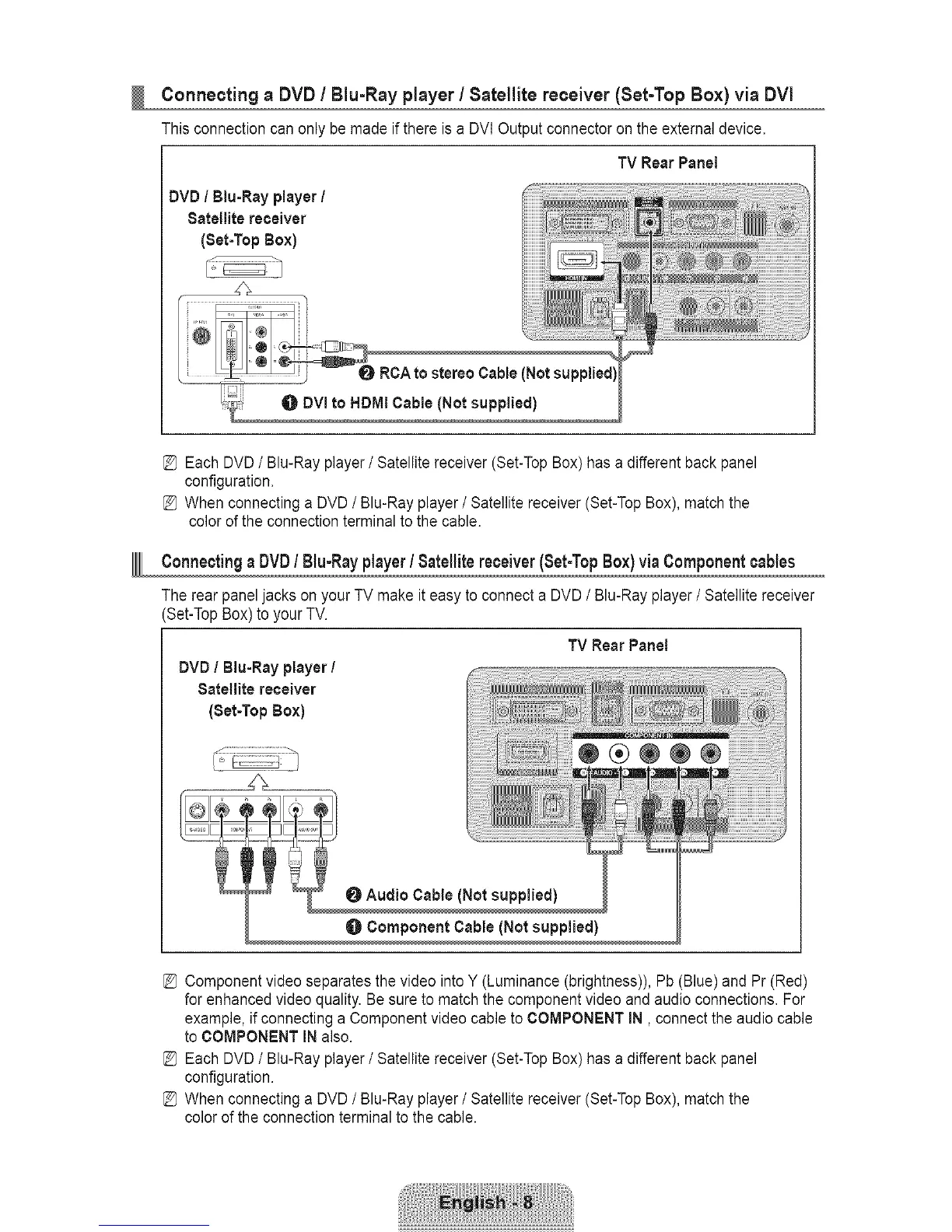
Connectinga DVD/ Blu-Rayplayer/ Satellite receiver (Set-Top Box)via DVi
This connection can only be made if there is a DVI Output connector on the external device.
TV Rear Panel
DVD / Blu=Rayplayer /
Satellite receiver
(Set-Top Box)
1
RCA to stereo Cable (Not
DVI to HDMI Cable (Not supplied)
[_ Each DVD / Blu-Ray player / Satellite receiver (Set-Top Box) has a different back panel
configuration.
[_ When connecting a DVD / Blu-Ray player/Satellite receiver (Set-Top Box), match the
color ofthe connection terminal to the cable.
ConnectingaDVDtBlu-Rayplayert Satellitereceiver(Set-TopBox)viaComponentcables
The rear panel jacks on your TV make it easy to connect a DVD / Blu-Ray player / Satellite receiver
(Set-Top Box) to your TV.
TV Rear Pane_
DVD / Biu-Ray player /
Satellite receiver
(Set-Top Box)
O Audio Cable (Not supplied)
O Component Cable (Not supplied)
[_ Component video separates the video into Y (Luminance (brightness)), Pb (Blue) and Pr (Red)
for enhanced video quality. Be sure to match the component video and audio connections. For
example, if connecting a Component video cable to COMPONENT IN, connect the audio cable
to COMPONENT IN also.
[_ Each DVD / Blu-Ray player / Satellite receiver (Set-Top Box) has a different back pane]
configuration.
[_ When connecting a DVD / Blu-Ray player/Satellite receiver (Set-Top Box), match the
color of the connection terminal to the cable.









 To Next Page