Connecting Cable TV
Toconnecttoa cableTVsystem,followtheinstructionsbelow.
Cable without a Cable Box
Plug the incoming cable into the ANT iNterminal on the back of
the TV.
[_ Because this TV is cable-ready, you do not need a cable box
to view unscrambled cable channels.
Connectingto a CableBox that DescramblesAll Channels
l, Find the cable that is connected to the ANT OUT terminal on
your cable box.
[_ This terminal might be labeled =ANTOUT', 'VHF OUT' or
simply, 'OUT'.
2. Connect the other end of this cable to the ANT iN terminal on
the back of the TV.
Connecting to a Cable Box that Desorambles Some Channels
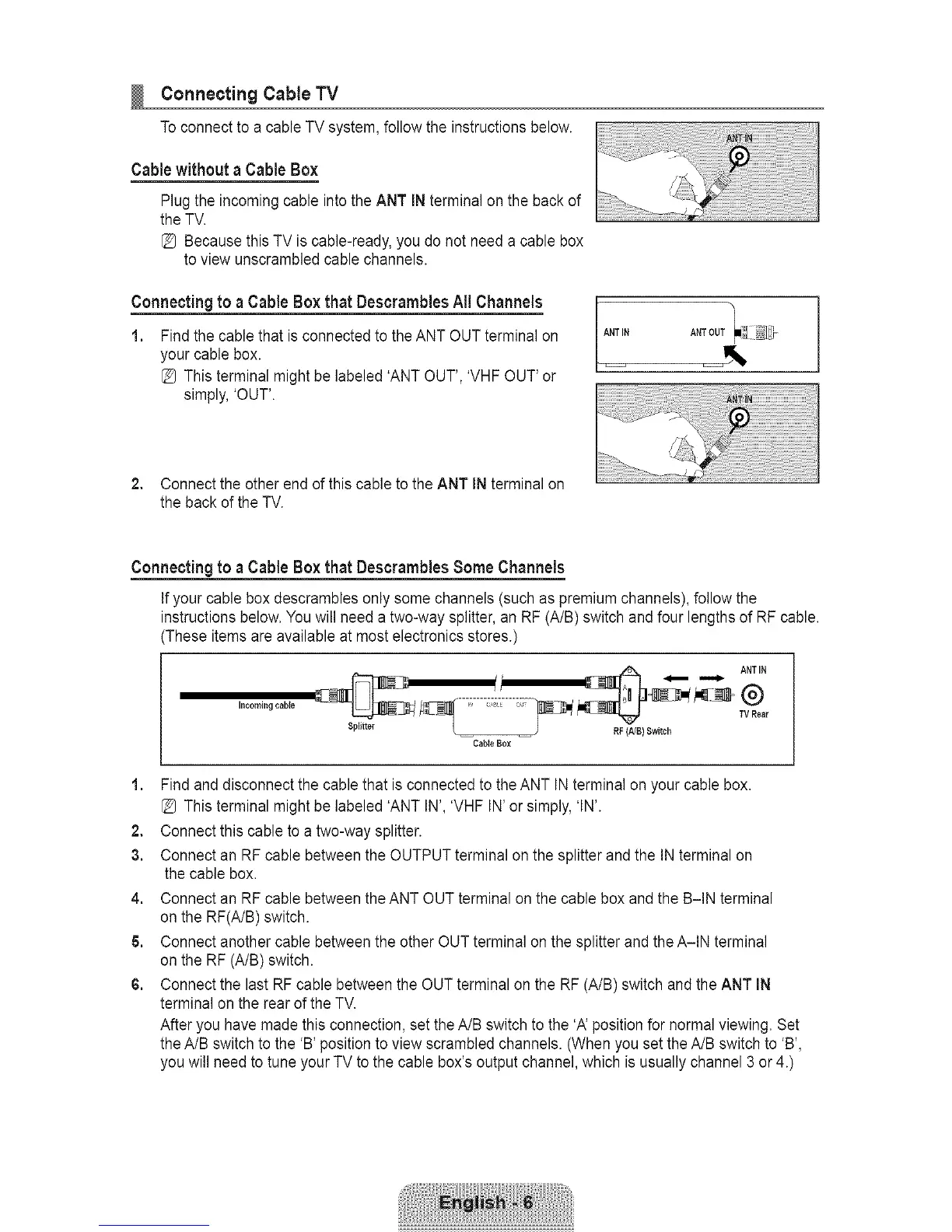
Ifyour cable box descrambles only some channels (such as premium channels), follow the
instructions below. You will need a two-way splitter, an RF (A/B) switch and four lengths of RF cable.
(These items are available at most electronics stores.)
Incoming cabJe
_,__ _ _, "wRear
Splitter _ -- -- / RF(A/B) Switch
CabJeBox
1, Find and disconnect the cable that is connected to the ANT INterminal on your cable box.
[_ This terminal might be labeled 'ANT IN', 'VHF IN' or simply, 'IN'.
2. Connect this cable to a two-way splitter.
3, Connect an RF cable between the OUTPUT terminal on the splitter and the IN terminal on
the cable box.
4, Connect an RF cable between the ANT OUT terminal on the cable box and the B-IN terminal
on the RF(A/B) switch.
5. Connect another cable between the other OUT terminal on the splitter and the A-IN terminal
on the RF (A/B) switch.
6. Connect the last RF cable between the OUT terminal on the RF (A/B) switch and the ANT iN
terminal on the rear of the TV.
After you have made this connection, set the A/B switch to the 'A' position for normal viewing. Set
the A/B switch to the 'B' position to view scrambled channels. (When you set the A/B switch to 'B',
you will need to tune your TV to the cable box's output channel, which is usually channel 3 or 4.)









 To Next Page