Viewingthe ConnectionPanel
O
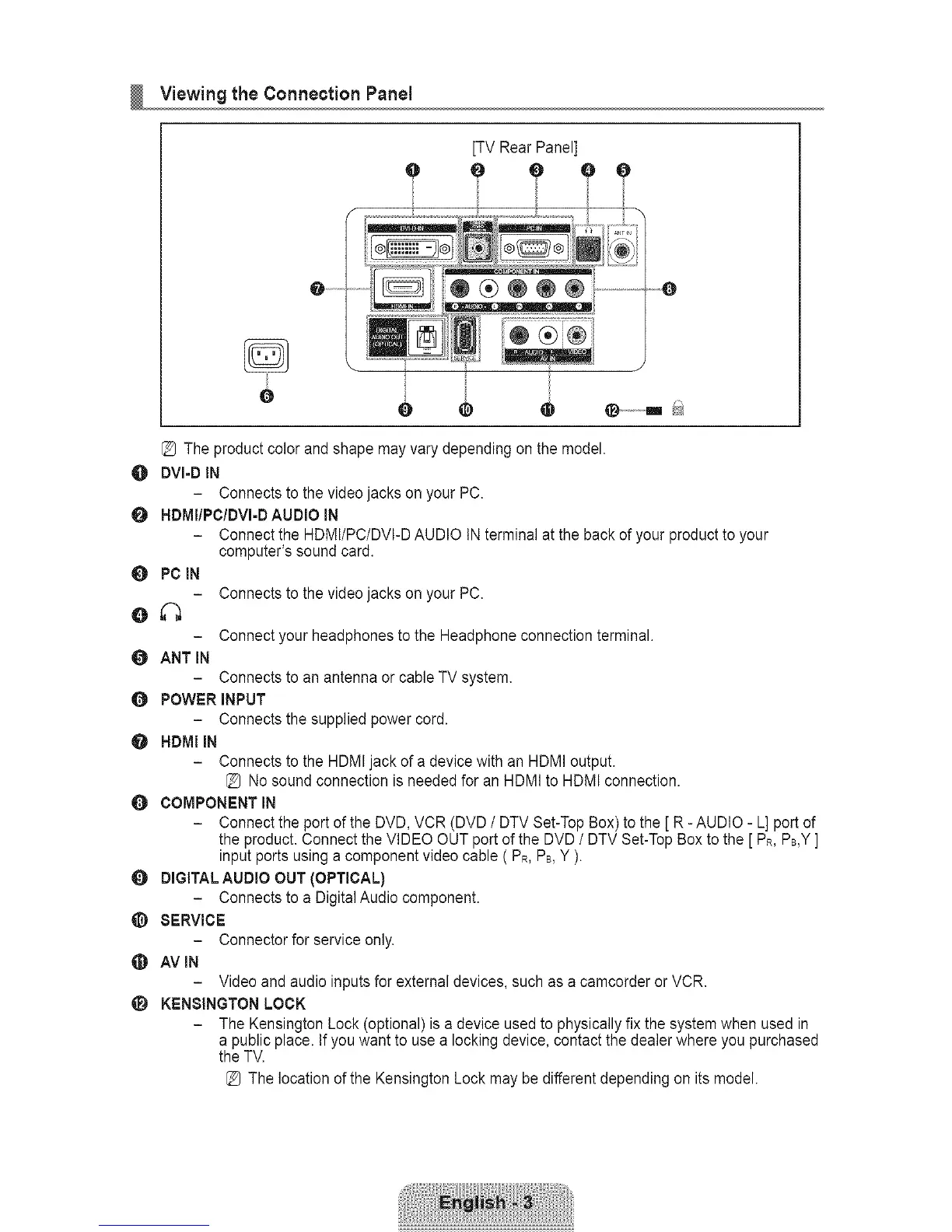
[TV Rear Panel]
0 ¸_ .......
0
e O •
O
O
[_ The product color and shape may vary depending on the model.
DVI=DIN
- Connects to the video jacks on your PC.
HDMIIPCIDVI=DAUDIO IN
- Connect the HDMI/PC/DVI-D AUDIO IN terminal at the back of your product to your
computer's sound card.
0 PC IN
0 ANT iN
Connects to the video jacks on your PC.
Connect your headphones to the Headphone connection terminal.
Connects to an antenna or cable TV system.
O POWER INPUT
- Connects the supplied power cord.
O HDMI IN
- Connects to the HDMI jack of a device with an HDMI output.
[_ No sound connection is needed for an HDMI to HDMI connection.
O COMPONENT IN
- Connect the port of the DVD, VCR (DVD / DTV Set-Top Box) to the [ R - AUDIO - L] port of
the product. Connect the VIDEO OUT port of the DVD / DTV Set-Top Box to the [PR,PB,Y]
input ports using a component video cable ( PR,PB,Y ).
0 DIGITAL AUDIO OUT (OPTICAL)
- Connects to a Digital Audio component.
@ SERVICE
- Connector for service only.
AVIN
- Video and audio inputs for external devices, such as a camcorder or VCR.
_i_ KENSINGTON LOCK
- The Kensington Lock (optional) is a device used to physically fix the system when used in
a public place. Ifyou want to use a locking device, contact the dealer where you purchased
the TV.
[_ The location of the Kensington Lock may be different depending on its model.









 To Next Page