Accessories
Please make sure the following items are included with your LeD TV. If any items are missing,
contact your dealer.
Remote Control & Batteries (AAA x2) (Not available in all locations) t Power Cord tCleaning
C!oth / User Manua! (CD; Book)/Quick Setup Guide/Warranty Card (Not available in all
locations)/Cable holding ring/Stand Body/Stand Base
I_ The items color and shape may vary depending on the model.
I_ Cleaning Cloth is only provided for highly polished black products as a product feature.
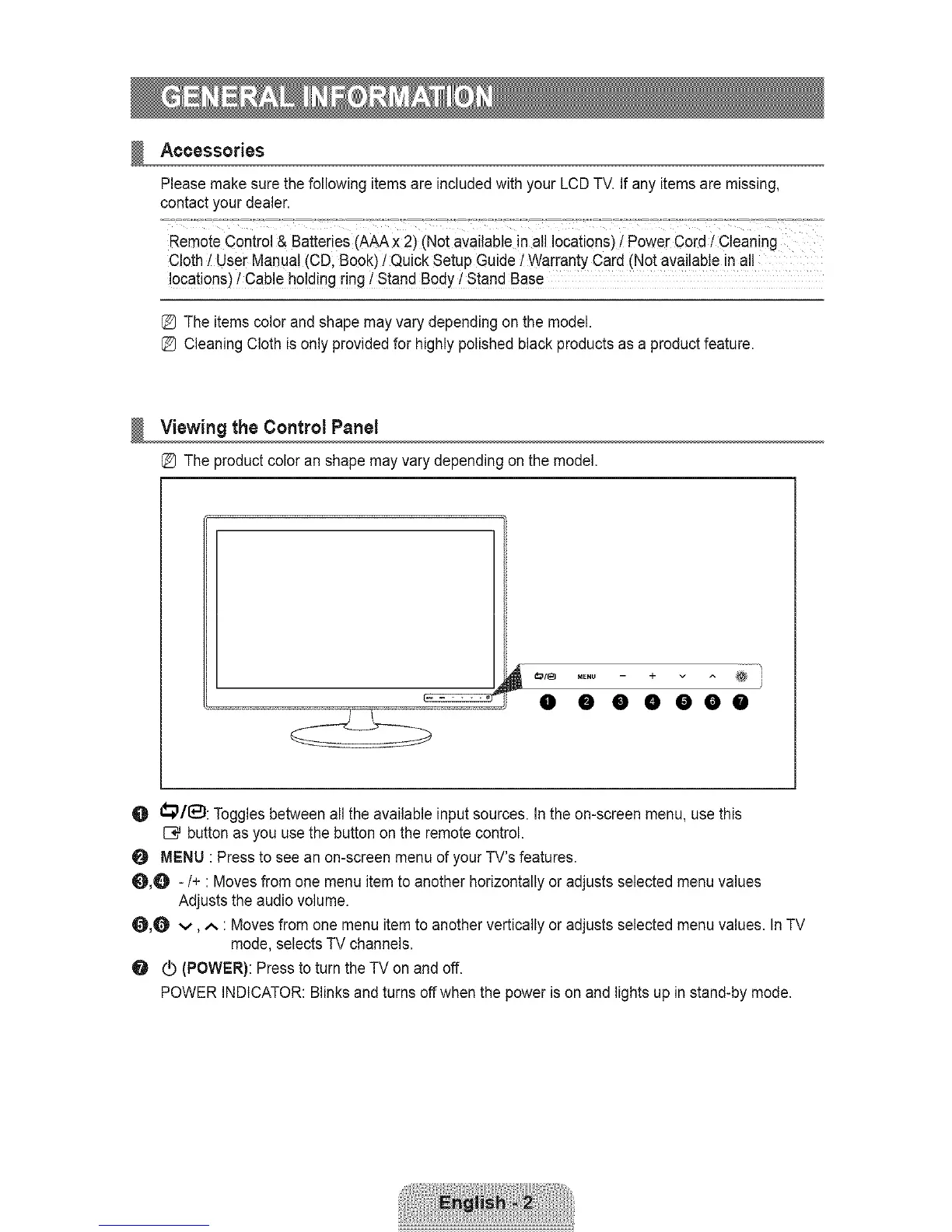
Viewingthe ControlP=nel
I_ The product color an shape may vary depending on the model.
0 0 00000
O _/8: Toggles between all the available input sources. Inthe on-screen menu, use this
button as you use the button on the remote control.
MENU : Press to see an on-screen menu of your TV's features.
@,O - I+ : Moves from one menu item to another horizontally or adjusts selected menu values
Adjusts the audio volume.
_,_ v, ^ :Moves from one menu item to another vertically or adjusts selected menu values. In TV
mode, selects TV channels.
O dD(POWER): Press to turn the TV on and off.
POWER INDICATOR: Blinks and turns off when the power ison and lights up in stand-by mode,









 To Next Page