Wall MountKit Specifications(VESA)
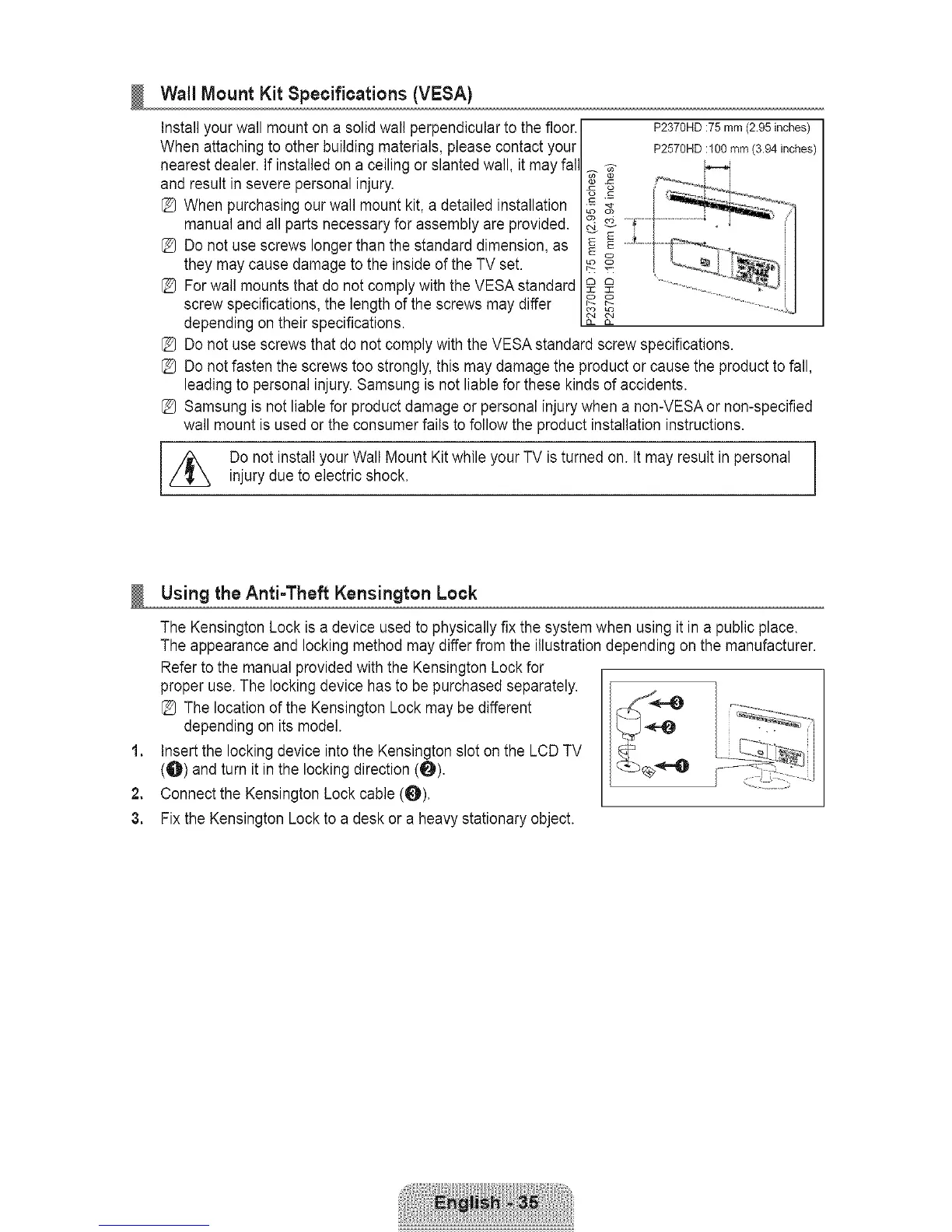
Install your wall mount on a solid wall perpendicular to the floor.
When attaching to other building materials, please contact your
nearest dealer. If installed on a ceiling or slanted wall, it may fal
and result in severe personal injury.
[_ When purchasing our wall mount kit, a detailed installation
manual and all parts necessary for assembly are provided.
[_ Do not use screws longer than the standard dimension, as
they may cause damage to the inside of the TV set.
[_ For wall mounts that do not comply with the VESA standard
screw specifications, the length of the screws may differ
depending on their specifications.
oo
22
P2370HD :75 mm (2.95 inches)
P2570HD :100 mm (3.94 inches)
[_ Do not use screws that do not comply with the VESA standard screw specifications.
[_ Do not fasten the screws too strongly, this may damage the product or cause the product to fall,
leading to personal injury. Samsung is not liable for these kinds of accidents.
[_ Samsung is not liable for product damage or personal injury when a non-VESA or non-specified
wall mount is used or the consumer fails tofollow the product installation instructions.
//_ Do not install your Wall Mount Kit while your TV is turned on. It may result in personal
injury due to electric shock.
1,
2.
3.
Usingthe Anti-Theft Kensington Lock
The Kensington Lock is a device used to physically fix the system when using it in a public place.
The appearance and locking method may differ from the illustration depending on the manufacturer.
Refer to the manual provided with the Kensington Lock for
proper use. The locking device has to be purchased separately.
[_ The location of the Kensington Lock may be different
depending on its model.
Insert the locking device into the Kensington slot on the LCD TV
(O) and turn it in the locking direction (O).
Connect the Kensington Lock cable (_).
Fix the Kensington Lock to a desk or a heavy stationary object.









 To Next Page