[] HD Connection Guide
This menu presents the connection method that provides the optimal quality for the HD TV.
Refer to this information when connecting external devices to the TV.
[] Contact Samsung
View this information when your TV does not work properly or when you want to upgrade the
software.
You can view the information regarding the call center, product and software file download method.
Anynet +
ConnectingAnynet+ Devices
Anynet + is a function that enables you to control all connected Samsung devices that support
Anynet + with your Samsung TV's remote.
The Anynet+ system can be used only with Samsung devices that have the Anynet+ feature. To be
sure your Samsung device has this feature, check if there is an Anynet + logo on it.
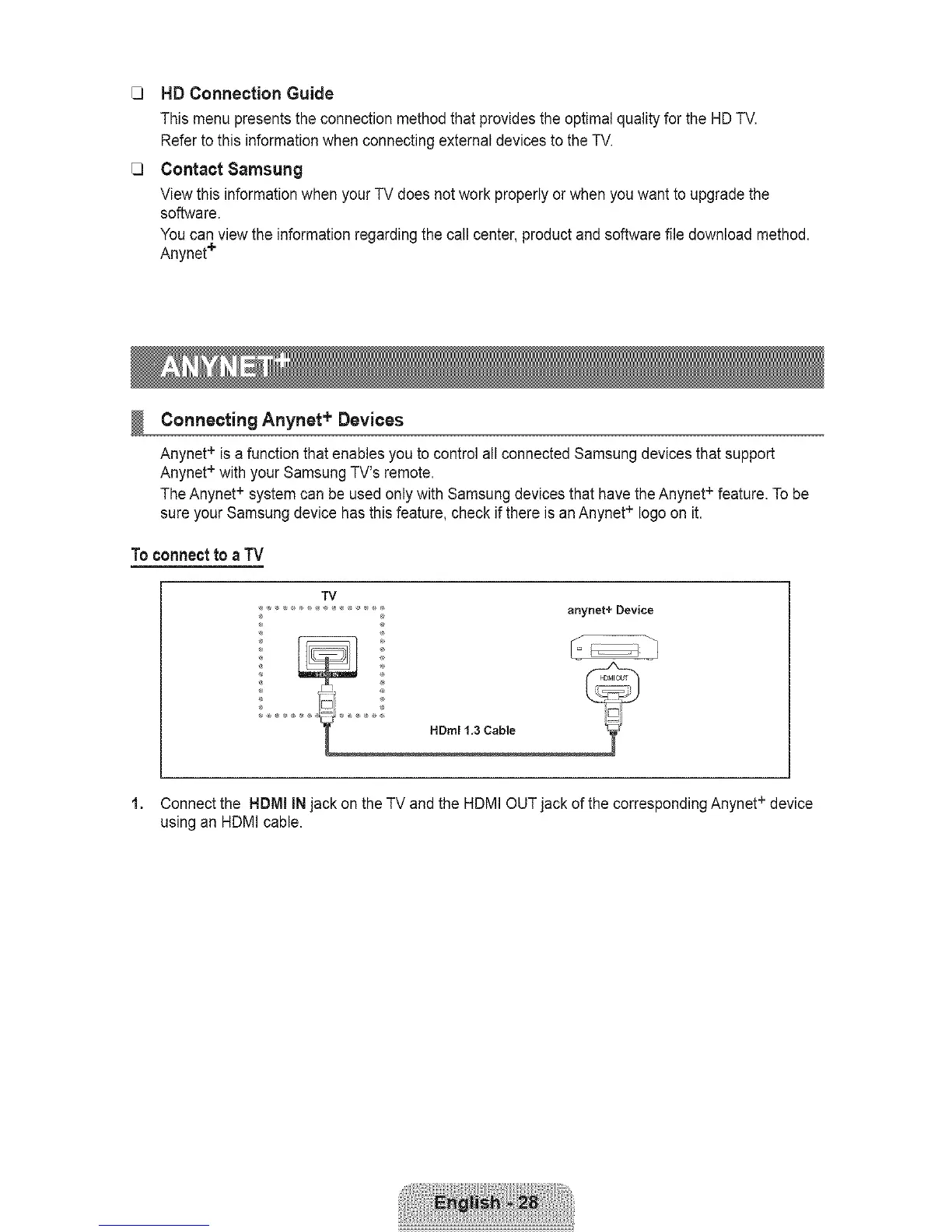
Toconnectto a TV
TV
.................... _ anynet+ Device
HDml t.3 Cable
1. Connect the HDMI INjack on the TV and the HDMI +OUT jack of the corresponding Anynet device
using an HDMI cable.









 To Next Page