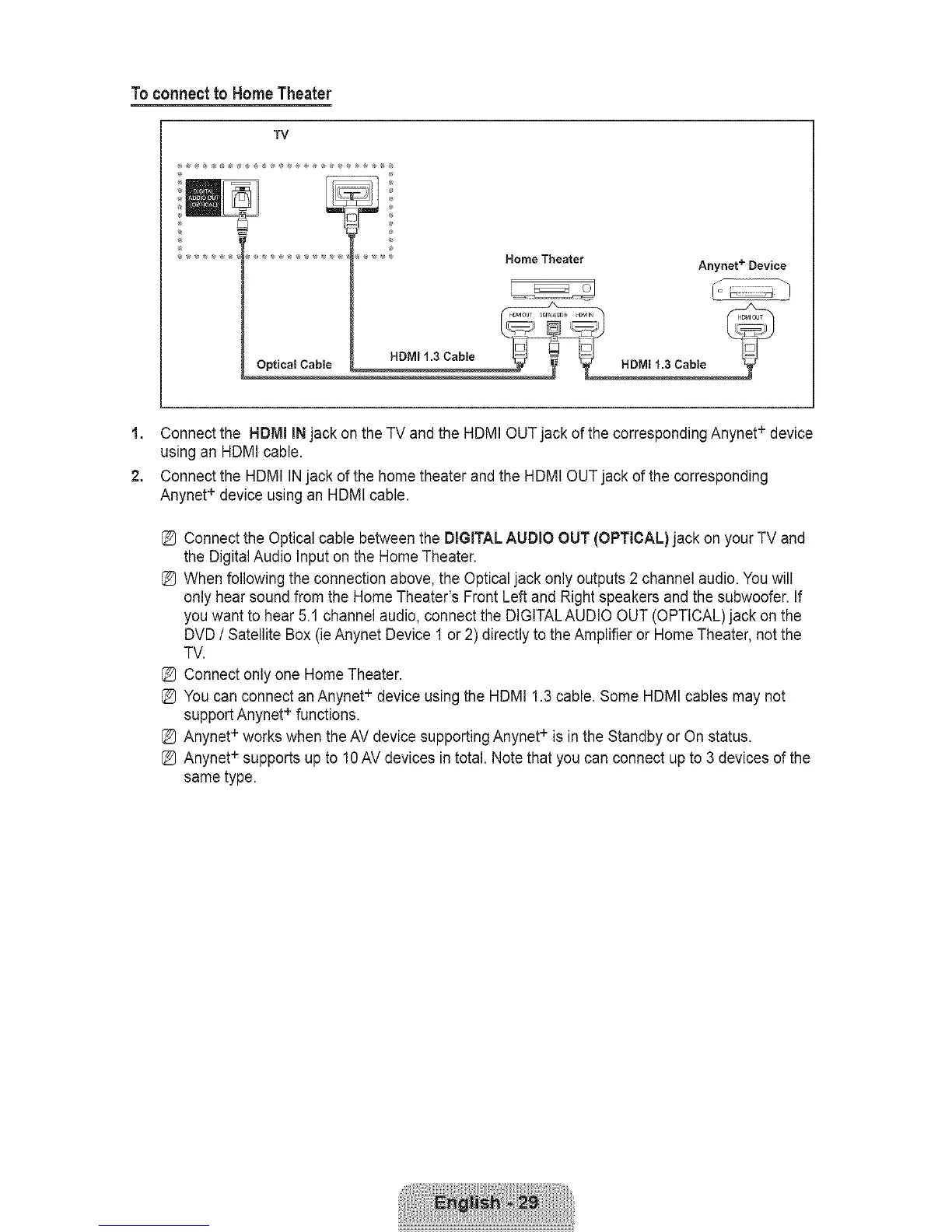
Toconnectto HomeTheater
TV
÷
®
Optical Cable
HDMI 1.3 Cable
Home Theater
Anynet + Device
HDMI 1.3 Cable
1. Connect the HDMI INjack on the TV and the HDMI OUTjack of the corresponding Anynet + device
using an HDMI cable.
2. Connect the HDMI INjack ofthe home theater and the HDMI OUT jack of the corresponding
Anynet + device using an HDMI cable.
I_ Connect the Optical cable between the DIGITALAUDIO OUT (OPTICAL) jack on your TV and
the Digital Audio Input on the Home Theater.
I_ When following the connection above, the Optical jack only outputs 2 channel audio. You will
only hear sound from the Home Theater's Front Left and Right speakers and the subwoofer. If
you want to hear 5.1 channel audio, connect the DIGITALAUDIO OUT (OPTICAL) jack on the
DVD / Satellite Box (ie Anynet Device 1 or 2) directly to the Amplifier or Home Theater, not the
TV.
I_ Connect only one Home Theater.
I_ You can connect an Anynet + device using the HDMI 1.3 cable. Some HDMI cables may not
support Anynet + functions.
I_ Anynet + works when the AV device supporting Anynet+ is in the Standby or On status.
I_ Anynet + supports up to 10AV devices in total. Note that you can connect up to 3 devices of the
same type.









 To Next Page