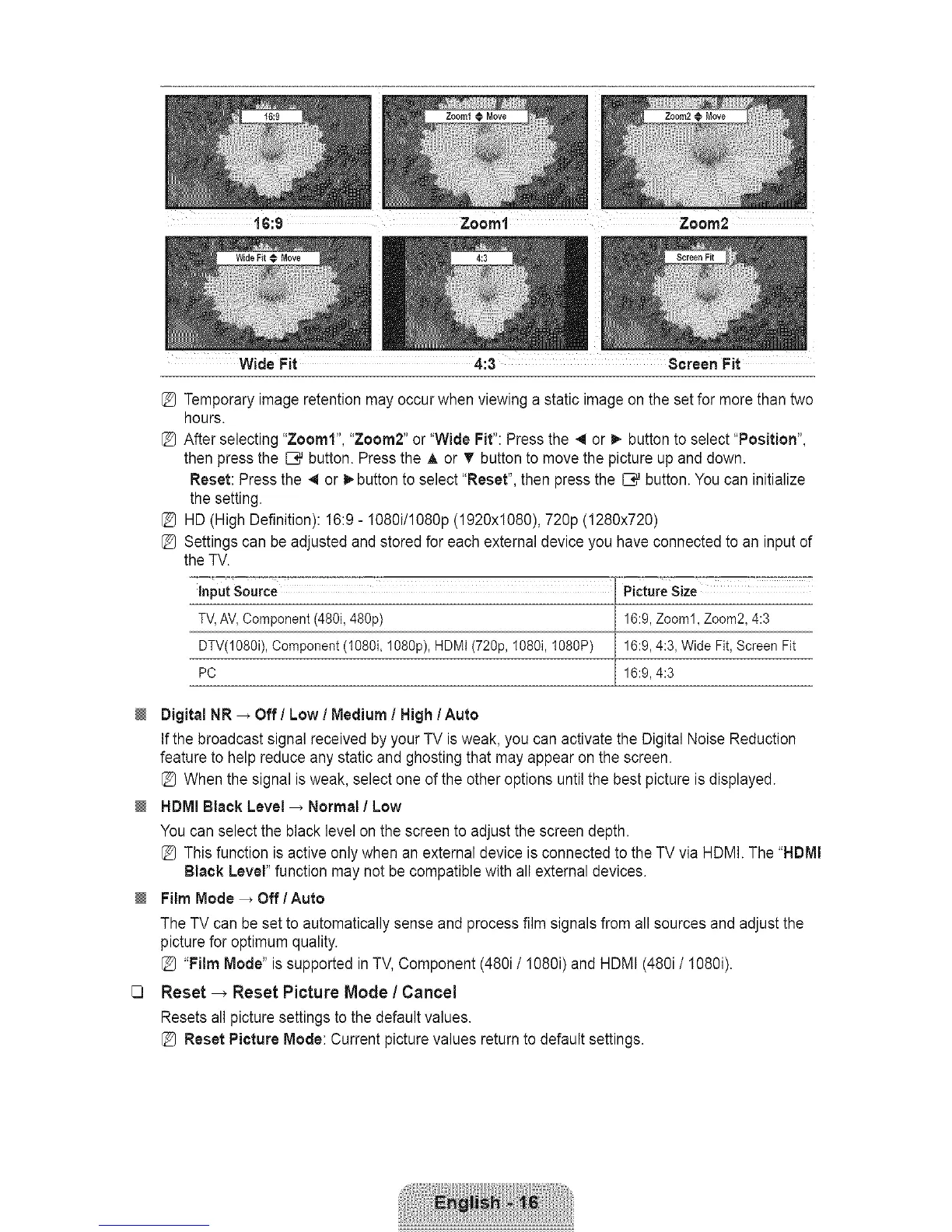
Zoom2@Move
Wide Fit 4:3 screen Fit
Temporary image retention may occur when viewing a static image on the set for more than two
hours.
After selecting "Zoom1", "Zoom2" or "Wide Fit": Press the 41or _. button to select "Position",
then press the _ button. Press the ,_ or _r button to move the picture up and down.
Reset: Press the _ or _ button to select "Reset", then press the _ button. You can initialize
the setting.
HD (High Definition): 16:9 - I080i/1080p (1920x1080), 720p (1280x720)
Settings can be adjusted and stored for each external device you have connected to an input of
the TV.
inputSource PictureSize
TV,AV,Component(480i,480p) 16:9,Zooml, Zoom2,4:3
DTV(1080i),Component(108%108%),HDMI(72%, 1080i,1080P) 16:9,4:3, WideFit, ScreenFit
PC 16:9,4:3
Digital NR _ Off/Low / Medium / High/Auto
Ifthe broadcast signal received by your TV is weak, you can activate the Digital Noise Reduction
feature to help reduce any static and ghosting that may appear on the screen.
[_ When the signal isweak, select one of the other options until the best picture is displayed.
HDMI Black Level _ Normal I Low
You can select the black level on the screen to adjust the screen depth.
[_ This function is active only when an external device is connected to the TV via HDMI. The "HDMI
Black Level" function may not be compatible with all external devices.
Film Mode _ Off / Auto
The TV can be set to automatically sense and process film signals from all sources and adjust the
picture for optimum quality.
[_ "Film Mode" is supported in TV,Component (480i/1080i) and HDMI (480i/I080i).
1_ Reset-_ Reset Picture Mode / Cancel
Resets all picture settings to the default values.
[_ Reset Picture Mode: Current picture values returnto default settings.









 To Next Page